VectorStyler
    • Categories
    • Unread
    • Recent
    • Tags
    • Popular
    • Register
    • Login

    Ungrouping changing the appearance of artwork

    Scheduled Pinned Locked Moved Questions and Support
    12 Posts 6 Posters 9.7k Views 5 Watching
    Loading More Posts
    • Oldest to Newest
    • Newest to Oldest
    • Most Votes
    Reply
    • Reply as topic
    Log in to reply
    This topic has been deleted. Only users with topic management privileges can see it.
    • T Offline
      tudor
      last edited by

      I have this complex illustration of a building made from lots and lots of objects and groups:
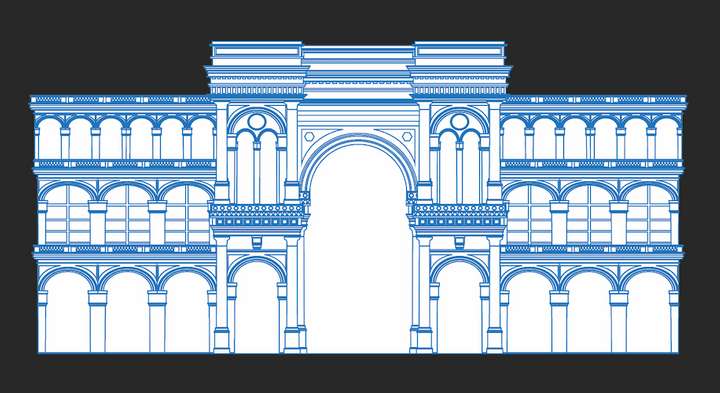
      0_1661708711734_Screen Shot 2022-08-28 at 20.41.35.png

      After ungrouping all, it looks like this:

      0_1661708747099_Screen Shot 2022-08-28 at 20.43.16.png

      It looks like Vectorstyler is either changing the stacking order of the ungrouped shapes, or is changing the colors.

      This is how it looks in Illustrator after I ungrouped everything:
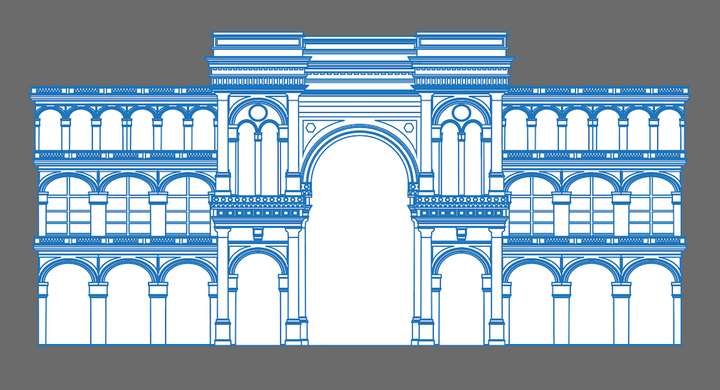
      0_1661709125414_Screen Shot 2022-08-28 at 20.47.56.png

      I've attached the Vectorstyler file.
      0_1661709149965_sample.vstyler

      S W VectorStylerV 3 Replies Last reply Reply Quote 0
      • S Offline
        Subpath @tudor
        last edited by Subpath

        @tudor

        I downloaded your file, opened it in VS and exported it as PDF.

        And then loaded that PDF into Coreldraw and Affinity Designer and ungrouped it, both worked

        But the curious thing is, I loaded the PDF exported from VS
        into VS as a test as well and then it works with ungrouping
        The VS file did not work with ungrouping.

        Win 10, VS 1.1.058

        Win 11
        CPU: AMD Ryzen 5 9600X, 6-core.
        GPU: Nvidia Geforce RTX 5070.

        1 Reply Last reply Reply Quote 0
        • W Offline
          William Kansepa @tudor
          last edited by

          @tudor Can you also attach the original Illustrator file?

          HP•Windows 11 Pro•11th Gen Intel(R) Core(TM) i7-1165G7 @ 2.80GHz 2.70 GHz• RAM: 16.0 GB (DDR4)

          W T 2 Replies Last reply Reply Quote 0
          • W Offline
            William Kansepa @William Kansepa
            last edited by

            Sorry if my assumption of it being an Illustrator file is wrong...

            HP•Windows 11 Pro•11th Gen Intel(R) Core(TM) i7-1165G7 @ 2.80GHz 2.70 GHz• RAM: 16.0 GB (DDR4)

            b77B 1 Reply Last reply Reply Quote 0
            • b77B Offline
              b77 @William Kansepa
              last edited by

              @William-Kansepa It's probably exported from a CAD app.

              MacBook Pro (Intel) running Monterey 12.6.4

              1 Reply Last reply Reply Quote 0
              • VectorStylerV Offline
                VectorStyler @tudor
                last edited by

                @tudor The drawing contains groups using shape combine operations. These can be selected after 3 or 4 ungrouping steps.
                Use Styles -> Expand Group first and then ungroup all.

                How many Ungroup steps were used in Illustrator?

                Ungrouping groups with shape combine operations will have similar results in other apps (where this feature is available).

                One thing that I could do here is to stop Ungroup All at groups having combine operators. I added this to the backlog.

                I also tried the PDF export and then import thing. And since exporting to PDF flattens the shape combine operations, the ungroup all worked as expected after importing.

                T 1 Reply Last reply Reply Quote 0
                • IngolfI Offline
                  Ingolf
                  last edited by

                  @VectorStyler

                  Undoing the ungroup crashes VS on macOS. First time I tried I got a never ending spinner (using control-z), second time using toolbar the undo button stays depressed and I have to restart VS.

                  🍏 macOS Sequoia Apple Silicon

                  VectorStylerV 1 Reply Last reply Reply Quote 1
                  • IngolfI Offline
                    Ingolf
                    last edited by

                    No, second time it came to life again.

                    🍏 macOS Sequoia Apple Silicon

                    1 Reply Last reply Reply Quote 0
                    • VectorStylerV Offline
                      VectorStyler @Ingolf
                      last edited by

                      @Ingolf said in Ungrouping changing the appearance of artwork:

                      Undoing the ungroup crashes VS on macOS

                      Replicated here also.

                      1 Reply Last reply Reply Quote 0
                      • T Offline
                        tudor @William Kansepa
                        last edited by

                        @William-Kansepa said in Ungrouping changing the appearance of artwork:

                        @tudor Can you also attach the original Illustrator file?

                        The original was an EPS file downloaded from Getty Images. Here is a sample:
                        https://www.dropbox.com/s/sr82epasubd7m0z/sample.ai?dl=0

                        1 Reply Last reply Reply Quote 0
                        • T Offline
                          tudor @VectorStyler
                          last edited by

                          @VectorStyler said in Ungrouping changing the appearance of artwork:

                          The drawing contains groups using shape combine operations. These can be selected after 3 or 4 ungrouping steps.
                          Use Styles -> Expand Group first and then ungroup all.
                          How many Ungroup steps were used in Illustrator?

                          So VS treats a "compound shape" (as Illustrator calls it) like a group. That explains it. It is unusual though, because all other applications I use have different commands for breaking apart compound shapes.

                          VectorStylerV 1 Reply Last reply Reply Quote 1
                          • VectorStylerV Offline
                            VectorStyler @tudor
                            last edited by

                            @tudor Yes the Illustrator compound shapes are imported as groups (in the AI file format, they are groups).
                            I will try to find a solution for this.

                            1 Reply Last reply Reply Quote 0
                            • First post
                              Last post