VectorStyler
    • Categories
    • Unread
    • Recent
    • Tags
    • Popular
    • Register
    • Login

    Artifacts on Gradient Mesh Gradients when zooming

    Scheduled Pinned Locked Moved Resolved Issues
    12 Posts 2 Posters 12.8k Views 2 Watching
    Loading More Posts
    • Oldest to Newest
    • Newest to Oldest
    • Most Votes
    Reply
    • Reply as topic
    Log in to reply
    This topic has been deleted. Only users with topic management privileges can see it.
    • S Offline
      Subpath
      last edited by Subpath

      First of all, I like how a gradient mesh gradient looks now.
      But unfortunately, there are some artifacts when I zoom in or out of a canvas.
      Other Gradients are fine.
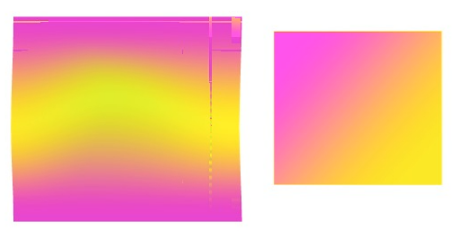
      Video here

      0_1662056228782_Artifacts on Gradient Mesh.png

      Win 11
      CPU: AMD Ryzen 5 9600X, 6-core.
      GPU: Nvidia Geforce RTX 5070.

      VectorStylerV 2 Replies Last reply Reply Quote 2
      • VectorStylerV Offline
        VectorStyler @Subpath
        last edited by

        @Subpath Send me a file with that gradient.

        S 1 Reply Last reply Reply Quote 0
        • S Offline
          Subpath @VectorStyler
          last edited by

          @VectorStyler said in Artifacts on Gradient Mesh Gradients when zooming:

          @Subpath Send me a file with that gradient.

          File currently being sent

          Win 11
          CPU: AMD Ryzen 5 9600X, 6-core.
          GPU: Nvidia Geforce RTX 5070.

          1 Reply Last reply Reply Quote 1
          • VectorStylerV Offline
            VectorStyler @Subpath
            last edited by

            @Subpath Can be replicate here also (on Windows only).
            As a temporary workaround, select the Software mode in Preferences -> Performance -> Compute Engine.

            S 1 Reply Last reply Reply Quote 0
            • S Offline
              Subpath @VectorStyler
              last edited by Subpath

              @VectorStyler said in Artifacts on Gradient Mesh Gradients when zooming:

              @Subpath Can be replicate here also (on Windows only).
              As a temporary workaround, select the Software mode in Preferences -> Performance -> Compute Engine.

              think there is a missing Part in your reply

              Have only this two Modes:
              Compute Engine: Software
              and Compute Engine: Open CL

              My Standard in VS was "Software" and also the File i have send you
              where the Artifacts appears.

              i tried "Open CL" and had also Artifacts
              then i going back to "Software" and the Artifacts seems gone
              Mysterious

              Win 11
              CPU: AMD Ryzen 5 9600X, 6-core.
              GPU: Nvidia Geforce RTX 5070.

              VectorStylerV 1 Reply Last reply Reply Quote 0
              • VectorStylerV Offline
                VectorStyler @Subpath
                last edited by

                @Subpath I tried with a similar Win 10 config as yours (AMD Ryzen, NVidia GPU)

                You should also have CUDA as a compute option.

                When I tried the Software mode on Windows, it worked here.
                For OpenCL/CUDA modes I had to move the handles to get the glitches.

                If you have a glitching state with Software mode, save the file in that state and send it to me.
                The file I received has the mesh handles in their initial position.

                BTW: If I can replicate this in Software mode, the fix will be much easier.

                S 1 Reply Last reply Reply Quote 0
                • S Offline
                  Subpath @VectorStyler
                  last edited by

                  @VectorStyler

                  ...You should also have CUDA as a compute option...

                  No, no CUDA
                  Maybe i have to install this on my NVidia ?
                  But I have not had a need for it so far.

                  0_1662101805719_No Cuda.png

                  Win 11
                  CPU: AMD Ryzen 5 9600X, 6-core.
                  GPU: Nvidia Geforce RTX 5070.

                  VectorStylerV 1 Reply Last reply Reply Quote 0
                  • S Offline
                    Subpath
                    last edited by

                    @VectorStyler

                    had no Glitches in Software Mode

                    But a current State in Open CL
                    should i send you this File ?

                    Win 11
                    CPU: AMD Ryzen 5 9600X, 6-core.
                    GPU: Nvidia Geforce RTX 5070.

                    1 Reply Last reply Reply Quote 0
                    • VectorStylerV Offline
                      VectorStyler @Subpath
                      last edited by

                      @Subpath said in Artifacts on Gradient Mesh Gradients when zooming:

                      Maybe i have to install this on my NVidia ?

                      I think this is needed.

                      had no Glitches in Software Mode

                      Ok

                      But a current State in Open CL should i send you this File ?

                      Yes, please send me a file.

                      S 1 Reply Last reply Reply Quote 0
                      • S Offline
                        Subpath @VectorStyler
                        last edited by Subpath

                        @VectorStyler

                        File is already send

                        as i wrote above i have until now
                        no more Gitches in Software Mode

                        since i have switched from "Software" Mode
                        to "Open CL" and then back to "Software"
                        .
                        .
                        Had no needs for CUDA so far
                        so I will not install it for now

                        Win 11
                        CPU: AMD Ryzen 5 9600X, 6-core.
                        GPU: Nvidia Geforce RTX 5070.

                        1 Reply Last reply Reply Quote 0
                        • S Offline
                          Subpath
                          last edited by

                          Here yet two Screenshots

                          the first is a state in Open CL Mode
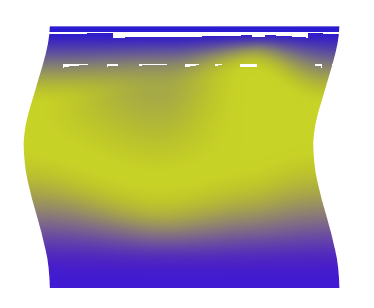
                          0_1662104282376_Open CL Mode.png
                          .
                          .
                          the second is the same File/ same Gradient
                          after i switched to Software Mode
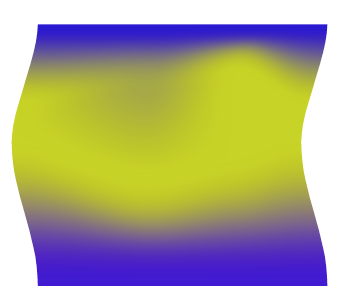
                          0_1662104289641_Software Mode.png

                          Win 11
                          CPU: AMD Ryzen 5 9600X, 6-core.
                          GPU: Nvidia Geforce RTX 5070.

                          VectorStylerV 1 Reply Last reply Reply Quote 0
                          • VectorStylerV Offline
                            VectorStyler @Subpath
                            last edited by

                            @Subpath Got it!

                            1 Reply Last reply Reply Quote 0
                            • First post
                              Last post
