VectorStyler
    • Categories
    • Unread
    • Recent
    • Tags
    • Popular
    • Register
    • Login

    Built a funny little Truck - some steps described
    Scheduled Pinned Locked Moved Tutorials
    10 Posts 4 Posters 13.2k Views 3 Watching
    Loading More Posts
    • Oldest to Newest
    • Newest to Oldest
    • Most Votes
    Reply
    • Reply as topic
    Log in to reply
    This topic has been deleted. Only users with topic management privileges can see it.
    • S Offline
      Subpath
      last edited by Subpath

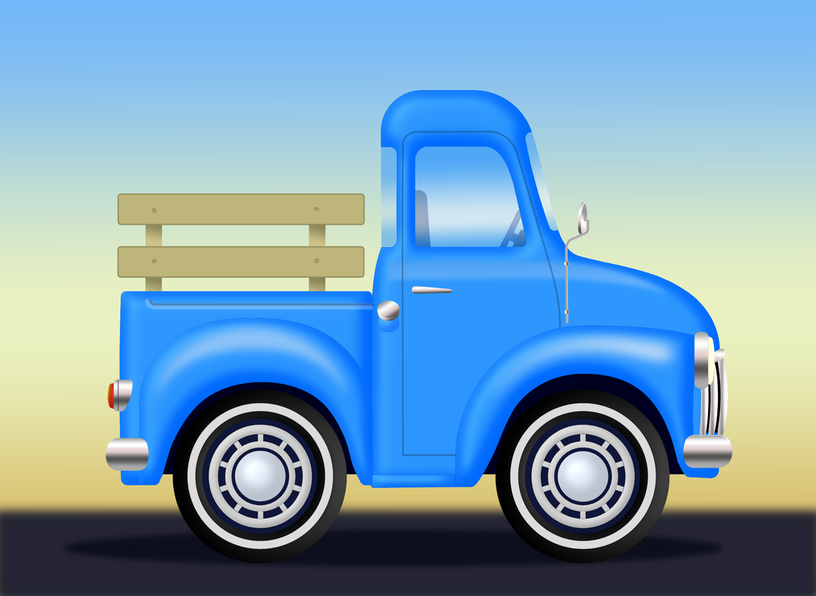
      Built a funny little Truck

      This is the first Car I ever made. Before I tried to avoid cars.
      The special thing about it, is that the 3D-Effect is made with Bevels.

      A while ago we had a discussion about beveling in VS
      @VectorStyler has been working on it making it look a little better.

      Had the idea to do a little Project around this topic. That's how
      I came up with creating a car in VS. The result surprised me in
      a positive way and looks better than I expected, but see for yourself 🙂
      .
      .
      Will explain some steps of my procedure,e.g. which
      Tools were useful for me, but not all steps.
      .
      .
      The Bitmap Template for this Truck doesn't look like this in the original.
      I found a nice way to deform a Shape of an Object in a Bitmap Template.
      This is called "content aware scaling" and is often found in image editing programs.
      In this case i use Xara/Magix Graphics Designer which has such a tool
      to deform the Shape of that Truck according to my wishes.
      0_1663251076862_Fun-Car-copy.png

      Win 11
      CPU: AMD Ryzen 5 9600X, 6-core.
      GPU: Nvidia Geforce RTX 5070.

      BoldlineB 1 Reply Last reply Reply Quote 7
      • BoldlineB Online
        Boldline @Subpath
        last edited by

        @Subpath That's a really cool truck! I'd be interest for sure to see your steps in how you made it.

        🍎 macOS Tahoe 26.2, Mac mini (M1, 2020), Chip Apple M1, Memory 16 GB
        Cintiq 27QHD Display and LG Ultra HD Display

        S 1 Reply Last reply Reply Quote 1
        • S Offline
          Subpath @Boldline
          last edited by Subpath

          @Boldline

          thanks, i am also surprised by the result
          the Steps will follow

          I think one of the most important parts of this,
          is using that "content aware scaling" to deform a bitmap template
          of a car/truck in this particular way.

          The rest are more or less normal vector graphics techniques.

          Win 11
          CPU: AMD Ryzen 5 9600X, 6-core.
          GPU: Nvidia Geforce RTX 5070.

          1 Reply Last reply Reply Quote 1
          • F Offline
            fde101 Global Moderator
            last edited by

            It definitely looks nice, but looking at it practically... it has an awfully short bed. Unless you are hauling really tall items you would probably be better off with a Jeep or an SUV?

            😇

            S 2 Replies Last reply Reply Quote 1
            • S Offline
              Subpath @fde101
              last edited by Subpath

              @fde101

              Think, you will probably have to squeeze the cargo a bit. 🙂

              But in real life there are certainly some trucks whose
              biggest cargo is probably only their engine and
              their driver. 🙂

              Win 11
              CPU: AMD Ryzen 5 9600X, 6-core.
              GPU: Nvidia Geforce RTX 5070.

              1 Reply Last reply Reply Quote 1
              • S Offline
                Subpath @fde101
                last edited by

                @fde101

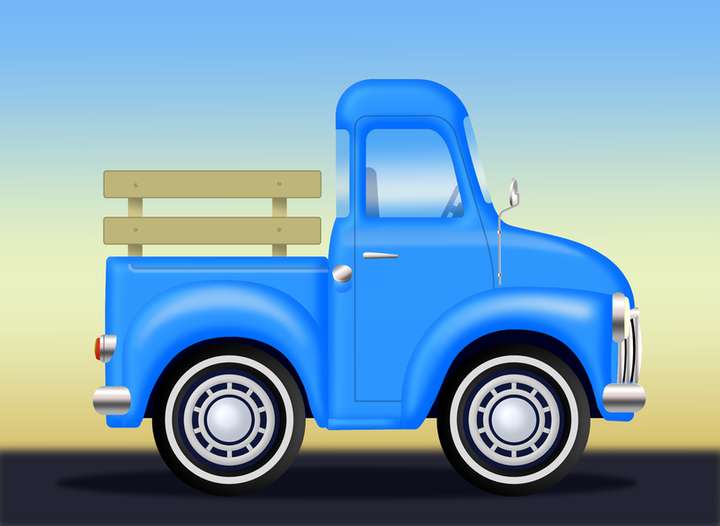
                ahm, will this bed be ok ? 🙂

                0_1663351104777_Funny-Truck.png

                Win 11
                CPU: AMD Ryzen 5 9600X, 6-core.
                GPU: Nvidia Geforce RTX 5070.

                1 Reply Last reply Reply Quote 1
                • S Offline
                  Subpath
                  last edited by Subpath

                  Here now some details about this funny Truck project.

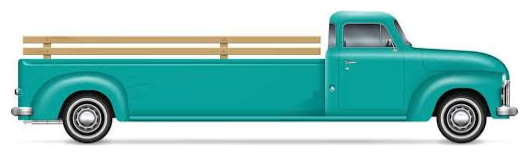
                  The original Truck

                  0_1663351948665_Original-Truck.png

                  Took the original Truck and deformed/scaled it with the "Content aware scaling" tool in Xara.
                  Photoshop also has such a tool, as do other Photo editors.

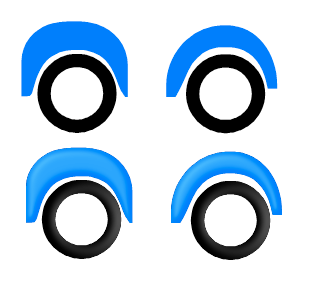
                  Whereby I scaled parts of the truck differently and made multiple copies of it at different scales.
                  In the end, I decided which parts fit best.
                  .
                  .
                  Some States of it
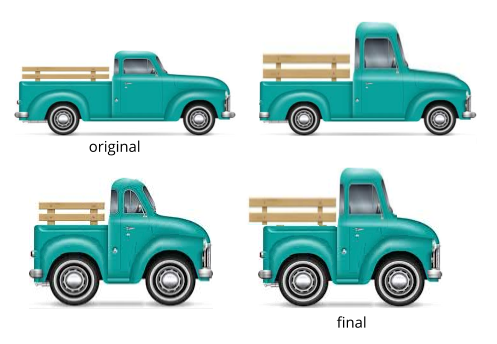
                  0_1663352069618_some-states.png
                  .
                  .
                  Here a Video how "Content aware scaling" work, re-uolad
                  .
                  .

                  Then i put these parts together and imported them into VS and created
                  the first vectorization of the outline with simple straight lines.
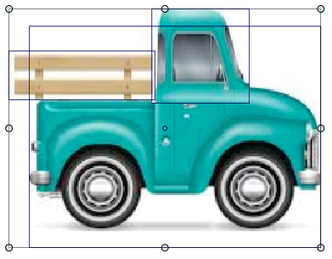

                  0_1663414497501_Scaled-different-Parts.png

                  0_1663414508659_vectorized-1.png

                  Win 11
                  CPU: AMD Ryzen 5 9600X, 6-core.
                  GPU: Nvidia Geforce RTX 5070.

                  1 Reply Last reply Reply Quote 2
                  • S Offline
                    Subpath
                    last edited by Subpath

                    .

                    Then Bevel came into play and one of my favorite Tools in VS.
                    The Picker Tools! 🙂

                    0_1663352952522_Picker-Tools-1.png
                    .

                    Since Bevel is an image effect I used the Image Effect Picker.
                    With this tool it is very easy to apply the bevel effect onto
                    other objects. (Which saves some hassle)
                    0_1663352980777_Picker-Tools-2.png
                    .

                    Workflow speed up Tip:
                    Press the Ctrl-Key (PC) / Command-Key (Mac)
                    while using any of the Picker Tools, to switch
                    temporaly to the Transform Tool for faster Object selection.
                    .
                    .

                    Here a Video how i used Bevel for the Truck, re-upload
                    .
                    .
                    0_1663353026517_First-Bevels-1.png

                    Win 11
                    CPU: AMD Ryzen 5 9600X, 6-core.
                    GPU: Nvidia Geforce RTX 5070.

                    1 Reply Last reply Reply Quote 1
                    • S Offline
                      Subpath
                      last edited by Subpath

                      Let's take a look at the final steps to create this little Truck.

                      Used a Rectangle with a Gradient for the Background.
                      Street and Shadow are Shapes with a little Gaussian Blur.

                      Used the Corner Tool to round some Corners. The Gradient Tool
                      for chrome parts and windows.

                      0_1663755258752_Gradients.png
                      .
                      .
                      The Style Picker Tool was a great help to transfer, very easily,
                      Gradients from one Shape to another.

                      0_1663755323720_Picker-Tools-1.png
                      0_1663755341819_Style-Picker-Tool.png
                      .
                      .
                      Finally, the Lines for the Door and the loading Bed. For a bit more glossy Surface on the Fenders
                      i used simple Strokes with a Profile and a "Gaussian blur" Image Effect.
                      ( Found this easier to match the Shape, than a Gradient )

                      0_1663755493273_Glossy Lights.png
                      .
                      .
                      Here a video that shows a few of these last steps, re-upload
                      .
                      .
                      That's all, hope this inspired a little bit.
                      Have fun being creative 🙂

                      Win 11
                      CPU: AMD Ryzen 5 9600X, 6-core.
                      GPU: Nvidia Geforce RTX 5070.

                      1 Reply Last reply Reply Quote 2
                      • IngolfI Offline
                        Ingolf
                        last edited by

                        Also remember that you can copy and paste styles and image effects which can sometimes be a lot faster depending on how you work.

                        I added an extra paste submenu to this menu:
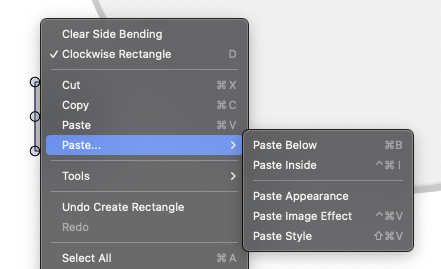
                        0_1664233333047_650060f7-aac4-40f6-ad26-745cc54ce72f-image.png

                        and keep some tools handy in same menu as well:
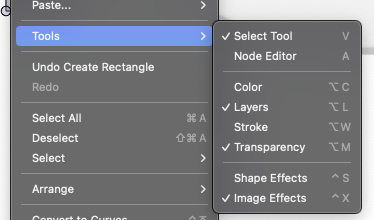
                        0_1664233417733_001acb8b-2c3f-4132-96b7-d8352ef9f547-image.png

                        🍏 macOS Sequoia Apple Silicon

                        1 Reply Last reply Reply Quote 5
                        • First post
                          Last post