VectorStyler
    • Categories
    • Unread
    • Recent
    • Tags
    • Popular
    • Register
    • Login

    HSI sliders bug

    Scheduled Pinned Locked Moved Resolved Issues
    15 Posts 2 Posters 13.7k Views 2 Watching
    Loading More Posts
    • Oldest to Newest
    • Newest to Oldest
    • Most Votes
    Reply
    • Reply as topic
    Log in to reply
    This topic has been deleted. Only users with topic management privileges can see it.
    • P Offline
      Petar_MK
      last edited by

      Hi,
      the "H" slider in HSI color model does not show the color correctly as shown in the attacnment. The "H" slider shows RED color and the color of the rectangle is YELLOW.
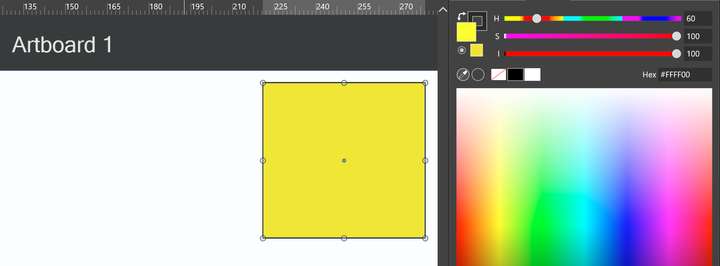
      0_1664032204100_HSI sliders.png

      VectorStylerV 1 Reply Last reply Reply Quote 0
      • VectorStylerV Offline
        VectorStyler @Petar_MK
        last edited by

        @Petar_MK I cannot replicate this. Tried on both Windows (10) and Mac (Intel).
        Is this on Windows or Mac?
        Are the sliders broken for HLS / HSB also?
        From the image it is clear that all the HSI sliders are broken. Since these (gradients) are computed on the GPU, one thing to try is to select a different "Compute Engine" in Preferences -> Performance.

        1 Reply Last reply Reply Quote 0
        • P Offline
          Petar_MK
          last edited by

          This is the Windows version. I didn't tried on Mac yet.
          I changed the Performace preferences from "Software" to "OpenGL". It is the same, but it works slowlier. BTW, I have 2 graphic cards -- Intel and GeForce but I can't select either of them.
          HLS / HSB are OK, but on HWB color model the "H" slider is totally white. However, in the LCH color model if the "H" means Hue -- then it is broken, too.

          VectorStylerV P 2 Replies Last reply Reply Quote 0
          • VectorStylerV Offline
            VectorStyler @Petar_MK
            last edited by

            @Petar_MK I open a bug on this one.

            In the "Compute Engine" drop down is there a "NVIDIA" option?

            1 Reply Last reply Reply Quote 0
            • P Offline
              Petar_MK
              last edited by

              No, only "Software" and "OpenGL".

              VectorStylerV 1 Reply Last reply Reply Quote 0
              • VectorStylerV Offline
                VectorStyler @Petar_MK
                last edited by

                @Petar_MK Than means that it sees the Intel GPU only.

                1 Reply Last reply Reply Quote 0
                • P Offline
                  Petar_MK
                  last edited by

                  I think so, because it is integrated within motherboard. But, with which option: Software or OpenGL?

                  VectorStylerV 1 Reply Last reply Reply Quote 0
                  • VectorStylerV Offline
                    VectorStyler @Petar_MK
                    last edited by

                    @Petar_MK The OpenCL option selects the GPU (in this case intel) to be used for compute (gradients, image effects, etc).
                    Software will use the CPU.

                    If the OpenCL option is selected, are the gradients rendered correctly in the document?

                    1 Reply Last reply Reply Quote 0
                    • P Offline
                      Petar_MK @Petar_MK
                      last edited by

                      @Petar_MK said in HSI sliders bug:

                      I changed the Performace preferences from "Software" to "OpenGL". It is the same, but it works slowlier. BTW, I have 2 graphic cards -- Intel and GeForce but I can't select either of them.
                      HLS / HSB are OK, but on HWB color model the "H" slider is totally white. However, in the LCH color model if the "H" means Hue -- then it is broken, too.

                      This is from my previous post.

                      VectorStylerV 1 Reply Last reply Reply Quote 0
                      • VectorStylerV Offline
                        VectorStyler @Petar_MK
                        last edited by

                        @Petar_MK I was referring to the gradient fill style. Draw a shape and use the gradient tool to set a gradient fill style.

                        1 Reply Last reply Reply Quote 0
                        • P Offline
                          Petar_MK
                          last edited by

                          Same with gradients. But, I notice one more "bug" when using gradients. When applying a color to a gradient stop, the same color is applied to a stroke.

                          VectorStylerV 1 Reply Last reply Reply Quote 1
                          • VectorStylerV Offline
                            VectorStyler @Petar_MK
                            last edited by

                            @Petar_MK As a workaround, in Preferences -> Performance -> Compute Engine select "Software" mode.
                            This should be working, as it avoids the GPU.

                            1 Reply Last reply Reply Quote 0
                            • P Offline
                              Petar_MK
                              last edited by

                              Same problems persist regardles the modes "Software" or "OpenGL", but in "Software" -- VectorStyler runs taster.
                              Are you going to add in the future an option in VectorStyler to recognize the GPU's?

                              VectorStylerV 1 Reply Last reply Reply Quote 0
                              • VectorStylerV Offline
                                VectorStyler @Petar_MK
                                last edited by

                                @Petar_MK said in HSI sliders bug:

                                Are you going to add in the future an option in VectorStyler to recognize the GPU's?

                                Yes. Basically this already exists as an internal configuration option, but it has to be added to Preferences UI.

                                1 Reply Last reply Reply Quote 0
                                • P Offline
                                  Petar_MK
                                  last edited by

                                  OK, thank you.

                                  1 Reply Last reply Reply Quote 0
                                  • First post
                                    Last post
