VectorStyler
    • Categories
    • Unread
    • Recent
    • Tags
    • Popular
    • Register
    • Login

    Dragging one shape into another shape layer to clip causes clipped shape to be in wrong location

    Scheduled Pinned Locked Moved Resolved Issues
    3 Posts 3 Posters 4.6k Views 2 Watching
    Loading More Posts
    • Oldest to Newest
    • Newest to Oldest
    • Most Votes
    Reply
    • Reply as topic
    Log in to reply
    This topic has been deleted. Only users with topic management privileges can see it.
    • BoldlineB Offline
      Boldline
      last edited by

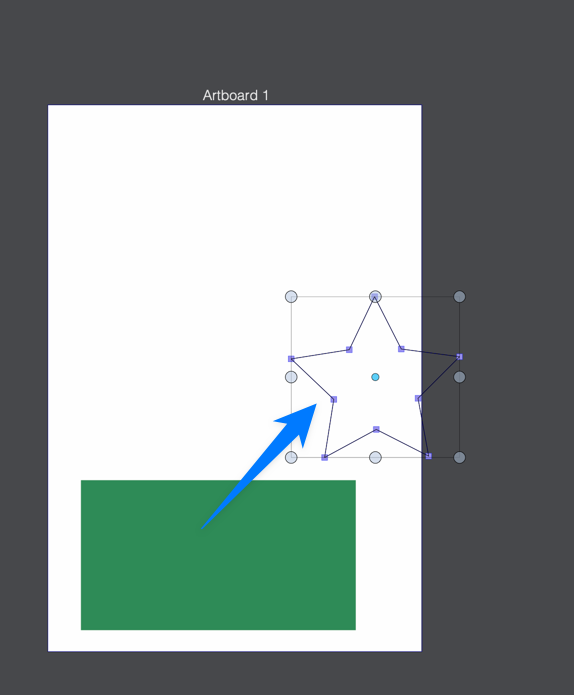
      In build 63, dragging a shape in the layer panel onto another shape to create a clipping mask causes the clipped shape to be placed in an odd location. It can be dragged over into view, but it shouldn't move in such a wonky way
      Here is a screenshot showing the star is way off from it's original location overlapping the rectangle
      0_1665779726292_24650f0c-80bf-4f86-a68a-67e8e856cd87-CleanShot 2022-10-14 at 16.34.52.png

      here is a video of this. (ignore the first part where i forgot i had en existing blue star from my previous test)

      🍎 macOS Tahoe 26.2, Mac mini (M1, 2020), Chip Apple M1, Memory 16 GB
      Cintiq 27QHD Display and LG Ultra HD Display

      b77B VectorStylerV 2 Replies Last reply Reply Quote 1
      • b77B Offline
        b77 @Boldline
        last edited by

        @Boldline Replicated here, and undoing doesn't bring the shape back.

        MacBook Pro (Intel) running Monterey 12.6.4

        1 Reply Last reply Reply Quote 1
        • VectorStylerV Offline
          VectorStyler @Boldline
          last edited by

          @Boldline Replicated here also.

          1 Reply Last reply Reply Quote 0
          • First post
            Last post
