VectorStyler
    • Categories
    • Unread
    • Recent
    • Tags
    • Popular
    • Register
    • Login

    Bugs - cros hair cursor v. .64

    Scheduled Pinned Locked Moved Resolved Issues
    12 Posts 4 Posters 12.1k Views 4 Watching
    Loading More Posts
    • Oldest to Newest
    • Newest to Oldest
    • Most Votes
    Reply
    • Reply as topic
    Log in to reply
    This topic has been deleted. Only users with topic management privileges can see it.
    • P Offline
      poljand
      last edited by poljand

      Hello,

      after running the cros hair cursor option, the left tool panel disappears and the program freezes

      does anyone have an idea how to avoid it
      in 64 version
      thx
      poljand

      b77B 1 Reply Last reply Reply Quote 0
      • b77B Offline
        b77 @poljand
        last edited by b77

        @poljand Does that mean the toolbox on the left disappears? And is this happening with any tool from the toolbox?

        MacBook Pro (Intel) running Monterey 12.6.4

        P 1 Reply Last reply Reply Quote 0
        • IngolfI Offline
          Ingolf
          last edited by

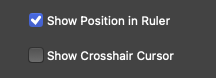
          Any improvement if you disable "Show position in Ruler?"
          0_1666356041434_6aed5a61-d398-4eb5-a4a9-fc7191fc0e30-image.png

          I tried enabling both on an old Windows machine and the position indicator in the ruler lagged behind the crosshair cursor.

          🍏 macOS Sequoia Apple Silicon

          1 Reply Last reply Reply Quote 0
          • P Offline
            poljand @b77
            last edited by

            @b77 yes, the entire left menu disappears and software is frousen

            P 1 Reply Last reply Reply Quote 0
            • P Offline
              poljand @poljand
              last edited by poljand

              @poljand

              in version 1.1.0.62 it was all eye on version .64-bug (pc version)

              1 Reply Last reply Reply Quote 0
              • P Offline
                poljand
                last edited by

                I can record a video

                VectorStylerV 1 Reply Last reply Reply Quote 0
                • P Offline
                  poljand
                  last edited by

                  https://drive.google.com/file/d/1-31UiGKPfgYgLh08kNIEc5_I8_rkHCtV/view?usp=sharing

                  VectorStylerV 1 Reply Last reply Reply Quote 1
                  • VectorStylerV Offline
                    VectorStyler @poljand
                    last edited by VectorStyler

                    @poljand I tried to replicate this on Windows but it seems to be working correctly here.

                    Two things to try

                    • first remove the VectorStyler user data folder (when VS is not running), by remove the c:\Users\<username>\NumericPath\VectorStyler1.0 folder.

                    • the second thing to try is to uninstall and download VS again (there were some late changes to the update).

                    If this occurs after the above steps, try the Panels -> Toolbox menu to show the toolbox, and check if the freeze occurs again.

                    I will open a bug here and try to replicate the issue.

                    P 1 Reply Last reply Reply Quote 0
                    • VectorStylerV Offline
                      VectorStyler @poljand
                      last edited by

                      @poljand One question, is this on Windows 11 or 10?

                      P 1 Reply Last reply Reply Quote 0
                      • P Offline
                        poljand @VectorStyler
                        last edited by

                        @VectorStyler win 10

                        1 Reply Last reply Reply Quote 0
                        • P Offline
                          poljand @VectorStyler
                          last edited by

                          @VectorStyler said in Bugs - cros hair cursor v. .64:

                          Two things to try

                          first remove the VectorStyler user data folder (when VS is not running), by remove the c:\Users<username>\NumericPath\VectorStyler1.0 folder.

                          the second thing to try is to uninstall and download VS again (there were some late changes to the update).

                          If this occurs after the above steps, try the Panels -> Toolbox menu to show the toolbox, and check if the freeze occurs again.
                          I will open a bug here and try to replicate the issue.

                          I am checking, I will write what I have done in a moment

                          1 Reply Last reply Reply Quote 0
                          • P Offline
                            poljand
                            last edited by

                            success, after deleting all files from 😄 \ Users \ <username> \ NumericPath \ VectorStyler1.0 folder
                            and after reinstalling version 1.1.0.64 EVERYTHING IS OK.

                            poljand

                            1 Reply Last reply Reply Quote 1
                            • First post
                              Last post
