VectorStyler
    • Categories
    • Unread
    • Recent
    • Tags
    • Popular
    • Register
    • Login

    Thickness of a line: shouldn't these two values be equal?... bug ?

    Scheduled Pinned Locked Moved Resolved Issues
    8 Posts 3 Posters 8.9k Views 3 Watching
    Loading More Posts
    • Oldest to Newest
    • Newest to Oldest
    • Most Votes
    Reply
    • Reply as topic
    Log in to reply
    This topic has been deleted. Only users with topic management privileges can see it.
    • B Offline
      B-Vs-V
      last edited by

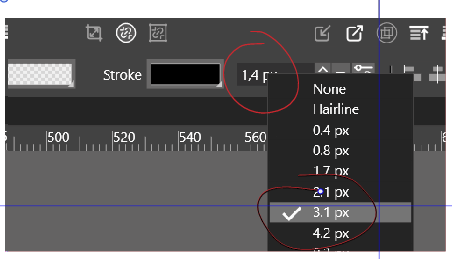
      In the context panel:

      0_1666451983783_6cb389b0-9ca5-49ff-a925-8c7b66d69056-image.png

      W11 Pro 25H2 - 12th Gen Intel(R) i7-12700K 3.61 GHz - RAM 64 Go - NVIDIA GF GTX 4070 Ti - Intuos - Dell UP3216Q / Eizo ColorEdge
      W11 Pro 25H2 - 12th Gen Intel(R) i7-12700KF 3.60 GHz -RAM 64 Go - NVIDIA GF GTX 3080 - IntuosPro- ProArt PA329C

      b77B VectorStylerV 2 Replies Last reply Reply Quote 0
      • b77B Offline
        b77 @B-Vs-V
        last edited by

        @PatrickM There seems to be a glitch here. Can you confirm that you picked the 1.4 value from the list and the app shows the checkmark at the 3.1 value instead?

        MacBook Pro (Intel) running Monterey 12.6.4

        1 Reply Last reply Reply Quote 0
        • VectorStylerV Offline
          VectorStyler @B-Vs-V
          last edited by

          @PatrickM This seems to be a bug, but I cannot replicate it.
          Are the document units set to Pixels?
          The stroke field is overlapped by the menu so I cannot see it, but is that a px also?

          B 1 Reply Last reply Reply Quote 0
          • B Offline
            B-Vs-V @VectorStyler
            last edited by

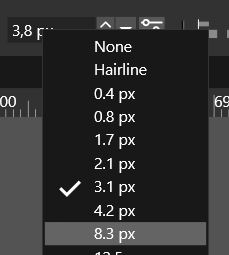
            @b77 vice & versa: 3.1px is selected but 1.4px is the value which appears in the windows.
            Hovering the cursor over other values changes the number that appears in the window but they never match.
            0_1666508617486_Capture.JPG

            @VectorStyler Yes to both questions, in px. I've sent you the file ☺

            W11 Pro 25H2 - 12th Gen Intel(R) i7-12700K 3.61 GHz - RAM 64 Go - NVIDIA GF GTX 4070 Ti - Intuos - Dell UP3216Q / Eizo ColorEdge
            W11 Pro 25H2 - 12th Gen Intel(R) i7-12700KF 3.60 GHz -RAM 64 Go - NVIDIA GF GTX 3080 - IntuosPro- ProArt PA329C

            VectorStylerV 1 Reply Last reply Reply Quote 0
            • VectorStylerV Offline
              VectorStyler @B-Vs-V
              last edited by

              @PatrickM Got the file, I will try to replicate with this.

              The file has Millimeter selected as a unit. So for me the Stroke Width field shows it in mm.

              A question: was the Preferences -> Number Editors -> Stroke Units changed?

              B 2 Replies Last reply Reply Quote 0
              • B Offline
                B-Vs-V @VectorStyler
                last edited by B-Vs-V

                @VectorStyler I setup the file in px by typing directly (if I recall correctly) 1.8 k px & 1 .8k px. No, I didn't change any Preferences settings - [edit: well, I'm not too sure anymore but I don't think so]

                W11 Pro 25H2 - 12th Gen Intel(R) i7-12700K 3.61 GHz - RAM 64 Go - NVIDIA GF GTX 4070 Ti - Intuos - Dell UP3216Q / Eizo ColorEdge
                W11 Pro 25H2 - 12th Gen Intel(R) i7-12700KF 3.60 GHz -RAM 64 Go - NVIDIA GF GTX 3080 - IntuosPro- ProArt PA329C

                1 Reply Last reply Reply Quote 1
                • B Offline
                  B-Vs-V @VectorStyler
                  last edited by

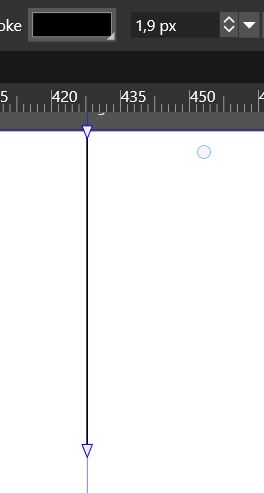
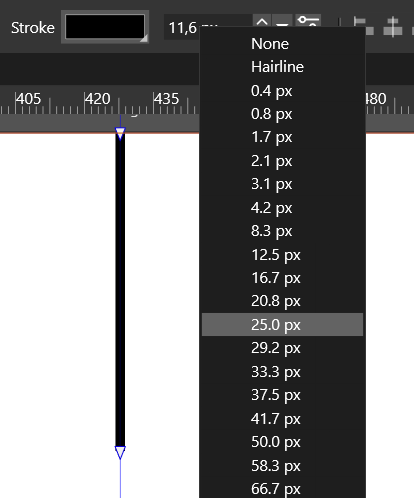
                  @VectorStyler I can reproduce this issue with a new document.

                  0_1666689483632_S1.JPG

                  0_1666689468469_eb318a5e-3e92-4bc7-8d73-a8c23a05e167-image.png

                  W11 Pro 25H2 - 12th Gen Intel(R) i7-12700K 3.61 GHz - RAM 64 Go - NVIDIA GF GTX 4070 Ti - Intuos - Dell UP3216Q / Eizo ColorEdge
                  W11 Pro 25H2 - 12th Gen Intel(R) i7-12700KF 3.60 GHz -RAM 64 Go - NVIDIA GF GTX 3080 - IntuosPro- ProArt PA329C

                  VectorStylerV 1 Reply Last reply Reply Quote 0
                  • VectorStylerV Offline
                    VectorStyler @B-Vs-V
                    last edited by

                    @PatrickM I opened a bug on this one, will try to replicate and fix it ASAP.

                    1 Reply Last reply Reply Quote 0
                    • First post
                      Last post