VectorStyler
    • Categories
    • Unread
    • Recent
    • Tags
    • Popular
    • Register
    • Login

    Floating window - no way to move using the wacom digital pen

    Scheduled Pinned Locked Moved VectorStyler 1.1 Bugs
    8 Posts 3 Posters 9.3k Views 2 Watching
    Loading More Posts
    • Oldest to Newest
    • Newest to Oldest
    • Most Votes
    Reply
    • Reply as topic
    Log in to reply
    This topic has been deleted. Only users with topic management privileges can see it.
    • B Offline
      B-Vs-V
      last edited by B-Vs-V

      As the title suggests, I can move a floating panel with the mouse but not with my pen (Intuos4).

      W11 Pro 25H2 - 12th Gen Intel(R) i7-12700K 3.61 GHz - RAM 64 Go - NVIDIA GF GTX 4070 Ti - Intuos - Dell UP3216Q / Eizo ColorEdge
      W11 Pro 25H2 - 12th Gen Intel(R) i7-12700KF 3.60 GHz -RAM 64 Go - NVIDIA GF GTX 3080 - IntuosPro- ProArt PA329C

      VectorStylerV BoldlineB 2 Replies Last reply Reply Quote 1
      • VectorStylerV Offline
        VectorStyler @B-Vs-V
        last edited by

        @PatrickM Added this to the backlog.

        1 Reply Last reply Reply Quote 0
        • BoldlineB Online
          Boldline @B-Vs-V
          last edited by Boldline

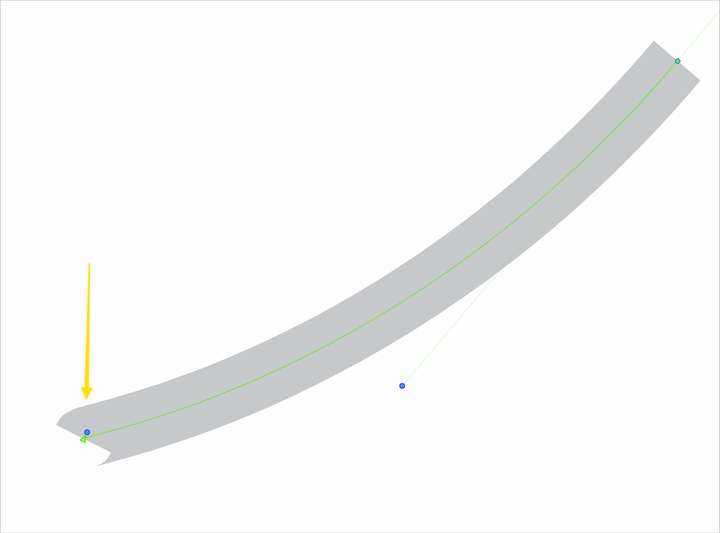
          @PatrickM I noticed form your post that you are using an Intous4. Are you having any issues with the pen tool accidentally creating two nodes at the start if you work quickly? Or when you start a pen path, does the initial node have a handle pulled out slightly by default?
          0_1666902475781_11fbc4b3-a1f1-4182-b3ef-1f266fc6d969-BLD 2022-10-27 at 16.27.23.png

          🍎 macOS Tahoe 26.2, Mac mini (M1, 2020), Chip Apple M1, Memory 16 GB
          Cintiq 27QHD Display and LG Ultra HD Display

          B 1 Reply Last reply Reply Quote 0
          • B Offline
            B-Vs-V @Boldline
            last edited by

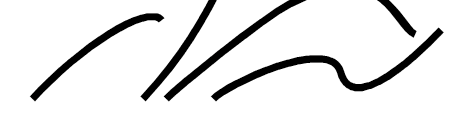
            @Boldline No, not that I can notice but I usually don't draw too fast. What is constant is that I don't see the initial handle before I release the mouse/pen, which is a bit annoying.

            I just deselected Windows Ink for VS. I'll test further whether there is a connection between the two (WI/VS) and VS bugs.
            0_1666935561416_5d37c1e9-b565-4ba1-823f-7a45c2a36474-image.png

            W11 Pro 25H2 - 12th Gen Intel(R) i7-12700K 3.61 GHz - RAM 64 Go - NVIDIA GF GTX 4070 Ti - Intuos - Dell UP3216Q / Eizo ColorEdge
            W11 Pro 25H2 - 12th Gen Intel(R) i7-12700KF 3.60 GHz -RAM 64 Go - NVIDIA GF GTX 3080 - IntuosPro- ProArt PA329C

            VectorStylerV 1 Reply Last reply Reply Quote 0
            • VectorStylerV Offline
              VectorStyler @B-Vs-V
              last edited by

              @PatrickM said in Floating window - no way to move using the pen tool:

              What is constant is that I don't see the initial handle before I release the mouse/pen,

              I tried here on Windows with an Intuos (pro) small and the initial handle is showing and can be dragged out.

              Could be an issue with some settings?

              B 3 Replies Last reply Reply Quote 1
              • B Offline
                B-Vs-V @VectorStyler
                last edited by B-Vs-V

                @VectorStyler A priori I don't see which settings but I'll have a look. I have another Wacom screen tablet that I no longer use because I don't like working on a small screen. I'll test with it after the next build.

                W11 Pro 25H2 - 12th Gen Intel(R) i7-12700K 3.61 GHz - RAM 64 Go - NVIDIA GF GTX 4070 Ti - Intuos - Dell UP3216Q / Eizo ColorEdge
                W11 Pro 25H2 - 12th Gen Intel(R) i7-12700KF 3.60 GHz -RAM 64 Go - NVIDIA GF GTX 3080 - IntuosPro- ProArt PA329C

                1 Reply Last reply Reply Quote 1
                • B Offline
                  B-Vs-V @VectorStyler
                  last edited by

                  @VectorStyler I've tested my other tablet with w11 and I can see one handle before I release the pen.

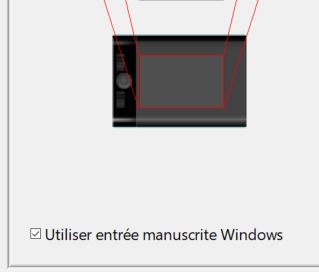
                  Nothing with the Intuos4: I've looked in the settings & I don't see what could be the issue. But when I've activated the inking stuff, I could only draw lines (pen tool) and not curves and I'm sure not to have press any keyboard (far from my hands ;-). I deactivated WI and I could draw curves with the pen tool again.

                  0_1667125760702_W1.JPG

                  0_1667125880869_c87745e2-c996-47ce-910f-63d357da7b12-image.png

                  W11 Pro 25H2 - 12th Gen Intel(R) i7-12700K 3.61 GHz - RAM 64 Go - NVIDIA GF GTX 4070 Ti - Intuos - Dell UP3216Q / Eizo ColorEdge
                  W11 Pro 25H2 - 12th Gen Intel(R) i7-12700KF 3.60 GHz -RAM 64 Go - NVIDIA GF GTX 3080 - IntuosPro- ProArt PA329C

                  1 Reply Last reply Reply Quote 0
                  • B Offline
                    B-Vs-V @VectorStyler
                    last edited by

                    @VectorStyler said in Floating window - no way to move using the pen tool:

                    @PatrickM said in Floating window - no way to move using the pen tool:

                    What is constant is that I don't see the initial handle before I release the mouse/pen (W10)

                    Could be an issue with some settings?

                    @VectorStyler Just to let you know it is fine with the v.066 and since I've deleted the settings.xml and workspace.xml files.

                    W11 Pro 25H2 - 12th Gen Intel(R) i7-12700K 3.61 GHz - RAM 64 Go - NVIDIA GF GTX 4070 Ti - Intuos - Dell UP3216Q / Eizo ColorEdge
                    W11 Pro 25H2 - 12th Gen Intel(R) i7-12700KF 3.60 GHz -RAM 64 Go - NVIDIA GF GTX 3080 - IntuosPro- ProArt PA329C

                    1 Reply Last reply Reply Quote 1
                    • First post
                      Last post