VectorStyler
    • Categories
    • Unread
    • Recent
    • Tags
    • Popular
    • Register
    • Login

    4 button dialogue popping up before VS freezes

    Scheduled Pinned Locked Moved VectorStyler 1.1 Bugs
    10 Posts 3 Posters 8.1k Views 3 Watching
    Loading More Posts
    • Oldest to Newest
    • Newest to Oldest
    • Most Votes
    Reply
    • Reply as topic
    Log in to reply
    This topic has been deleted. Only users with topic management privileges can see it.
    • VectorWhizV Offline
      VectorWhiz
      last edited by

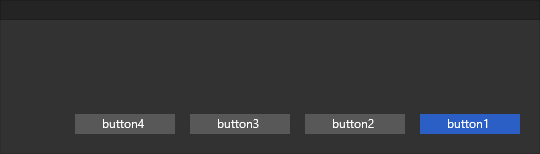
      Often when editing shapes in VS I see the dialogue as shown below appear after which the program freezes, I then see a very high power usage indicated in the Taskmanager that continues endlessly and can only close the program from there.
      0_1668436508277_Weird 4 button dialogue.png

      Digital Art & Creative Text - https://vectorwhiz.com | Portfolio blog - https://communicats.blogspot.com

      VectorStylerV 1 Reply Last reply Reply Quote 0
      • VectorStylerV Offline
        VectorStyler @VectorWhiz
        last edited by

        @VectorWhiz Yes, this has been reported before.

        Do you have the latest version (1.1.066), there were some issues with background saving.

        Also a reset might help by removing the VectorStyler user data from c:\Users\<username>\NumericPath\VectorStyler1.0

        VectorWhizV 2 Replies Last reply Reply Quote 0
        • VectorWhizV Offline
          VectorWhiz
          last edited by VectorWhiz

          Yes, I have the newest version, which function-wise is brilliant. Removing the user data from c:\Users<username>\NumericPath\VectorStyler1.0, does that mean it is safe to save the data elsewhere, including on a network drive?

          Curiously an export to the User directory failed (only the top part of the png was rendered) - Format: 8bit, Rendering 16 bit), but when exporting it to a network drive (Format: 8bit, Rendering 8 bit) it rendered the complete image properly. 15 minutes later the png export failed again, but this time the export of the canvas did work properly.

          I received a message that VS was unable to write to the file location of my network drive. after receiving the same message when I saved it to my user directory on the C (system) drive. I am somewhat puzzled now.

          My experience with the third VectorStyler experiment I reported in this blog entry: https://communicats.blogspot.com/2022/11/exploring-vectorstyler-part-iii.html in which I try to describe my venture into working with VS as accurate as possible.

          Digital Art & Creative Text - https://vectorwhiz.com | Portfolio blog - https://communicats.blogspot.com

          b77B 1 Reply Last reply Reply Quote 0
          • b77B Offline
            b77 @VectorWhiz
            last edited by

            @VectorWhiz Yes, I would copy these two files (settings.xml and workspace.xml) somewhere else before deleting them.

            Then you can restart the app and see if the issue is solved.

            If it's solved, send the .xml files to the developer's email.

            MacBook Pro (Intel) running Monterey 12.6.4

            1 Reply Last reply Reply Quote 0
            • VectorWhizV Offline
              VectorWhiz @VectorStyler
              last edited by VectorWhiz

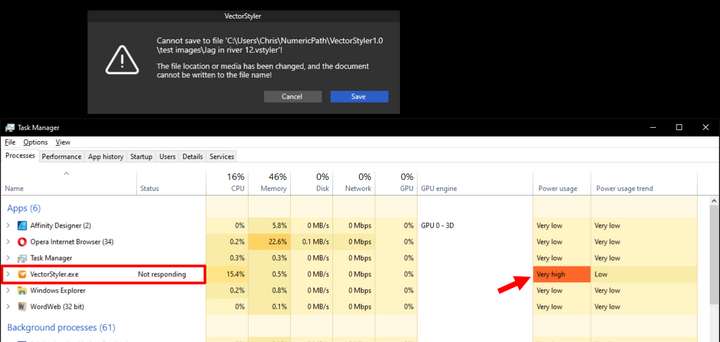
              This is what seems to happen randomly when editing a file - dialogue at the top:

              @VectorStyler 0_1668519936057_Save error and TaskManager.png

              Then after closing VS with the Task Manager I am presented with a dialogue that asks me if I want to open a backup file, which opens the file up to the penultimate stage. I save the file under a new name and after closing it I am able to re-open it.

              Digital Art & Creative Text - https://vectorwhiz.com | Portfolio blog - https://communicats.blogspot.com

              VectorStylerV 1 Reply Last reply Reply Quote 0
              • VectorStylerV Offline
                VectorStyler @VectorWhiz
                last edited by

                @VectorWhiz Is "Automatic Save" or "Automatic Backup" enabled in the preferences?

                VectorWhizV 1 Reply Last reply Reply Quote 0
                • VectorWhizV Offline
                  VectorWhiz @VectorStyler
                  last edited by

                  @VectorStyler Yes, both are activated.

                  Digital Art & Creative Text - https://vectorwhiz.com | Portfolio blog - https://communicats.blogspot.com

                  VectorStylerV 1 Reply Last reply Reply Quote 0
                  • VectorStylerV Offline
                    VectorStyler @VectorWhiz
                    last edited by

                    @VectorWhiz Turn them off for now, and let me know if the bug occurs then.
                    Automatic saving occurs in the background, and it could cause some issues on Windows.
                    I will try to replicate this.

                    1 Reply Last reply Reply Quote 0
                    • VectorWhizV Offline
                      VectorWhiz @VectorStyler
                      last edited by

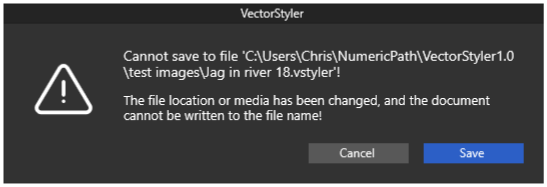
                      @VectorStyler No improvement with autosave off. I still get the message below. I can save as while this message appears, but it continues to show up.
                      0_1668684870896_Message with Autosave off.png

                      Digital Art & Creative Text - https://vectorwhiz.com | Portfolio blog - https://communicats.blogspot.com

                      VectorStylerV 1 Reply Last reply Reply Quote 0
                      • VectorStylerV Offline
                        VectorStyler @VectorWhiz
                        last edited by

                        @VectorWhiz Was "Automatic Backup" turned off also?

                        Meanwhile, I found the issue causing this in case of auto save.

                        1 Reply Last reply Reply Quote 0
                        • First post
                          Last post