Sections of work disappear, pen tool still having the restart issue
-
@Boldline I will try to replicate this issue.
-
OK I was able to recreate the disappearing nodes and strokes issue again. I recorded a video that captures the disappearance at the very end of the video
It happened prior to this recording as well, when I was starting a new stroke line inside the four sides of an existing closed path. In this case, I made the square around the outside of the E and then was adding paths inside that outer shape to make the inner lines of the E. I would go to place my first node inside that existing closed path and it would not register a node there... I'd click again and it would disappear.
When I turned on the screen capture and replicated the problem, it worked decently at that spot, but as you see, at the end, it all erased and hitting command-z to undo had no effect. Hitting command-z to go back actually just starts going back into the prior letter, skipping all steps I made in the E which is really odd....
🍎 macOS Tahoe 26.2, Mac mini (M1, 2020), Chip Apple M1, Memory 16 GB
Cintiq 27QHD Display and LG Ultra HD Display -
OK did one more test on it - here is that new video](https://recordit.co/eC1o3OnHh5)
You can see in the beginning, I was unable to start a path from inside the existing closed path again... I kept pressing and clicking to no avail. I can start it from outside the box.
I got through all the steps and right at the end it wouldn't cooperate and I clicked a second time and again, the last section disappeared...
I am going to save the file at this point... and send it over. -
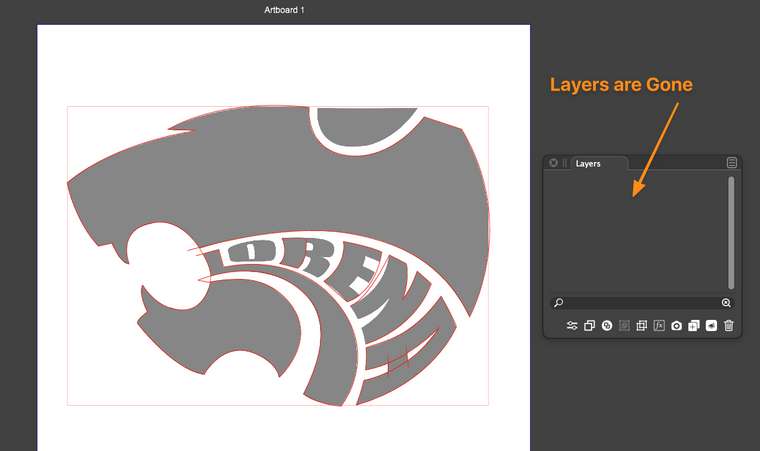
Not sure if this ties in with the missing sections of path and nodes, but now I have no layers available in that file. I used to have three layers - one with the image locked, another with the nodes and work I was doing, and the third was just empty and unused. I'll send this updated file to you as well with a new name of "lost layers"
-
@Boldline I tried to replicate this issue - and was not totally successful, but I can see one persistent issue - perhaps you can check if this happens to you too? It may provide some further insights.
I work on Win10, beta 209
Test one
- Pen tool -> create a closed path.
- Pen tool -> attempt to create a new path with its starting point within the closed path from (1) : fails
Test two
- Pen tool -> create a closed path.
- Pen tool -> attempt to create a new path with its starting point outside the closed path from (1) moving the second node within the shape : works
- Close the path(2)
- Pen tool -> attempt to create a new path with its starting point within the closed shape from (3): fails
Based on those 2 tests it looks like starting a new path within the 'last' created closed path fails.
Test 3
- Pen tool -> attempt to create a new path next to/on an existing close path (no matter when created) and the first click does not register.
It places what looks like a normal node, not the starting triangle node, but it has no function. The next click will be the 'starting node'.
Windows 10 Pro | 22H2
-
@syllie - You did a great job explaining those tests. I had the same results in the first two tests as you did.
I found I had no problem closing paths and the magnet effect worked this time in a new document... so not sure why it works now but not before.
For test 3 - When I click on the existing path, I get a small circle on the path that remains there until I click my next point and then a starter triangle node appears and the first circle is gone. I think that is in alignment with what you also saw happen -
@Boldline said in Sections of work disappear, pen tool still having the restart issue:
For test 3 - When I click on the existing path, I get a small circle on the path that remains there until I click my next point and then a starter triangle node appears and the first circle is gone. I think that is in alignment with what you also saw happen
Yes - sounds exactly like what I was trying to explain.
Thanks for your feedback - hopefully the dev can do something with this. @vectoradmin
-
Thanks for the detailed explanation.
Starting a path drawing inside a closed shape is an issue and can be fixed.
Opened a new bug on this one.I will also investigate more the disapearing act of shapes, there must be a reason for this.
-
@syllie Pen tool: starting path inside a selected path should work now.
-
@Boldline Please check this in the new build (210), there were fixes around how the Pen tool handles existing drawings.
-
@vectoradmin I tested starting a path inside a selected path and it works great! thank you! Now that the improvements have been made, I will test more with the pen tool and see if the other issue with sections disappearing is also fixed
-
The pen tool behaviour is much improved. The experience in itself is much smoother and this definitely looks like a step forward.


