VectorStyler
    • Categories
    • Unread
    • Recent
    • Tags
    • Popular
    • Register
    • Login

    Shortcut to make all selected node handles flush with path
    Scheduled Pinned Locked Moved Features and Ideas
    9 Posts 4 Posters 7.2k Views 3 Watching
    Loading More Posts
    • Oldest to Newest
    • Newest to Oldest
    • Most Votes
    Reply
    • Reply as topic
    Log in to reply
    This topic has been deleted. Only users with topic management privileges can see it.
    • BoldlineB Online
      Boldline
      last edited by b77

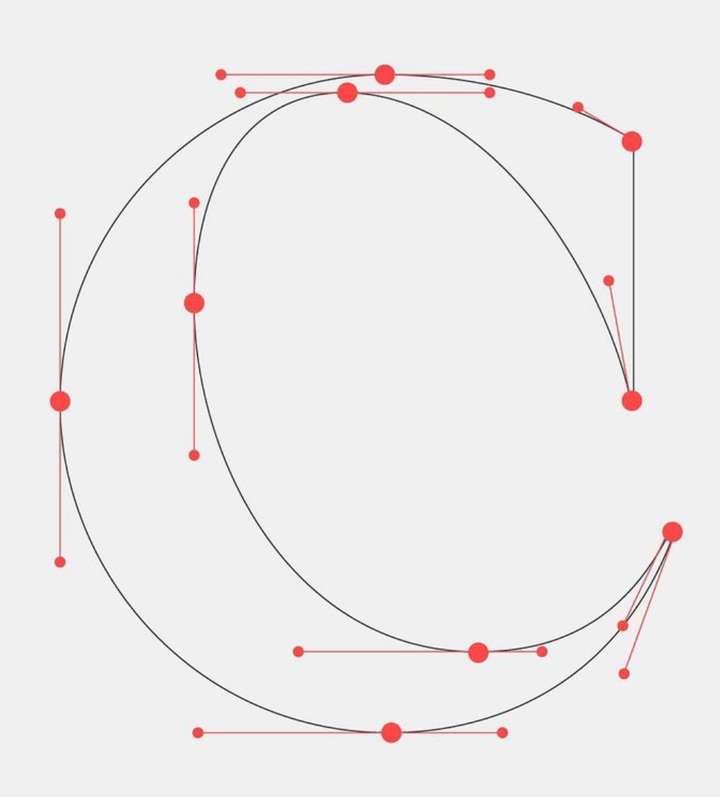
      I was wondering if it would be helpful to have an automatic option to alter the handles to be flush with the path, either horizontally or vertically. I know it comes in handy with type design!
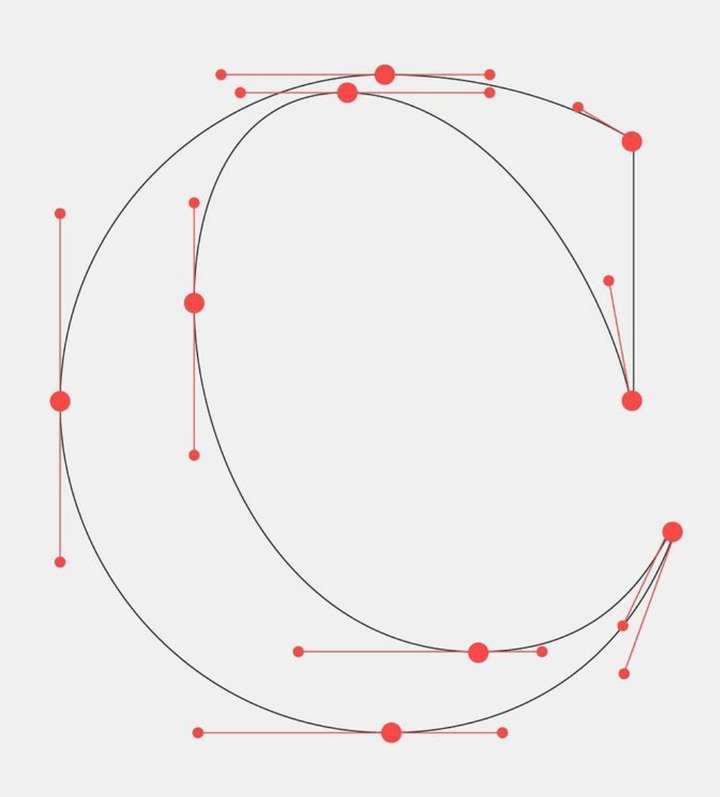
      0_1671489629106_1671487145541-be5c15b1-594d-4c34-ab9e-23556712dffa-resized.jpeg

      🍎 macOS Tahoe 26.2, Mac mini (M1, 2020), Chip Apple M1, Memory 16 GB
      Cintiq 27QHD Display and LG Ultra HD Display

      b77B VectorStylerV 2 Replies Last reply Reply Quote 1
      • S Offline
        Subpath
        last edited by

        @Boldline

        My posting was deleted because I misread your post.

        Win 11
        CPU: AMD Ryzen 5 9600X, 6-core.
        GPU: Nvidia Geforce RTX 5070.

        1 Reply Last reply Reply Quote 0
        • b77B Offline
          b77 @Boldline
          last edited by

          @Boldline Adding nodes at extremas could be useful, but when the nodes are far from the path extremes this means additional nodes.

          MacBook Pro (Intel) running Monterey 12.6.4

          BoldlineB 1 Reply Last reply Reply Quote 0
          • BoldlineB Online
            Boldline @b77
            last edited by

            @b77 In this case I was more thinking of a way to make the handles of existing nodes be set to 90 degrees or 180 degrees, etc. not necessarily adding more nodes. Im just now getting into the whole type design so you might know better what is needed or would be helpful

            🍎 macOS Tahoe 26.2, Mac mini (M1, 2020), Chip Apple M1, Memory 16 GB
            Cintiq 27QHD Display and LG Ultra HD Display

            b77B 1 Reply Last reply Reply Quote 0
            • b77B Offline
              b77 @Boldline
              last edited by

              @Boldline said in Shortcut to make all selected node handles flush with path:

              @b77 In this case I was more thinking of a way to make the handles of existing nodes be set to 90 degrees or 180 degrees,

              Glyphs has the 'Add Extremes' command in the Path menu that does exactly that, FontLab has
              'Nodes at Extremes' in the Contour menu, Robofont and the others probably have this as well.

              Glyphs relocates a node at the extreme of a path only if that node is close to the extreme.
              Otherwise it adds a new node at the extreme and keeps the existing nodes:

              alt text

              MacBook Pro (Intel) running Monterey 12.6.4

              BoldlineB 1 Reply Last reply Reply Quote 1
              • BoldlineB Online
                Boldline @b77
                last edited by

                @b77 thanks for explaining - I would think this could be a really useful set of features in VS

                🍎 macOS Tahoe 26.2, Mac mini (M1, 2020), Chip Apple M1, Memory 16 GB
                Cintiq 27QHD Display and LG Ultra HD Display

                b77B 1 Reply Last reply Reply Quote 0
                • b77B Offline
                  b77 @Boldline
                  last edited by

                  @Boldline I might have suggested this to the developer myself, but not like it's something urgent, since
                  this can be done really fast in Glyphs for all selected characters at once.

                  MacBook Pro (Intel) running Monterey 12.6.4

                  1 Reply Last reply Reply Quote 1
                  • VectorStylerV Offline
                    VectorStyler @Boldline
                    last edited by

                    @Boldline said in Shortcut to make all selected node handles flush with path:

                    I was wondering if it would be helpful to have an automatic option to alter the handles to be flush with the path, either horizontally or vertically. I know it comes in handy with type design!

                    The question here is: which handles to alter?
                    Cannot work on all handles, unless we have some rule, because not all handles are such in the example.
                    Could be for smooth node handles, but not sure if that would work always.
                    Or could be with selected node handles only, there it is simple.

                    @b77 Yes, the "extrema" point adding is in the backlog.

                    BoldlineB 1 Reply Last reply Reply Quote 1
                    • BoldlineB Online
                      Boldline @VectorStyler
                      last edited by

                      @VectorStyler said in Shortcut to make all selected node handles flush with path:

                      The question here is: which handles to alter?

                      Or could be with selected node handles only, there it is simple.

                      Yes, in the case of having node handles be made to run parallel with the stroke path, that would be with selected node handles only

                      🍎 macOS Tahoe 26.2, Mac mini (M1, 2020), Chip Apple M1, Memory 16 GB
                      Cintiq 27QHD Display and LG Ultra HD Display

                      1 Reply Last reply Reply Quote 1
                      • First post
                        Last post
