VectorStyler
    • Categories
    • Unread
    • Recent
    • Tags
    • Popular
    • Register
    • Login

    How to see long names for selected images
    Scheduled Pinned Locked Moved Features and Ideas
    5 Posts 3 Posters 5.1k Views 2 Watching
    Loading More Posts
    • Oldest to Newest
    • Newest to Oldest
    • Most Votes
    Reply
    • Reply as topic
    Log in to reply
    This topic has been deleted. Only users with topic management privileges can see it.
    • BoldlineB Offline
      Boldline
      last edited by

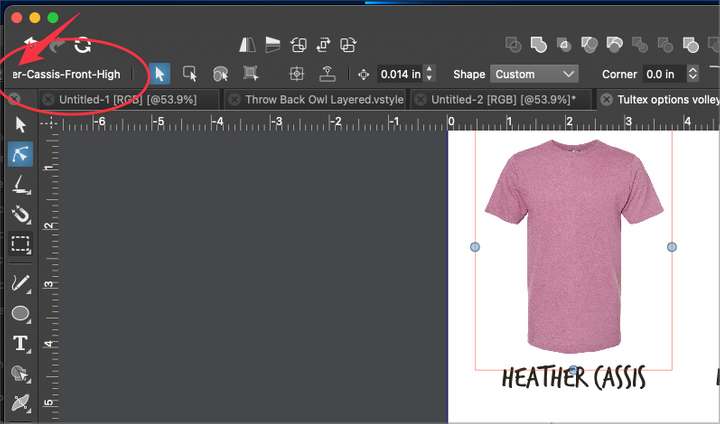
      Is there a way to see the full name of the selected image in the document? If I select an imported image and look to the contextual menu bar, the name, if too long, gets cut off. there does not seem to be an easy way to see the full name - I tried hovering over it, clicking on it, etc...
      0_1674014895673_7a690aea-18fb-4402-b70e-7642eb6057cb-BLD 2023-01-17 at 23.06.31.png

      🍎 macOS Tahoe 26.2, Mac mini (M1, 2020), Chip Apple M1, Memory 16 GB
      Cintiq 27QHD Display and LG Ultra HD Display

      VectorStylerV 1 Reply Last reply Reply Quote 0
      • VectorStylerV Offline
        VectorStyler @Boldline
        last edited by

        @Boldline There is limited room for this in the Context panel.
        Details on linked images can be seen in the Links panel, when hovering over the image in the list.

        b77B 1 Reply Last reply Reply Quote 1
        • b77B Offline
          b77 @VectorStyler
          last edited by

          @VectorStyler The full name could be shown in a tooltip when you hover the selection info area in the context panel.

          MacBook Pro (Intel) running Monterey 12.6.4

          BoldlineB VectorStylerV 2 Replies Last reply Reply Quote 1
          • BoldlineB Offline
            Boldline @b77
            last edited by Boldline

            @b77 said in How to see long names for selected images:

            @VectorStyler The full name could be shown in a tooltip when you hover the selection info area in the context panel.

            @VectorStyler Yes this was what I was thinking could be a good solution. I'll also make more use of the links panel

            Would it make sense to also let a double click of the name area in the contextual menu open the links panel? Much like the vertical tool bar options can be double clicked and it opens the appropriate panel?

            🍎 macOS Tahoe 26.2, Mac mini (M1, 2020), Chip Apple M1, Memory 16 GB
            Cintiq 27QHD Display and LG Ultra HD Display

            1 Reply Last reply Reply Quote 0
            • VectorStylerV Offline
              VectorStyler @b77
              last edited by

              @b77 said in How to see long names for selected images:

              @VectorStyler The full name could be shown in a tooltip when you hover the selection info area in the context panel.

              Added this to the backlog.

              1 Reply Last reply Reply Quote 1
              • First post
                Last post
