VectorStyler
    • Categories
    • Unread
    • Recent
    • Tags
    • Popular
    • Register
    • Login

    Link File Command Opens Export Options & Other Bugs in v1.1.077

    Scheduled Pinned Locked Moved VectorStyler 1.1 Bugs
    12 Posts 4 Posters 11.6k Views 4 Watching
    Loading More Posts
    • Oldest to Newest
    • Newest to Oldest
    • Most Votes
    Reply
    • Reply as topic
    Log in to reply
    This topic has been deleted. Only users with topic management privileges can see it.
    • G Offline
      gotanidea
      last edited by

      To reproduce this, click the File > Link File button.

      Or try to close a document without saving it. The buttons will appear with weird names

      b77B VectorStylerV 3 Replies Last reply Reply Quote 0
      • b77B Offline
        b77 @gotanidea
        last edited by

        @gotanidea Cannot replicate on the Mac.

        MacBook Pro (Intel) running Monterey 12.6.4

        1 Reply Last reply Reply Quote 0
        • S Offline
          Subpath
          last edited by

          @gotanidea

          no problem here either, win 10
          everthing looks normal

          Win 11
          CPU: AMD Ryzen 5 9600X, 6-core.
          GPU: Nvidia Geforce RTX 5070.

          G 1 Reply Last reply Reply Quote 0
          • b77B Offline
            b77 @gotanidea
            last edited by b77

            @gotanidea The 'Export' command in the File menu is right after 'Link File' — maybe
            clicking 'Link File' triggers the 'Export' command because of some mouse issue?

            What happens if you use the shortcut for 'Link File'?

            MacBook Pro (Intel) running Monterey 12.6.4

            1 Reply Last reply Reply Quote 0
            • G Offline
              gotanidea @Subpath
              last edited by

              @Subpath and @b77 , I have restarted my laptop after installing v1.1.077 on the latest version WIndows 11 and here is my laptop system:
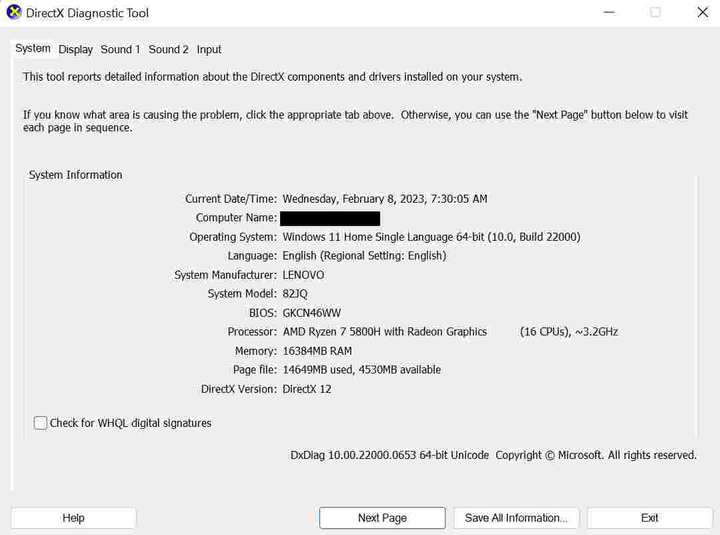
              0_1675817204759_My_Lenovo_Legion_5_Pro_Laptop_System.jpg

              And this is my laptop display:

              0_1675817366695_My_Lenovo_Legion_5_Pro_Laptop_Display.jpg

              The File menu item shows weird options:
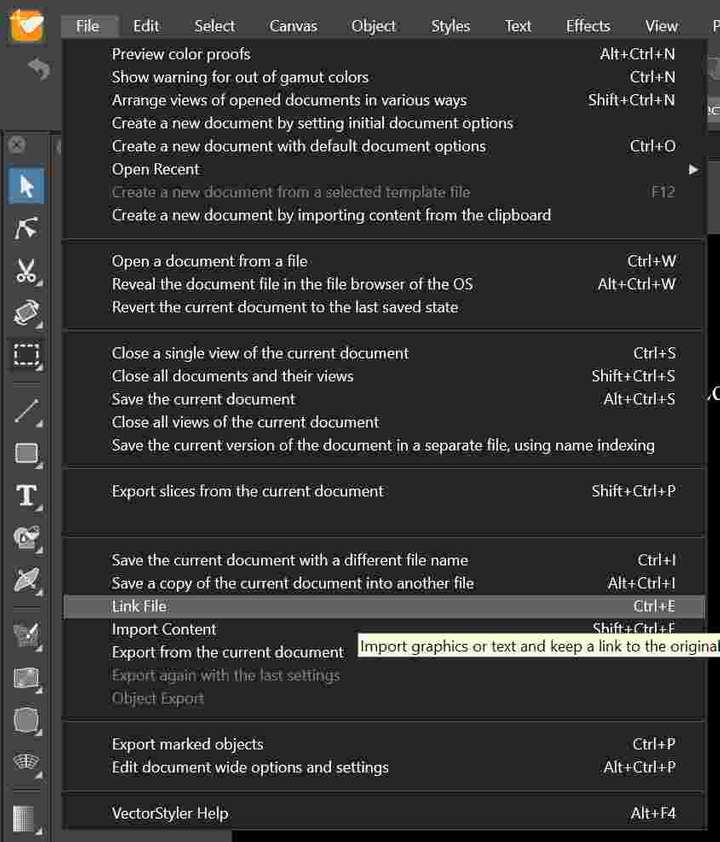
              0_1675817458621_File_-_Link_File_Command.jpg

              And clicking the Link File button shows export options instead of opening the link window. There is no close button and some tabs are not selectable:
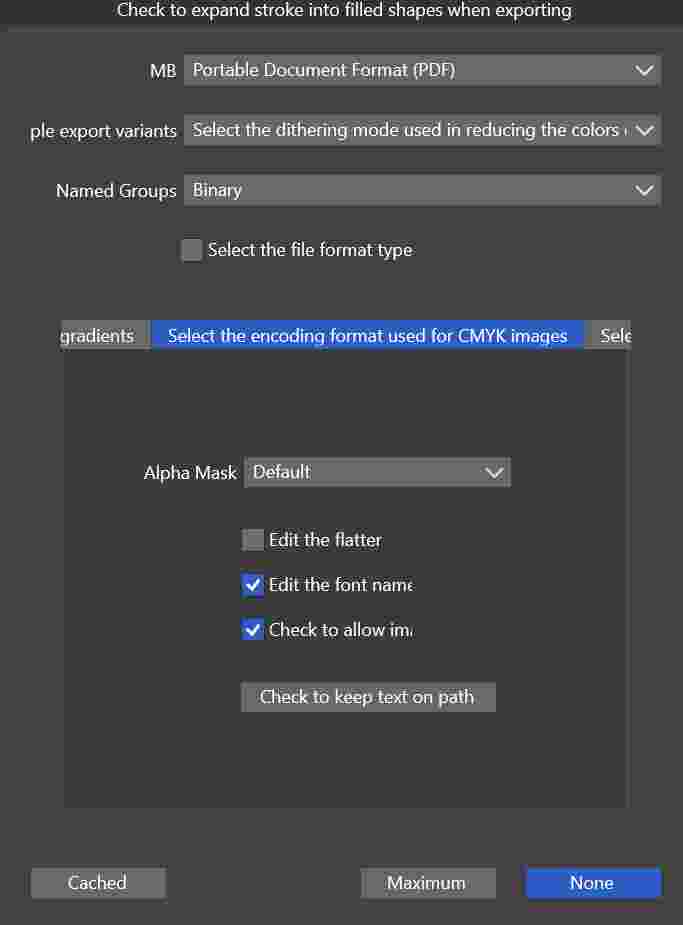
              0_1675817564250_Clicking_Link_File_Opens_Export_Options.jpg

              And if I close an altered document without saving it first, the warning window shows some weird options as well. There is no close button as well:
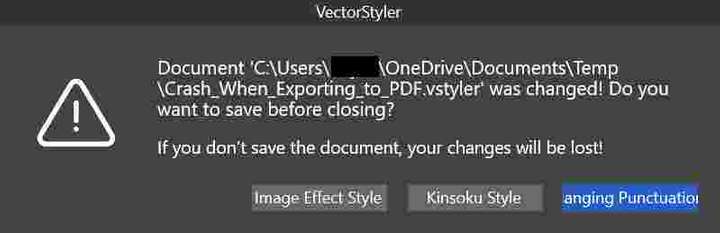
              0_1675817668775_Closing_Document_without_Saving_Shows_Weird_Buttons.jpg

              b77B VectorStylerV 2 Replies Last reply Reply Quote 0
              • b77B Offline
                b77 @gotanidea
                last edited by

                @gotanidea Alt-Ctrl-I is the shortcut for 'Link File'. Is it working?

                MacBook Pro (Intel) running Monterey 12.6.4

                G 1 Reply Last reply Reply Quote 0
                • VectorStylerV Offline
                  VectorStyler @gotanidea
                  last edited by

                  @gotanidea Looks like there are some issues with the resources.

                  Try removing the VectorStyler user data, by holding Control+Alt+Shift when starting VectorStyler

                  G 1 Reply Last reply Reply Quote 0
                  • G Offline
                    gotanidea @b77
                    last edited by

                    @b77 said in Link File Command Opens Export Options & Other Bugs in v1.1.077:

                    @gotanidea Alt-Ctrl-I is the shortcut for 'Link File'. Is it working?

                    Yes, I can import the files using the hotkey. But the buttons are still confusing

                    1 Reply Last reply Reply Quote 0
                    • G Offline
                      gotanidea @VectorStyler
                      last edited by

                      @VectorStyler said in Link File Command Opens Export Options & Other Bugs in v1.1.077:

                      @gotanidea Looks like there are some issues with the resources.

                      Try removing the VectorStyler user data, by holding Control+Alt+Shift when starting VectorStyler

                      It doesn't work

                      VectorStylerV 1 Reply Last reply Reply Quote 0
                      • VectorStylerV Offline
                        VectorStyler @gotanidea
                        last edited by

                        @gotanidea The way this looks like is that the update did not remove the old resources (this should be done by the Microsoft Installer / MSI).

                        So an other thing to try is to completely remove VectorStyler and reinstall.
                        And also manually remove VectorStyler user data from the c:\Users<user name>\AppData\Roaming\NumericPath\ folder
                        The "AppData" folder is hidden, and the "Roaming" can be "Local" depending on how it was installed.

                        Somewhere the old resource files persist.

                        G 1 Reply Last reply Reply Quote 1
                        • G Offline
                          gotanidea @VectorStyler
                          last edited by

                          @VectorStyler said in Link File Command Opens Export Options & Other Bugs in v1.1.077:

                          @gotanidea The way this looks like is that the update did not remove the old resources (this should be done by the Microsoft Installer / MSI).

                          So an other thing to try is to completely remove VectorStyler and reinstall.
                          And also manually remove VectorStyler user data from the c:\Users<user name>\AppData\Roaming\NumericPath\ folder
                          The "AppData" folder is hidden, and the "Roaming" can be "Local" depending on how it was installed.

                          Somewhere the old resource files persist.

                          It works. Thanks

                          1 Reply Last reply Reply Quote 1
                          • VectorStylerV Offline
                            VectorStyler @gotanidea
                            last edited by

                            @gotanidea This issue should be fixed in build 1.1.080

                            1 Reply Last reply Reply Quote 1
                            • First post
                              Last post