VectorStyler
    • Categories
    • Unread
    • Recent
    • Tags
    • Popular
    • Register
    • Login

    Circle: changing its shape with the Shape editor tool


    Scheduled Pinned Locked Moved VectorStyler 1.1 Bugs
    8 Posts 3 Posters 8.6k Views 3 Watching
    Loading More Posts
    • Oldest to Newest
    • Newest to Oldest
    • Most Votes
    Reply
    • Reply as topic
    Log in to reply
    This topic has been deleted. Only users with topic management privileges can see it.
    • B Offline
      B-Vs-V
      last edited by

      This is not a big issue but I just noticed that modifying a simple circle with the 'Shape editor' tool is correct (is what is expected) if you apply the change gradually and slowly.

      0_1677917755241_Capture d’écran 2023-03-04 090920.jpg

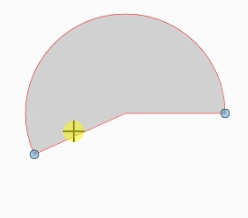
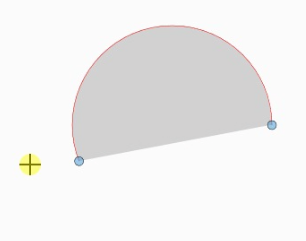
      Moving the point too fast leads to this... is it by design ?

      0_1677917788988_Capture d’écran 2023-03-04 090942.jpg :

      W11 Pro 25H2 - 12th Gen Intel(R) i7-12700K 3.61 GHz - RAM 64 Go - NVIDIA GF GTX 4070 Ti - Intuos - Dell UP3216Q / Eizo ColorEdge
      W11 Pro 25H2 - 12th Gen Intel(R) i7-12700KF 3.60 GHz -RAM 64 Go - NVIDIA GF GTX 3080 - IntuosPro- ProArt PA329C

      S VectorStylerV 2 Replies Last reply Reply Quote 0
      • S Offline
        Subpath @B-Vs-V
        last edited by Subpath

        @Pat

        is not due to the speed

        that are different modes
        If you are fast, it can be that
        you come outside the circle
        what causes this
        see video here

        0_1677920425050_Circle-1.png

        0_1677920436063_Circle-2.png

        Win 11
        CPU: AMD Ryzen 5 9600X, 6-core.
        GPU: Nvidia Geforce RTX 5070.

        B 1 Reply Last reply Reply Quote 2
        • VectorStylerV Offline
          VectorStyler @B-Vs-V
          last edited by

          @Pat Yes, as @Subpath explained, inside means "closed pie", outside means "open arc".

          B 1 Reply Last reply Reply Quote 2
          • B Offline
            B-Vs-V @Subpath
            last edited by B-Vs-V

            @Subpath Thanks, I had no idea... glad I learn this trick and indeed, no doubt going slowly kept my mouse pointer inside the circle ☺

            W11 Pro 25H2 - 12th Gen Intel(R) i7-12700K 3.61 GHz - RAM 64 Go - NVIDIA GF GTX 4070 Ti - Intuos - Dell UP3216Q / Eizo ColorEdge
            W11 Pro 25H2 - 12th Gen Intel(R) i7-12700KF 3.60 GHz -RAM 64 Go - NVIDIA GF GTX 3080 - IntuosPro- ProArt PA329C

            1 Reply Last reply Reply Quote 1
            • B Offline
              B-Vs-V @VectorStyler
              last edited by

              @VectorStyler Thanks, nice to know... did not pay attention to the position of my mouse pointer 😖

              W11 Pro 25H2 - 12th Gen Intel(R) i7-12700K 3.61 GHz - RAM 64 Go - NVIDIA GF GTX 4070 Ti - Intuos - Dell UP3216Q / Eizo ColorEdge
              W11 Pro 25H2 - 12th Gen Intel(R) i7-12700KF 3.60 GHz -RAM 64 Go - NVIDIA GF GTX 3080 - IntuosPro- ProArt PA329C

              S 1 Reply Last reply Reply Quote 0
              • S Offline
                Subpath @B-Vs-V
                last edited by Subpath

                @Pat

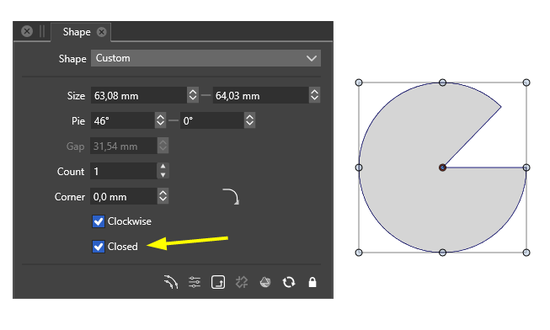
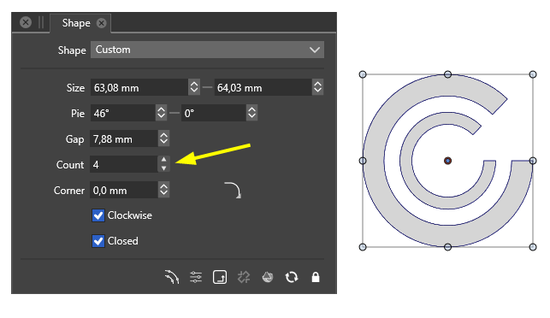
                the Shape Panel is also a good way
                to get an overview of the respective options
                of a smart shape
                0_1677925929731_Circle Shape Panel.png
                .
                try also to change the "Gap" and "Corner" value
                0_1677926151083_Circle-ShapePanel-2.png

                Win 11
                CPU: AMD Ryzen 5 9600X, 6-core.
                GPU: Nvidia Geforce RTX 5070.

                B 1 Reply Last reply Reply Quote 2
                • B Offline
                  B-Vs-V @Subpath
                  last edited by B-Vs-V

                  @Subpath thank you, you are always a great help on this forum 👍
                  With VS, we would need 2 x 32" screens to have all the panels open ☺

                  Hopefully we'll get soon iconized pannels 😎

                  W11 Pro 25H2 - 12th Gen Intel(R) i7-12700K 3.61 GHz - RAM 64 Go - NVIDIA GF GTX 4070 Ti - Intuos - Dell UP3216Q / Eizo ColorEdge
                  W11 Pro 25H2 - 12th Gen Intel(R) i7-12700KF 3.60 GHz -RAM 64 Go - NVIDIA GF GTX 3080 - IntuosPro- ProArt PA329C

                  S 1 Reply Last reply Reply Quote 2
                  • S Offline
                    Subpath @B-Vs-V
                    last edited by

                    @Pat , thanks

                    Well, I'm sitting at a 40-inch screen with 1440 x 900 pixels.
                    I like large screens with a slightly lower resolution when I'm
                    editing vector graphics.
                    Find it better for the eyes because of the thin lines.

                    Get along with the panels so far, except for a few exceptions.

                    Win 11
                    CPU: AMD Ryzen 5 9600X, 6-core.
                    GPU: Nvidia Geforce RTX 5070.

                    1 Reply Last reply Reply Quote 0
                    • First post
                      Last post