VectorStyler
    • Categories
    • Unread
    • Recent
    • Tags
    • Popular
    • Register
    • Login

    Any way to move 2 selected anchor points in opposite direction?

    Scheduled Pinned Locked Moved Questions and Support
    8 Posts 4 Posters 8.7k Views 3 Watching
    Loading More Posts
    • Oldest to Newest
    • Newest to Oldest
    • Most Votes
    Reply
    • Reply as topic
    Log in to reply
    This topic has been deleted. Only users with topic management privileges can see it.
    • syllieS Offline
      syllie
      last edited by

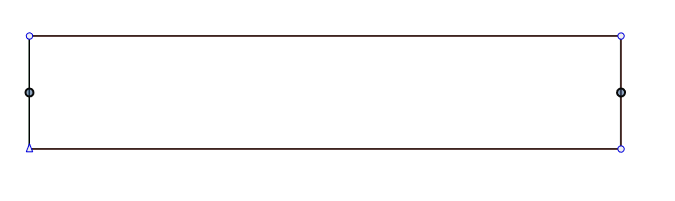
      Example:
      0_1680901938850_10514c11-d68d-4f2e-8a7e-fe305662503b-image.png

      In Inkscape I would just press Ctrl+> or Ctrl+< to walk the nodes towards or away from each other resulting in something like this
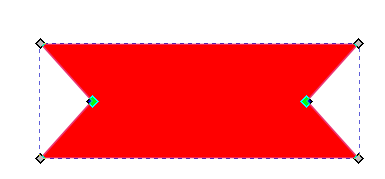
      0_1680902158152_80e9d26a-7cde-403c-bf78-e71550c8ab4b-image.png

      Any VS way of doing this?

      Windows 10 Pro | 22H2

      S 1 Reply Last reply Reply Quote 1
      • S Offline
        Subpath @syllie
        last edited by Subpath

        @syllie

        open the tranform panel
        Panels > Transform

        select your (both) nodes
        and change the Value in the width
        or the scale field
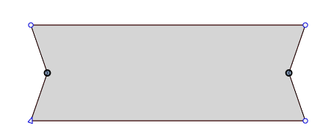
        here a short video

        0_1680905481516_Nodes-width.png

        Win 11
        CPU: AMD Ryzen 5 9600X, 6-core.
        GPU: Nvidia Geforce RTX 5070.

        syllieS 1 Reply Last reply Reply Quote 3
        • syllieS Offline
          syllie @Subpath
          last edited by

          @Subpath Thanks that is a nice way of solving it. Had not thought to use the transform panel for between-nodes operations (rather than on a full object) and this opens the door for more tricks. Step wise interactive change would have been nice but I can live with this!

          Windows 10 Pro | 22H2

          b77B S VectorStylerV 4 Replies Last reply Reply Quote 1
          • b77B Offline
            b77 @syllie
            last edited by b77

            @syllie
            • select the nodes;
            • switch to the Select/Transform tool (V) and…
            • Ctrl-drag to scale them by their bounding box.

            MacBook Pro (Intel) running Monterey 12.6.4

            syllieS 1 Reply Last reply Reply Quote 4
            • S Offline
              Subpath @syllie
              last edited by Subpath

              @syllie said in Any way to move 2 selected anchor points in opposite direction?:

              this opens the door for more tricks

              your welcome

              because of Tricks 🙂
              here is another one

              Win 11
              CPU: AMD Ryzen 5 9600X, 6-core.
              GPU: Nvidia Geforce RTX 5070.

              1 Reply Last reply Reply Quote 2
              • syllieS Offline
                syllie @b77
                last edited by

                @b77 Thank you, this feels a bit counter intuitive, and I actually was wondering why the bounding box changed when switching between Node Tool and Select tool, but now I see that it changes context to selected nodes only. Very nifty!

                Windows 10 Pro | 22H2

                1 Reply Last reply Reply Quote 1
                • S Offline
                  Subpath @syllie
                  last edited by Subpath

                  @syllie said in Any way to move 2 selected anchor points in opposite direction?:

                  Step wise interactive change would have been nice

                  Moving node/s a defined step is possible.

                  You can change the value in the "... edit the movement by keyboard" field.
                  When moving node/s with the arrow keys.

                  Multiplier keys work also in the Transform panel.

                  When I change a value with the mouse scroll wheel in the transform panel.
                  Only with the mouse wheel the value changes by 1.
                  Holding down the shift key changes the value by 10 units.
                  If you use the Ctrl (win) key, the node will change in a fraction of 1.

                  It is also possible to use the arrow keys in a value field
                  "up" increases a value, "down" decreases it.

                  Here a video

                  Win 11
                  CPU: AMD Ryzen 5 9600X, 6-core.
                  GPU: Nvidia Geforce RTX 5070.

                  1 Reply Last reply Reply Quote 1
                  • VectorStylerV Offline
                    VectorStyler @syllie
                    last edited by

                    @syllie said in Any way to move 2 selected anchor points in opposite direction?:

                    Step wise interactive change would have been nice

                    I added this to the feature request backlog.

                    1 Reply Last reply Reply Quote 3
                    • First post
                      Last post