VectorStyler
    • Categories
    • Unread
    • Recent
    • Tags
    • Popular
    • Register
    • Login

    warp function has issues

    Scheduled Pinned Locked Moved VectorStyler 1.1 Bugs
    6 Posts 3 Posters 5.8k Views 2 Watching
    Loading More Posts
    • Oldest to Newest
    • Newest to Oldest
    • Most Votes
    Reply
    • Reply as topic
    Log in to reply
    This topic has been deleted. Only users with topic management privileges can see it.
    • BoldlineB Offline
      Boldline
      last edited by

      I am having issues with trying to get the warp tool to work on shapes. I add a warp and try to edit it and the object does not respond - though sometimes after, if I move the shape, the result will show itself.
      Here is the video showing the issue.
      I tried this on two different machines and restarted VS on both - refreshed it, etc. same issue occurs.
      @VectorStyler this seems like the same issue I emailed you about earlier this same day
      Is anyone else having this issue?

      🍎 macOS Tahoe 26.2, Mac mini (M1, 2020), Chip Apple M1, Memory 16 GB
      Cintiq 27QHD Display and LG Ultra HD Display

      Devil DinosaurD VectorStylerV 2 Replies Last reply Reply Quote 0
      • Devil DinosaurD Offline
        Devil Dinosaur @Boldline
        last edited by

        @Boldline Everything works by my side. I tried the same text, font and warp tool, even 2 of them combined.

        Fred.
        MacBook Pro (M1) - MacOs Sonoma 14

        BoldlineB 1 Reply Last reply Reply Quote 1
        • BoldlineB Offline
          Boldline @Devil Dinosaur
          last edited by Boldline

          @Devil-Dinosaur Thanks for checking. I'm kind of baffled because even with restarting VS, refreshing VS, setting workspace and preferences back to default, it still does not act properly.

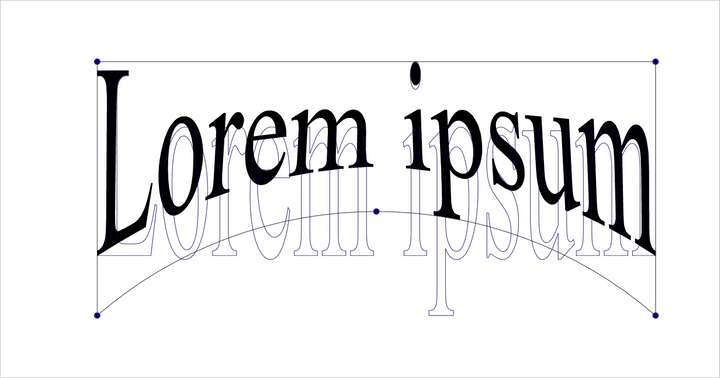
          However, if I do Shape Effect>Warp then I do have success editing the warps - just not using it from the vertical toolbar apparently
          0_1684294555220_4c6742ba-ac49-4dc4-a0a6-e6c9be4eb0c5-BLD 2023-05-16 at 23.34.31.png

          🍎 macOS Tahoe 26.2, Mac mini (M1, 2020), Chip Apple M1, Memory 16 GB
          Cintiq 27QHD Display and LG Ultra HD Display

          Devil DinosaurD 1 Reply Last reply Reply Quote 0
          • Devil DinosaurD Offline
            Devil Dinosaur @Boldline
            last edited by Devil Dinosaur

            @Boldline My bad, I didn't notice you converted the text. I have the same result as you if I convert the text.
            I think it's the group resulting the conversion that is not affected by the warp. Once I combine again the letters in one shape, it works again.

            Fred.
            MacBook Pro (M1) - MacOs Sonoma 14

            1 Reply Last reply Reply Quote 1
            • VectorStylerV Offline
              VectorStyler @Boldline
              last edited by

              @Boldline Major regression in the new build. This can be replicated, fix will be uploaded ASAP.

              BoldlineB 1 Reply Last reply Reply Quote 2
              • BoldlineB Offline
                Boldline @VectorStyler
                last edited by

                @VectorStyler Thanks for getting that addressed and fixed so quickly.

                🍎 macOS Tahoe 26.2, Mac mini (M1, 2020), Chip Apple M1, Memory 16 GB
                Cintiq 27QHD Display and LG Ultra HD Display

                1 Reply Last reply Reply Quote 1
                • First post
                  Last post
