VectorStyler
    • Categories
    • Unread
    • Recent
    • Tags
    • Popular
    • Register
    • Login

    Consider simplifying interface

    Scheduled Pinned Locked Moved Implemented Features
    33 Posts 6 Posters 67.7k Views 1 Watching
    Loading More Posts
    • Oldest to Newest
    • Newest to Oldest
    • Most Votes
    Reply
    • Reply as topic
    Log in to reply
    This topic has been deleted. Only users with topic management privileges can see it.
    • b77B Offline
      b77 @Kyriakos
      last edited by b77

      @Kyriakos The toolbar has separators — it’s enough for me (unless you consider them too thin?) and I really don’t want to have to look at a multicolored string of icons that interferes with the nice combination of colors of the artwork on the canvas. To me it would be a constant annoyance. It’s enough that I have too many colors on the right — the RGB or CMYK sliders, the wheel, the color-coded layers and the color bar.

      IMO, and sorry to disagree with you on this topic. ☺

      MacBook Pro (Intel) running Monterey 12.6.4

      K 1 Reply Last reply Reply Quote 1
      • K Offline
        Kyriakos @b77
        last edited by

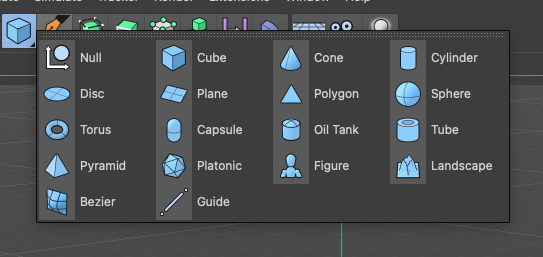
        @b77 Wasn't talking about multi-coloured icons but monochromatic tinted ones. For example here's all primitives having a light blue tint, and this scheme works especially best in busy scenes.
        0_1616167907083_Screenshot 2021-03-19 at 5.31.08 PM.png

        b77B VectorStylerV 2 Replies Last reply Reply Quote 0
        • b77B Offline
          b77 @Kyriakos
          last edited by b77

          @Kyriakos Yes, I know Cinema4D's UI (it's not some obscure app), so I did understand what you mean. I still disagree, I'm sorry. I want to be "alone" with the nice combination of three or four colors of my artwork and not have blue, green, orange and violet buttons on the side.

          The developer might very well agree with your suggestion and implement this (everybody knows he's very open to our ideas), but then I would change it or make my own monochrome icon set. 🙂

          MacBook Pro (Intel) running Monterey 12.6.4

          BoldlineB 1 Reply Last reply Reply Quote 0
          • BoldlineB Offline
            Boldline @b77
            last edited by

            @b77 I prefer the monochrome look myself. If colors get added, as long as there is the option to switch to monochrome if I prefer it, I don't mind. Affinity has that option and I set it to monochrome.

            🍎 macOS Tahoe 26.2, Mac mini (M1, 2020), Chip Apple M1, Memory 16 GB
            Cintiq 27QHD Display and LG Ultra HD Display

            1 Reply Last reply Reply Quote 0
            • VectorStylerV Offline
              VectorStyler @Kyriakos
              last edited by

              @Kyriakos An option towards this could be added in the future (after version 1). There are no technical obstacles on this one.
              The monochrome UI theme will be kept as a primary theme in the future also.
              In my opinion (as a developer) having colors in the UI unrelated to the content being edited can distract from the content (and maybe visually influence the perception of the content).
              But VS is about having options 🙂 so I add this for the post version 1 backlog.

              BoldlineB 1 Reply Last reply Reply Quote 0
              • BoldlineB Offline
                Boldline @VectorStyler
                last edited by

                @vectoradmin said in Consider simplifying interface:

                In my opinion (as a developer) having colors in the UI unrelated to the content being edited can distract from the content (and maybe visually influence the perception of the content).

                This is my opinion as well as a professional graphic designer

                🍎 macOS Tahoe 26.2, Mac mini (M1, 2020), Chip Apple M1, Memory 16 GB
                Cintiq 27QHD Display and LG Ultra HD Display

                1 Reply Last reply Reply Quote 0
                • K Offline
                  Kyriakos
                  last edited by

                  Fair enough, having it as option would be great.

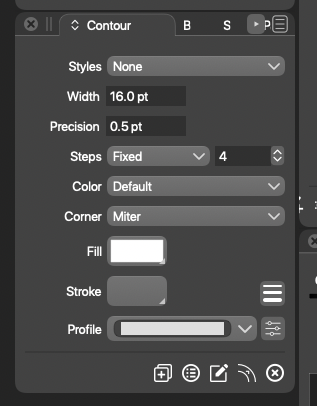
                  Another small thing, it would be great if the tab length adjusted to the text to leave more breathing room for the rest.
                  0_1616183229472_Screenshot 2021-03-19 at 9.46.50 PM.png

                  VectorStylerV BoldlineB 2 Replies Last reply Reply Quote 0
                  • VectorStylerV Offline
                    VectorStyler @Kyriakos
                    last edited by VectorStyler

                    @Kyriakos There is also a close button just on the right side of the active tab text, when hovering over it. That takes some space also.

                    1 Reply Last reply Reply Quote 0
                    • BoldlineB Offline
                      Boldline @Kyriakos
                      last edited by

                      @Kyriakos Sorry if it felt like you were being ganged up on - your view is not bad and if he adds a colorized option to the toolbar, it wouldn't bother me.

                      🍎 macOS Tahoe 26.2, Mac mini (M1, 2020), Chip Apple M1, Memory 16 GB
                      Cintiq 27QHD Display and LG Ultra HD Display

                      1 Reply Last reply Reply Quote 0
                      • K Offline
                        Kyriakos
                        last edited by

                        No worries @Boldline!

                        @vectoradmin, that seems a bit problematic on second look because as it stands there's nothing to indicate that the areas i circled in red are closing buttons and users might accidentally close the tabs while trying to activate or move them, i think it would be better to have them always be visible or implement a right click > close menu.
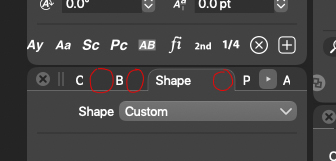
                        0_1616190193855_tabs.jpg

                        VectorStylerV 2 Replies Last reply Reply Quote 0
                        • VectorStylerV Offline
                          VectorStyler @Kyriakos
                          last edited by

                          @Kyriakos Yes, those tabs can be accidentally closed. I figure something out for a better spacing (and minimum size). Opened an issue in this backlog for this.

                          b77B 1 Reply Last reply Reply Quote 0
                          • b77B Offline
                            b77 @VectorStyler
                            last edited by

                            @vectoradmin Would there be a problem if the invisible close button overlaps the title of the tab? It would become visible only when hovering it anyway.

                            MacBook Pro (Intel) running Monterey 12.6.4

                            VectorStylerV 1 Reply Last reply Reply Quote 1
                            • VectorStylerV Offline
                              VectorStyler @b77
                              last edited by

                              @b77 Or it could be visible (and active) for the selected tab only. To close a tab first must be activated.

                              1 Reply Last reply Reply Quote 1
                              • VectorStylerV Offline
                                VectorStyler @Kyriakos
                                last edited by

                                @Kyriakos The panel title area has been improved in the new build. Docking multiple panels may still result in a crowded title area.

                                K 1 Reply Last reply Reply Quote 0
                                • K Offline
                                  Kyriakos @VectorStyler
                                  last edited by

                                  @vectoradmin thank you, managing them is much easier now.

                                  1 Reply Last reply Reply Quote 0
                                  • First post
                                    Last post