VS sends every color separation as it's own sheet to the printer manager - even blank ones
-
I am hoping an option can be added to not have to go through all the potential colors in the print preview to be sure the right one(s) are previewing correctly.
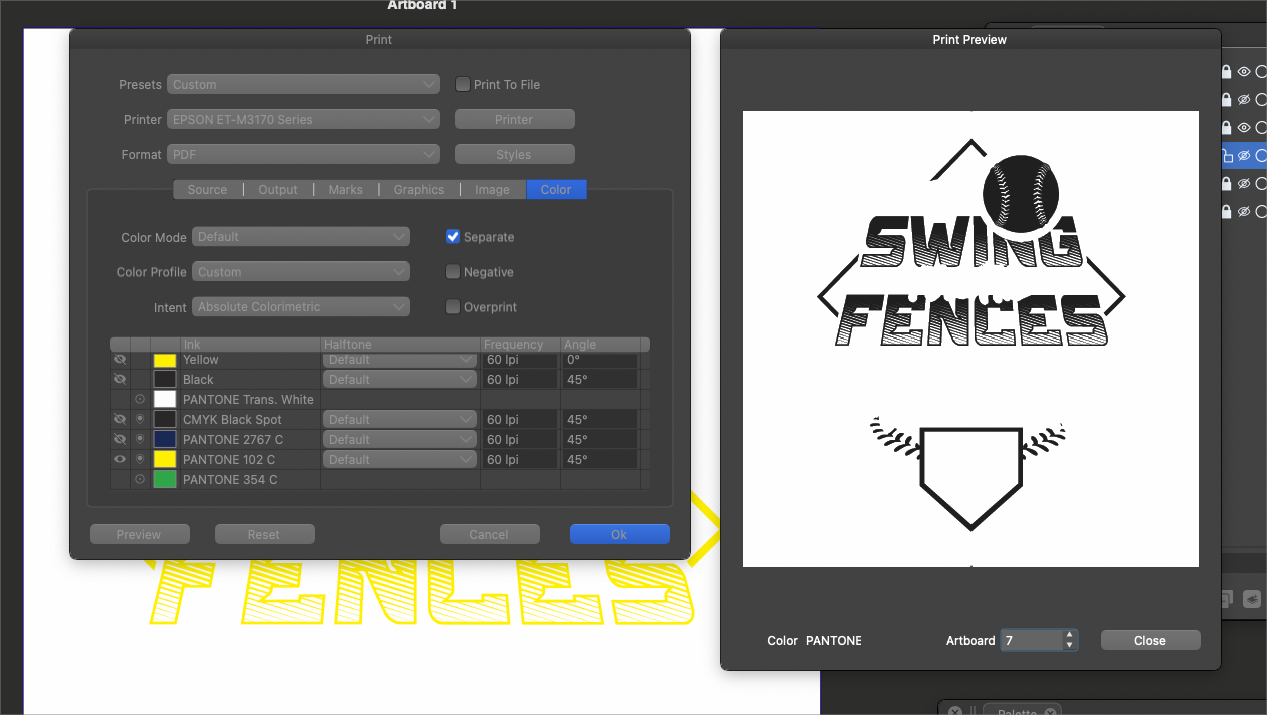
It would be nice if only the selected colors from the print "separate" panel options would show in the print preview list.
Another issue with choosing the colors to print is that VS sends a blank sheet to the printer for ALL the colors, even those not activated and selected.
So in the example in the screenshot below, I have seven potential colors to choose from in this file (including all four CMYK options that I turned off) I literally only want to print one spot color, but it will send 7 sheets to the print manager and I have to cancel out 6 of them to just have it print the one I want.
🍎 macOS Tahoe 26.2, Mac mini (M1, 2020), Chip Apple M1, Memory 16 GB
Cintiq 27QHD Display and LG Ultra HD Display -
@Boldline It should be like that by default — if a separation is not selected
there is no situation I can think of where somebody would still want it
included in the file sent to the printer. -
@b77 I agree. When I asked @VectorStyler about this topic from a different angle a while back, he mentioned that even if the unused sheets showed in the preview, none of them would print.
That has not totally been the case though - they don't technically print, but they do still get sent to the printer print manager itself.Hopefully this can be changed so blank sheets do not get sent out
-
@Boldline I added this to the backlog, but it would be a bit difficult to decide whether a plate is to be printed or not.
-
@VectorStyler I would say that enabling or disabling each separation in the
Print window is when the user decides what gets printed, and should be
reflected in Print Preview — otherwise it's confusing, especially in a prepress
workflow.Btw, an improvement to Print Preview would be using buttons to jump directly to
each separation instead of the 'Artboard' number field with its spinner buttons.


