VectorStyler
    • Categories
    • Unread
    • Recent
    • Tags
    • Popular
    • Register
    • Login

    Copying and pasting path segments

    Scheduled Pinned Locked Moved Features and Ideas
    11 Posts 4 Posters 10.7k Views 3 Watching
    Loading More Posts
    • Oldest to Newest
    • Newest to Oldest
    • Most Votes
    Reply
    • Reply as topic
    Log in to reply
    This topic has been deleted. Only users with topic management privileges can see it.
    • W Offline
      William Kansepa
      last edited by

      Using the Shape Editor Tool I can select and cut or copy a path segment but cannot do any pasting...
      I am thinking that the Shape Editor Tool exhibits the same traits as the Direct Selection Tool in AI?

      HP•Windows 11 Pro•11th Gen Intel(R) Core(TM) i7-1165G7 @ 2.80GHz 2.70 GHz• RAM: 16.0 GB (DDR4)

      S VectorStylerV 2 Replies Last reply Reply Quote 0
      • S Offline
        Subpath @William Kansepa
        last edited by Subpath

        @William-Kansepa

        if your Path is a closed one, then open it
        and try again

        if i remember right i once find out that
        copy and paste a segment of a Path work
        only on a open Path

        try this way to copy a segement on a open path:
        select your segment
        copy it
        deselect your path
        and paste that segment

        Win 11
        CPU: AMD Ryzen 5 9600X, 6-core.
        GPU: Nvidia Geforce RTX 5070.

        W 1 Reply Last reply Reply Quote 1
        • W Offline
          William Kansepa @Subpath
          last edited by William Kansepa

          @Subpath said in Copying and pasting path segments:

          if your Path is a closed one, then open it
          and try again

          Thank you @Subpath and I was actually working on an open path... It's not working.

          HP•Windows 11 Pro•11th Gen Intel(R) Core(TM) i7-1165G7 @ 2.80GHz 2.70 GHz• RAM: 16.0 GB (DDR4)

          S 1 Reply Last reply Reply Quote 0
          • S Offline
            Subpath @William Kansepa
            last edited by

            @William-Kansepa said in Copying and pasting path segments:

            @Subpath said in Copying and pasting path segments:

            if your Path is a closed one, then open it
            and try again

            Thank you @Subpath and I was actually working on an open path...

            please read my previous comment again
            i extend it a bit

            Win 11
            CPU: AMD Ryzen 5 9600X, 6-core.
            GPU: Nvidia Geforce RTX 5070.

            W 1 Reply Last reply Reply Quote 0
            • W Offline
              William Kansepa @Subpath
              last edited by

              @Subpath It would make a lot of sense if it would work that way, but it's not...

              HP•Windows 11 Pro•11th Gen Intel(R) Core(TM) i7-1165G7 @ 2.80GHz 2.70 GHz• RAM: 16.0 GB (DDR4)

              S 1 Reply Last reply Reply Quote 0
              • S Offline
                Subpath @William Kansepa
                last edited by

                @William-Kansepa said in Copying and pasting path segments:

                @Subpath It would make a lot of sense if it would work that way, but it's not...

                its working here this way
                here a video

                Win 11
                CPU: AMD Ryzen 5 9600X, 6-core.
                GPU: Nvidia Geforce RTX 5070.

                W Victor VectorV 2 Replies Last reply Reply Quote 1
                • W Offline
                  William Kansepa @Subpath
                  last edited by

                  @Subpath thank you so much for the video. Yes, I see it's working 🍻 I probably need to have a look at my settings!

                  HP•Windows 11 Pro•11th Gen Intel(R) Core(TM) i7-1165G7 @ 2.80GHz 2.70 GHz• RAM: 16.0 GB (DDR4)

                  1 Reply Last reply Reply Quote 0
                  • Victor VectorV Offline
                    Victor Vector @Subpath
                    last edited by

                    @Subpath @William-Kansepa
                    Interesting. For me:

                    1. Draw an open shape with the Pen tool,
                    2. switch to the Shape Editor,
                    3. select a few nodes,
                    4. CTRL +C,
                    5. switch to the Transform Tool,
                    6. deselect the shape,
                    7. CTRL + V.

                    The copied path is available to manipulate.

                    W 1 Reply Last reply Reply Quote 2
                    • W Offline
                      William Kansepa @Victor Vector
                      last edited by

                      @Victor-Vector said in Copying and pasting path segments:

                      @Subpath @William-Kansepa
                      Interesting. For me:

                      1. Draw an open shape with the Pen tool,
                      2. switch to the Shape Editor,
                      3. select a few nodes,
                      4. CTRL +C,
                      5. switch to the Transform Tool,
                      6. deselect the shape,
                      7. CTRL + V.

                      The copied path is available to manipulate.

                      I got it now... phew. I was selecting the segment directly not the nodes. I am so used to the AI method my bad. In AI you can select either the segment or points and it will work.
                      Everything is working as expected now. Thank you @Subpath @Victor-Vector.
                      God I love this forum 🕺🏾🕺🏾

                      HP•Windows 11 Pro•11th Gen Intel(R) Core(TM) i7-1165G7 @ 2.80GHz 2.70 GHz• RAM: 16.0 GB (DDR4)

                      1 Reply Last reply Reply Quote 2
                      • S Offline
                        Subpath
                        last edited by Subpath

                        @William-Kansepa , @Victor-Vector

                        btw. if you are a bit adventurous like me 🙂

                        something like this is also possible
                        see video here
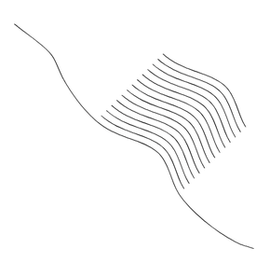
                        0_1685365885041_Copy-Segments.png

                        Win 11
                        CPU: AMD Ryzen 5 9600X, 6-core.
                        GPU: Nvidia Geforce RTX 5070.

                        1 Reply Last reply Reply Quote 3
                        • VectorStylerV Offline
                          VectorStyler @William Kansepa
                          last edited by

                          @William-Kansepa said in Copying and pasting path segments:

                          I am thinking that the Shape Editor Tool exhibits the same traits as the Direct Selection Tool in AI?

                          Similar, yes.

                          And for pasting a copied path section: select a node (preferably an ending node) and the path is pasted as a continuation there.
                          Otherwise, it is pasted as a new object.

                          1 Reply Last reply Reply Quote 1
                          • First post
                            Last post