VectorStyler
    • Categories
    • Unread
    • Recent
    • Tags
    • Popular
    • Register
    • Login

    The opacity value stay at 100%
    Scheduled Pinned Locked Moved VectorStyler 1.1 Bugs
    9 Posts 3 Posters 8.5k Views 3 Watching
    Loading More Posts
    • Oldest to Newest
    • Newest to Oldest
    • Most Votes
    Reply
    • Reply as topic
    Log in to reply
    This topic has been deleted. Only users with topic management privileges can see it.
    • B Offline
      B-Vs-V
      last edited by B-Vs-V

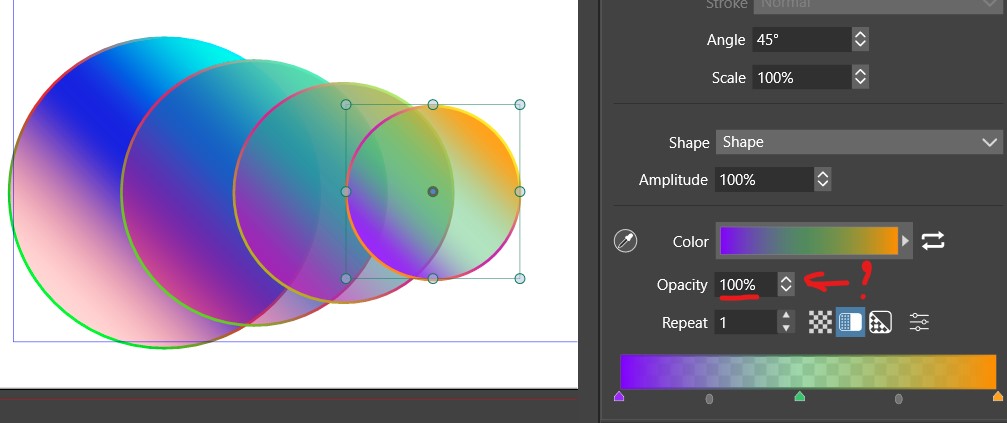
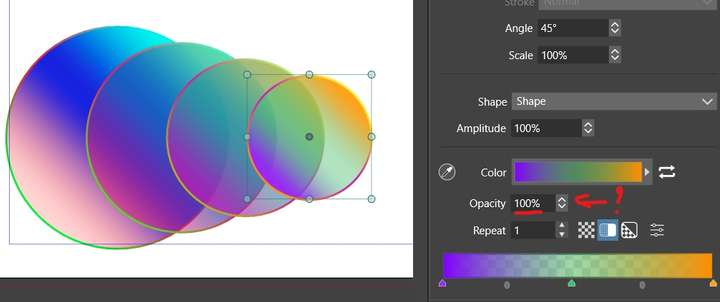
      I decreased the opacity value & the opacity decreased but the value stays at 100%:
      0_1689013355451_vs1.jpg

      W11 Pro 25H2 - 12th Gen Intel(R) i7-12700K 3.61 GHz - RAM 64 Go - NVIDIA GF GTX 4070 Ti - Intuos - Dell UP3216Q / Eizo ColorEdge
      W11 Pro 25H2 - 12th Gen Intel(R) i7-12700KF 3.60 GHz -RAM 64 Go - NVIDIA GF GTX 3080 - IntuosPro- ProArt PA329C

      b77B VectorStylerV 2 Replies Last reply Reply Quote 0
      • b77B Offline
        b77 @B-Vs-V
        last edited by

        @Pat If the screenshot would include the panel title and if you would
        upload the file with that shape you would get help faster.

        MacBook Pro (Intel) running Monterey 12.6.4

        B 1 Reply Last reply Reply Quote 0
        • B Offline
          B-Vs-V @b77
          last edited by

          @b77 that's the Gradient panel ☺

          W11 Pro 25H2 - 12th Gen Intel(R) i7-12700K 3.61 GHz - RAM 64 Go - NVIDIA GF GTX 4070 Ti - Intuos - Dell UP3216Q / Eizo ColorEdge
          W11 Pro 25H2 - 12th Gen Intel(R) i7-12700KF 3.60 GHz -RAM 64 Go - NVIDIA GF GTX 3080 - IntuosPro- ProArt PA329C

          1 Reply Last reply Reply Quote 0
          • VectorStylerV Offline
            VectorStyler @B-Vs-V
            last edited by

            @Pat Does it show the opacity if you select a gradient knob (on the bottom of the panel)?
            That opacity value should be associated with gradient stops.

            B 2 Replies Last reply Reply Quote 0
            • B Offline
              B-Vs-V @VectorStyler
              last edited by

              @VectorStyler yes indeed, and only the centre knob has reduced opacity. However, I have selected the whole object, so shouldn't all the opacities of the different knobs be modified?

              W11 Pro 25H2 - 12th Gen Intel(R) i7-12700K 3.61 GHz - RAM 64 Go - NVIDIA GF GTX 4070 Ti - Intuos - Dell UP3216Q / Eizo ColorEdge
              W11 Pro 25H2 - 12th Gen Intel(R) i7-12700KF 3.60 GHz -RAM 64 Go - NVIDIA GF GTX 3080 - IntuosPro- ProArt PA329C

              VectorStylerV b77B 2 Replies Last reply Reply Quote 0
              • B Offline
                B-Vs-V @VectorStyler
                last edited by

                @VectorStyler I'd also like to design different colour gradients and was wondering what's the best way of saving them and making a palette so that I can use them for all my files? Thanks ☺

                W11 Pro 25H2 - 12th Gen Intel(R) i7-12700K 3.61 GHz - RAM 64 Go - NVIDIA GF GTX 4070 Ti - Intuos - Dell UP3216Q / Eizo ColorEdge
                W11 Pro 25H2 - 12th Gen Intel(R) i7-12700KF 3.60 GHz -RAM 64 Go - NVIDIA GF GTX 3080 - IntuosPro- ProArt PA329C

                1 Reply Last reply Reply Quote 0
                • VectorStylerV Offline
                  VectorStyler @B-Vs-V
                  last edited by

                  @Pat said in The opacity value stay at 100%:

                  yes indeed, and only the centre knob has reduced opacity. However, I have selected the whole object, so shouldn't all the opacities of the different knobs be modified?

                  Even if the whole object is selected, it contains different opacities at different locations, and those are shown / edited only if that knob is selected.

                  what's the best way of saving them and making a palette so that I can use them for all my files?

                  Save them as presets: Gradient panel menu -> Save Gradient Preset. Then they will be listed in the Presets panel (Panels -> Presets -> Presets)

                  1 Reply Last reply Reply Quote 1
                  • b77B Offline
                    b77 @B-Vs-V
                    last edited by

                    @Pat said in The opacity value stay at 100%:

                    @VectorStyler shouldn't all the opacities of the different knobs be modified?

                    Change the opacity of the entire object from the Opacity slider in the Color panel.

                    To change only the opacity of the Fill (color, gradient, pattern, whatever), expand the
                    Fill attribute in the Appearance panel and adjust the Opacity slider there:

                    alt text

                    MacBook Pro (Intel) running Monterey 12.6.4

                    B 1 Reply Last reply Reply Quote 1
                    • B Offline
                      B-Vs-V @b77
                      last edited by

                      @b77 nice, thanks. I didn't think about the Appearance panel for the opacity.

                      The opacity feature of the Gradient panel adjust the opacity of one knob & it seems that it is the first (left) one by default.

                      It works well through the appearance panel except that I can't use the cursor... I have to enter a value (a bug I suppose).
                      I've just noticed that we can combine opacity values from the Gradient and Appearance panels, quite tricky afterwards to remember if one or both were changed.


                      W11 Pro 25H2 - 12th Gen Intel(R) i7-12700K 3.61 GHz - RAM 64 Go - NVIDIA GF GTX 4070 Ti - Intuos - Dell UP3216Q / Eizo ColorEdge
                      W11 Pro 25H2 - 12th Gen Intel(R) i7-12700KF 3.60 GHz -RAM 64 Go - NVIDIA GF GTX 3080 - IntuosPro- ProArt PA329C

                      1 Reply Last reply Reply Quote 0
                      • First post
                        Last post