VectorStyler
    • Categories
    • Unread
    • Recent
    • Tags
    • Popular
    • Register
    • Login

    About Object> Transform> [Scale], [Skew], [Rotate], [Reflect]

    Scheduled Pinned Locked Moved Resolved Issues
    6 Posts 2 Posters 8.0k Views
    Loading More Posts
    • Oldest to Newest
    • Newest to Oldest
    • Most Votes
    Reply
    • Reply as topic
    Log in to reply
    This topic has been deleted. Only users with topic management privileges can see it.
    • 861475_VctSt8 Offline
      861475_VctSt
      last edited by

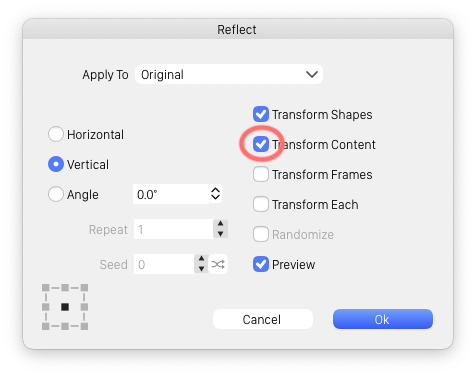
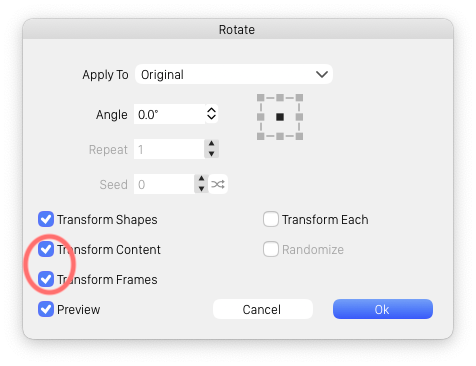
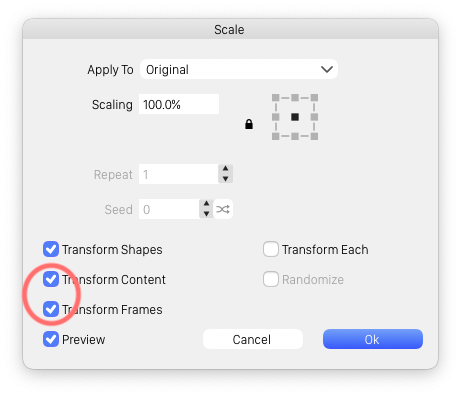
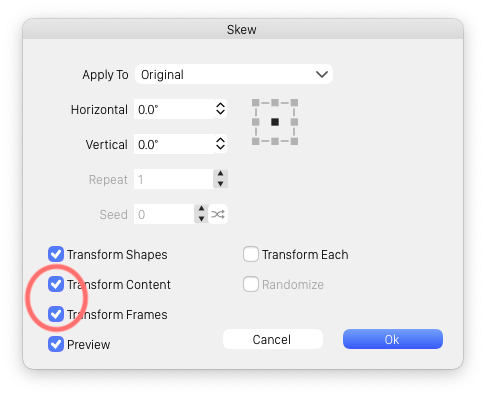
      Interlocking transformation does not work.
      Even if the check box is turned on,
      frame * (stroke) and content (fill) do not change.

      • Excluding Reflect

      0_1615529962266_reflect.png
      0_1615529991886_rotate.png
      0_1615530072478_scale.png
      0_1615530085362_skew.png

      LIc. 0 OS10.15.7
      MacBook Air (13-inch, Mid 2012) / Intel Core i5, 8GB / Intel HD Graphics 4000
      LIc. 1 OS13.6.7
      MacBook Pro (14-inch, 2023) / Apple M2 Pro, 16GB / Apple GPU

      VectorStylerV 1 Reply Last reply Reply Quote 0
      • VectorStylerV Offline
        VectorStyler @861475_VctSt
        last edited by

        @861475_VctSt In the Appearance panel, select the Stroke (or Fill) which should be transformable, and the select the Transform Content in the Appearance panel menu to be checked. This will enable transformations on that content.

        861475_VctSt8 1 Reply Last reply Reply Quote 0
        • 861475_VctSt8 Offline
          861475_VctSt @VectorStyler
          last edited by

          @vectoradmin

          I was able to confirm the operation.
          I think it needs to be considered that these series of operations are separated into a command dialog and a palette menu. How is it?

          LIc. 0 OS10.15.7
          MacBook Air (13-inch, Mid 2012) / Intel Core i5, 8GB / Intel HD Graphics 4000
          LIc. 1 OS13.6.7
          MacBook Pro (14-inch, 2023) / Apple M2 Pro, 16GB / Apple GPU

          VectorStylerV 1 Reply Last reply Reply Quote 0
          • VectorStylerV Offline
            VectorStyler @861475_VctSt
            last edited by

            @861475_VctSt The options in the command dialog probably should have a different name. I will think of a better description for these.

            861475_VctSt8 1 Reply Last reply Reply Quote 0
            • 861475_VctSt8 Offline
              861475_VctSt @VectorStyler
              last edited by

              @vectoradmin

              sure
              👪 🖼
              Or is it better to set the red circle check box in the above figure to off by default?

              LIc. 0 OS10.15.7
              MacBook Air (13-inch, Mid 2012) / Intel Core i5, 8GB / Intel HD Graphics 4000
              LIc. 1 OS13.6.7
              MacBook Pro (14-inch, 2023) / Apple M2 Pro, 16GB / Apple GPU

              VectorStylerV 1 Reply Last reply Reply Quote 0
              • VectorStylerV Offline
                VectorStyler @861475_VctSt
                last edited by

                @861475_VctSt Set them on by default.

                1 Reply Last reply Reply Quote 0
                • First post
                  Last post