VectorStyler
    • Categories
    • Unread
    • Recent
    • Tags
    • Popular
    • Register
    • Login

    Transform panel proportion lock is not remembering previous setting

    Scheduled Pinned Locked Moved VectorStyler 1.1 Bugs
    5 Posts 2 Posters 5.4k Views 1 Watching
    Loading More Posts
    • Oldest to Newest
    • Newest to Oldest
    • Most Votes
    Reply
    • Reply as topic
    Log in to reply
    This topic has been deleted. Only users with topic management privileges can see it.
    • BoldlineB Online
      Boldline
      last edited by Boldline

      I'm using the default settings at the moment in build 97.

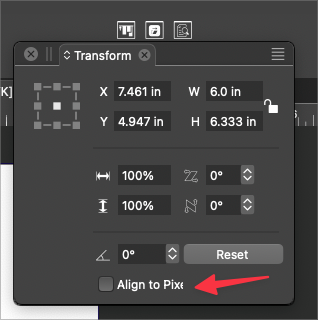
      The transform panel proportions lock is not "sticky". When I lock it to maintain proportions, it works for that instance, but the next time I opened the panel, it's reverted back to being unlocked.

      I also noticed the wording ""Align to Pixel" is cut off
      0_1691167755186_c7a61df3-197c-47f0-9b4a-ab035ba01a8d-BLD 2023-08-04 at 12.48.24.png

      🍎 macOS Tahoe 26.2, Mac mini (M1, 2020), Chip Apple M1, Memory 16 GB
      Cintiq 27QHD Display and LG Ultra HD Display

      VectorStylerV 1 Reply Last reply Reply Quote 1
      • VectorStylerV Offline
        VectorStyler @Boldline
        last edited by

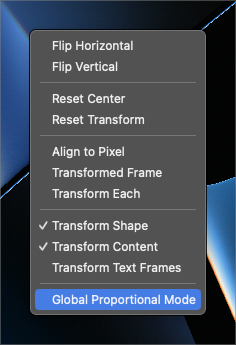
        @Boldline Enable the Global Proportional Mode in the panel menu, but be aware that if enabled it also changes the proportional mode in the interactive transform tool.

        BoldlineB 1 Reply Last reply Reply Quote 0
        • BoldlineB Online
          Boldline @VectorStyler
          last edited by

          @VectorStyler

          When I go to select it, there's not a checkmark that appears to indicate if it;s on or off
          0_1691169068961_7bf7e21d-3ccb-40e1-8d33-7f41bec9abcf-BLD 2023-08-04 at 13.10.42.png

          🍎 macOS Tahoe 26.2, Mac mini (M1, 2020), Chip Apple M1, Memory 16 GB
          Cintiq 27QHD Display and LG Ultra HD Display

          VectorStylerV 1 Reply Last reply Reply Quote 0
          • VectorStylerV Offline
            VectorStyler @Boldline
            last edited by

            @Boldline Seems to be working here (the checkmark).

            BoldlineB 1 Reply Last reply Reply Quote 1
            • BoldlineB Online
              Boldline @VectorStyler
              last edited by Boldline

              @VectorStyler ok working now here as well. I don't know what to say lol. I tried it several times before reporting it. Glad it's not an issue


              🍎 macOS Tahoe 26.2, Mac mini (M1, 2020), Chip Apple M1, Memory 16 GB
              Cintiq 27QHD Display and LG Ultra HD Display

              1 Reply Last reply Reply Quote 0
              • First post
                Last post