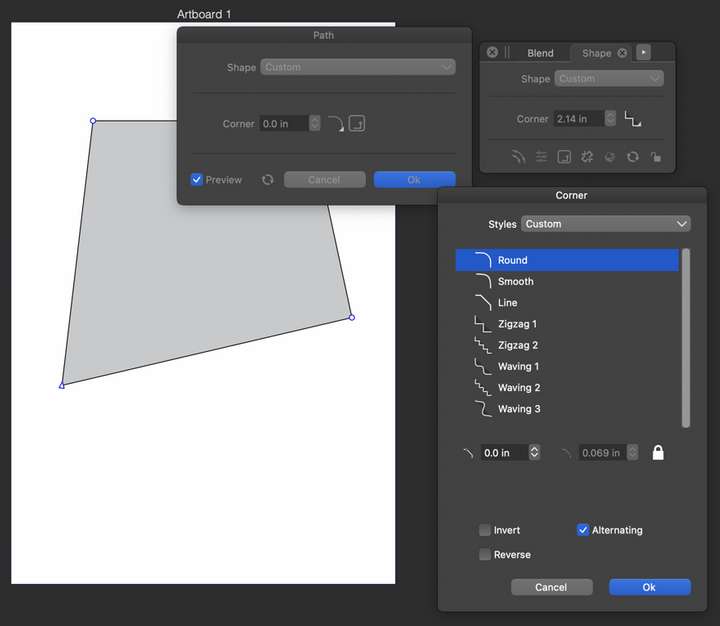
Problems with shape corners
-
There are numerous issues with shape corners. As a matter of fact there are so many that I'm not even going to start writing them all up. Just look at the shape corner feature, check out and test every related dialogs, buttons, fields, and settings and you should immediately discover a few issues with it. Some shape corner related buttons bring up new dialogs that have more buttons and shapes and values to adjust. Check out and test all of these.
It would take some time for me to detail all of this and at this point I'm just not going to do that. Sorry.
VS 1.1.099
-
@pentool I added this to the backlog and will try to replicate this.
At the first try, the Corner tool and selecting corner size and shape from the context panel were working fine here. -
Did you do your experiments via the Shape Panel?
If I change the shape of a corner via the Corner Panel
(Panels > Corner), everything works fine so far. -
I believe I can see in part what @pentool is referring to with the shape panel. It seems to me that there's some repetitive options as you go deeper with the buttons to edit the shape and the one to edit the corners. I started getting confused as to what was different about setting the corners on the surface level compared to going deeper aside from there being a couple other clickable options for inverse, etc
Someone may know more and have a better idea, but it seems to me it would make more sense to have these options for the shape itself and the corners as sections of the same panel like the stroke panel is now. The stroke panel covers several stroke options, each in their own open section of the panel