VectorStyler
    • Categories
    • Unread
    • Recent
    • Tags
    • Popular
    • Register
    • Login

    Labels do not appear to be different now for compound groups
    Scheduled Pinned Locked Moved VectorStyler 1.1 Bugs
    4 Posts 3 Posters 4.7k Views 2 Watching
    Loading More Posts
    • Oldest to Newest
    • Newest to Oldest
    • Most Votes
    Reply
    • Reply as topic
    Log in to reply
    This topic has been deleted. Only users with topic management privileges can see it.
    • BoldlineB Offline
      Boldline
      last edited by

      @VectorStyler said in update 1.1.100:

      Show composited groups with a special label in the layers panel.

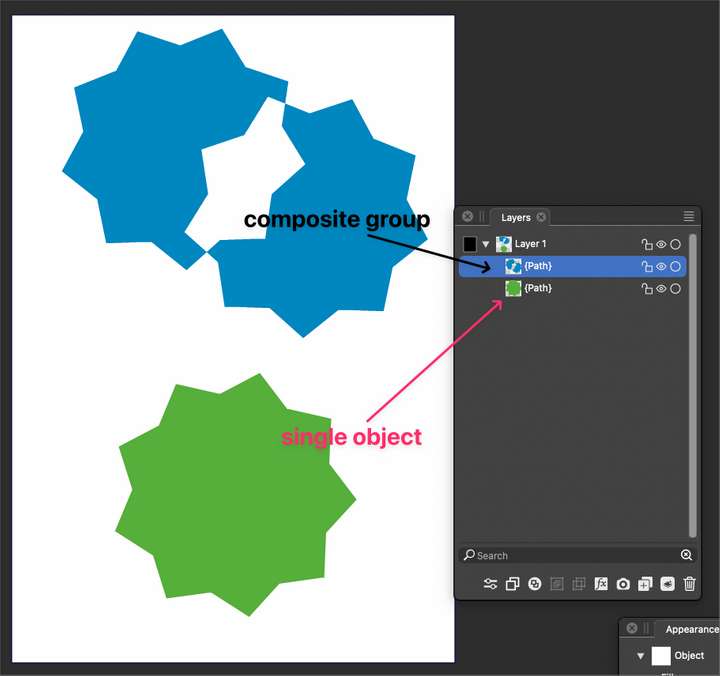
      Am I missing the label? I have an example of a compound grouping and a singular object, but both leayer labels look the same in build 100.
      0_1692048412373_c6741bba-9fb8-4894-aa94-489f7406d8b9-BLD 2023-08-14 at 17.24.46.png

      Even if I group two compound paths that are each grouped, I get a standard "group" label

      🍎 macOS Tahoe 26.2, Mac mini (M1, 2020), Chip Apple M1, Memory 16 GB
      Cintiq 27QHD Display and LG Ultra HD Display

      1 Reply Last reply Reply Quote 0
      • P Offline
        pentool
        last edited by pentool

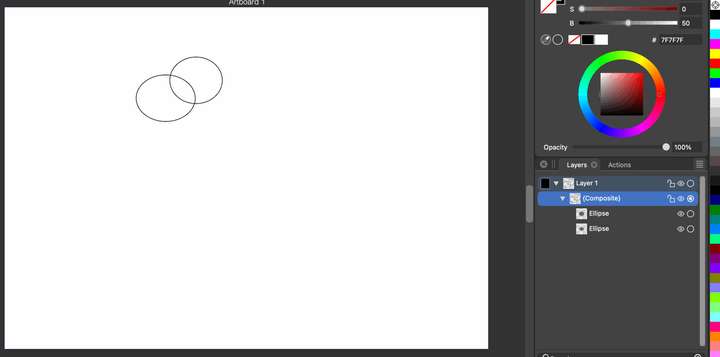
        I get the word "{Composite}" in the Layers panel.
        0_1692049959765_Screen Shot 2023-08-14 at 11.51.12 PM.png

        Select 2 objects > Object > Composite Shape > Compound

        MacBook Pro 13" early 2015 8G | Intel Iris Graphics 6100 1536 MB | macOS Monterey 12.7.6

        1 Reply Last reply Reply Quote 0
        • BoldlineB Offline
          Boldline
          last edited by

          @pentool ok I figured out the issue. If I use the Object > Composite Shape > Combine, I get the intended result. If I use the shortcut for the same thing, command-8, it makes a compound shape but does not register it as such in the layer panel

          Here is a video showing this

          🍎 macOS Tahoe 26.2, Mac mini (M1, 2020), Chip Apple M1, Memory 16 GB
          Cintiq 27QHD Display and LG Ultra HD Display

          b77B 1 Reply Last reply Reply Quote 1
          • b77B Offline
            b77 @Boldline
            last edited by b77

            @Boldline Command-8 triggers the "destructive" Combine operation (Object > Combine Path > Combine)
            which results in a path, not the composite operation which lets you move/edit the objects inside the
            composite object with the third mode of the Select/Transform tool.

            Btw, Option-clicking any of the Combine buttons in the context panel triggers the non-destructive
            Boolean operation instead.

            MacBook Pro (Intel) running Monterey 12.6.4

            1 Reply Last reply Reply Quote 3
            • First post
              Last post