VectorStyler
    • Categories
    • Unread
    • Recent
    • Tags
    • Popular
    • Register
    • Login

    Vector Style 1.1.100 Regression Bug?- Path Panel removed from menu ...

    Scheduled Pinned Locked Moved VectorStyler 1.1 Bugs
    18 Posts 4 Posters 17.6k Views 3 Watching
    Loading More Posts
    • Oldest to Newest
    • Newest to Oldest
    • Most Votes
    Reply
    • Reply as topic
    Log in to reply
    This topic has been deleted. Only users with topic management privileges can see it.
    • _ Offline
      _NM_
      last edited by

      ... which looks like a regression bug. Looking at a YouTube video, I could see that it was previously present under the Panels menu, but it is no longer listed there. However, the video showed the shortcut and using option-P, I could activate it. Would you please look into this? The Path Panel provides critical functions that are now hard to find. Thank you.

      macOS Sonoma 14.5 - MacBook Pro 16" - Apple Silicon M2 Max

      1 Reply Last reply Reply Quote 0
      • _ Offline
        _NM_
        last edited by _NM_

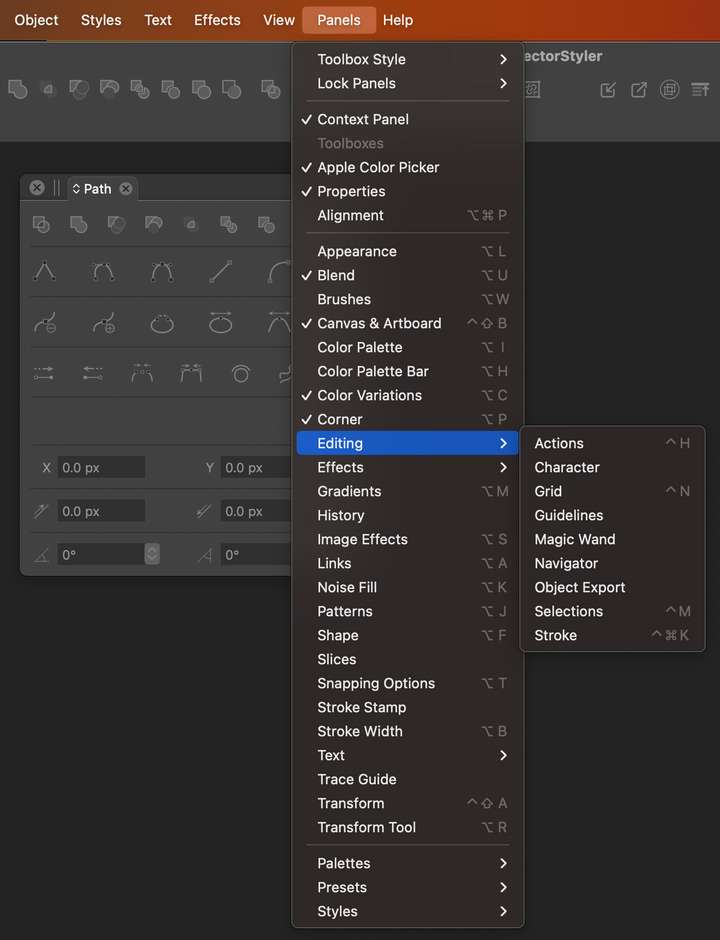
        Also, Transform opens a panel called Alignment, while Transform Tool opens Repeater ... and this goes on and on. Is this on purpose that each item under the Panels menu opens an inspector with a different name?

        This all seems very odd. Reminds me of the old hidden tiles game called Memory.

        macOS Sonoma 14.5 - MacBook Pro 16" - Apple Silicon M2 Max

        VectorStylerV 1 Reply Last reply Reply Quote 0
        • BoldlineB Offline
          Boldline
          last edited by

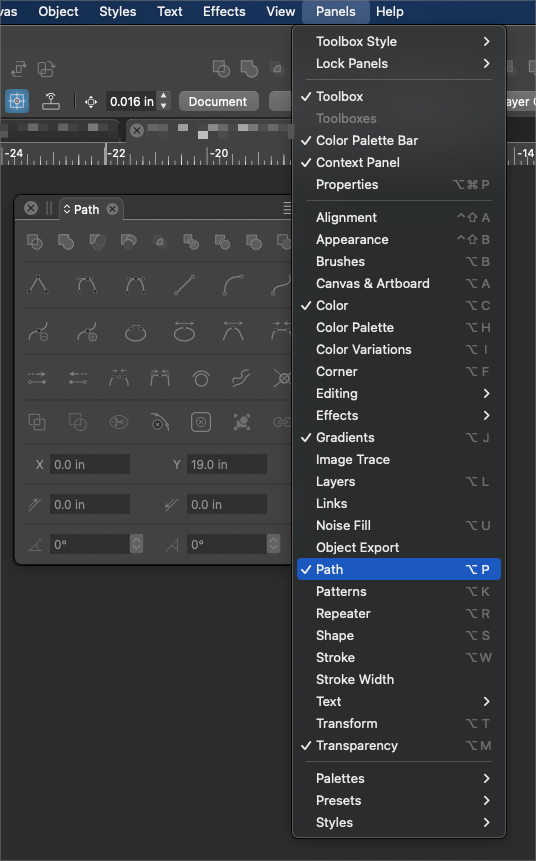
          @_NM_ Were you able to figure it out? It seems to be working fine for me here with the option-p shortcut and listed under the panels menu
          0_1692330371260_e900b388-00d0-44b1-94e3-659a114c7f75-BLD 2023-08-17 at 23.44.28.png

          🍎 macOS Tahoe 26.2, Mac mini (M1, 2020), Chip Apple M1, Memory 16 GB
          Cintiq 27QHD Display and LG Ultra HD Display

          1 Reply Last reply Reply Quote 0
          • VectorStylerV Offline
            VectorStyler @_NM_
            last edited by

            @_NM_ Remove all VectorStyler, including the VS user data folder and reinstall.
            It looks like something broke in the update process.
            Are you on Windows or Mac?

            1 Reply Last reply Reply Quote 0
            • _ Offline
              _NM_
              last edited by

              I am on macOS - all the Panels menu entries open something else: Path is missing, compared to the image above, Object Export is in different location.
              0_1692355423318_e63f1fa0-af66-4413-a5e6-757e841c01c3-image.png

              macOS Sonoma 14.5 - MacBook Pro 16" - Apple Silicon M2 Max

              1 Reply Last reply Reply Quote 0
              • P Offline
                pentool
                last edited by

                Have you tried resetting the panels? VectorStyler menu > Reset Panels

                MacBook Pro 13" early 2015 8G | Intel Iris Graphics 6100 1536 MB | macOS Monterey 12.7.6

                _ 1 Reply Last reply Reply Quote 0
                • _ Offline
                  _NM_ @pentool
                  last edited by

                  @pentool Yes thank you. It was the first thing I tried. It did not help, and maybe caused all Panels menu items to point somewhere else.

                  macOS Sonoma 14.5 - MacBook Pro 16" - Apple Silicon M2 Max

                  1 Reply Last reply Reply Quote 0
                  • P Offline
                    pentool
                    last edited by

                    I believe all the UI is customizable so it's possible to create your own menu structure. Is it possible that somehow this got corrupted?

                    MacBook Pro 13" early 2015 8G | Intel Iris Graphics 6100 1536 MB | macOS Monterey 12.7.6

                    _ 1 Reply Last reply Reply Quote 0
                    • _ Offline
                      _NM_ @pentool
                      last edited by

                      @pentool Yes I totally agree. I just need to comb through the containers and libraries to see if I can find the settings and delete them. Deleting and reinstalling the app alone did not help. Currently, the application is completely nutty.

                      macOS Sonoma 14.5 - MacBook Pro 16" - Apple Silicon M2 Max

                      1 Reply Last reply Reply Quote 0
                      • _ Offline
                        _NM_
                        last edited by

                        @pentool However, I never customized anything to have so caused the corruption.

                        macOS Sonoma 14.5 - MacBook Pro 16" - Apple Silicon M2 Max

                        1 Reply Last reply Reply Quote 0
                        • P Offline
                          pentool
                          last edited by pentool

                          Did you delete all VectorStyler related folders? For example, there's a cache folder in:
                          ~/Library/Caches/com.vectorstyler

                          I'm not sure what that's used for exactly but if you just simply delete the app, the cache folder won't be removed. Who knows what's in there...

                          MacBook Pro 13" early 2015 8G | Intel Iris Graphics 6100 1536 MB | macOS Monterey 12.7.6

                          _ 1 Reply Last reply Reply Quote 0
                          • _ Offline
                            _NM_ @pentool
                            last edited by

                            @pentool Thanks: I missed that folder the first time I looked ... I guess I was looking for too many things, also related to NumericPath and all variations ... Anyway, I deleted the folder, and the app, reinstalled and still the same 😞

                            macOS Sonoma 14.5 - MacBook Pro 16" - Apple Silicon M2 Max

                            1 Reply Last reply Reply Quote 0
                            • P Offline
                              pentool
                              last edited by pentool

                              So this is a tad going overboard, but you could try to create a new user account and install the app there. Then Command-drag the installed application into Macintosh HD > Applications, so it will only be installed for that specific user (as opposed to for everyone).

                              Not saying this will help but a step to try to isolate the issue (since I don't have more ideas). After this "test" you can delete the extra user account you created.

                              If it works, then it's something about your user account. If it doesn't, then, well, it's something else... 🙂

                              MacBook Pro 13" early 2015 8G | Intel Iris Graphics 6100 1536 MB | macOS Monterey 12.7.6

                              1 Reply Last reply Reply Quote 0
                              • _ Offline
                                _NM_
                                last edited by

                                Yes, that might work, but beyond what I would try for an application trial.

                                I am sorry that I have to say this, and it might be premature only after a week of using the app. But consistent with the impressions of some YouTubers expressed a year ago, and with my experience of serious performance issues related to lag, a busy interface, and overwhelming features and options, these issues really leave the impression that I am using a pre-alpha release application that is not ready for prime time.

                                macOS Sonoma 14.5 - MacBook Pro 16" - Apple Silicon M2 Max

                                1 Reply Last reply Reply Quote 0
                                • P Offline
                                  pentool
                                  last edited by

                                  I was under the impression you have already removed the user data folder - as VectorStyler - previously suggested.

                                  MacBook Pro 13" early 2015 8G | Intel Iris Graphics 6100 1536 MB | macOS Monterey 12.7.6

                                  1 Reply Last reply Reply Quote 0
                                  • _ Offline
                                    _NM_
                                    last edited by

                                    I had also missed the NumericPath folder in the application support folder. After deleting everything and reinstalling, I got the proper menu structure back.

                                    BTW, despite my reservations above, I decided to become a paying customer. I. just purchased a license. I have high hopes for VS, especially considering the level and support and engagement from its developer(s).

                                    macOS Sonoma 14.5 - MacBook Pro 16" - Apple Silicon M2 Max

                                    BoldlineB 1 Reply Last reply Reply Quote 4
                                    • BoldlineB Offline
                                      Boldline @_NM_
                                      last edited by

                                      @_NM_ welcome aboard!

                                      🍎 macOS Tahoe 26.2, Mac mini (M1, 2020), Chip Apple M1, Memory 16 GB
                                      Cintiq 27QHD Display and LG Ultra HD Display

                                      1 Reply Last reply Reply Quote 0
                                      • _ Offline
                                        _NM_
                                        last edited by _NM_

                                        Thank you! I have to say, the mesh gradient's thoughtful implementation is very intuitive. It simply does what you expect it to do.

                                        macOS Sonoma 14.5 - MacBook Pro 16" - Apple Silicon M2 Max

                                        1 Reply Last reply Reply Quote 2
                                        • First post
                                          Last post