update 1.1.101
-
VectorStyler 1.1.101 release notes
- Access and manage display presets in the preset manager.
- Fixed document tab closing issue with multiple open documents.
- Fixed exporting images into SVG.
- Setting uniform scaled stroke width on multiple objects should result on the same apparent width.
- Do not select multiple palette colors when dragging the mouse in the palette grid.
- Wrong selection after assigning a blend path to the blend object.
- Grouping objects from layers containing position offset.
- Setting the selected color of a gradient using the color sliders.
- Confirming gradient from the modal editor when opend from a fill popup should apply the changes on the selection.
- Changing reference canvas roles multiple times should update style lists.
- Update current color in palette panel, even if not visible.
- Do not snap reference point to grid.
- Do not use Shift modifier when working the color sliders.
- Pen tool should constrain lines with Shift also after modifying a node.
- Correctly enable or disable the Edit Color command of the palette menu, depending on the selection status.
- Fixed rendering adjustment effects on text shapes with multiple styles.
- Allow using the Shift modifier while editing the opacity in the Appearance panel.
- Select color mode when changing colors inside an isolated mask.
- Fixed crash when ungrouping inside an isolated mask.
- Allow dragging AI format onto a VectorStyler document.
- Fixed text scaling issues of text on path inside a group.
- Positioning the last object for of a blend aligned to a path.
- Fixed crash when changing blend object order in the Layers panel.
- Changed how numbers are edited in the various snapping list views.
- Select small text shape using the bounding box of the glyphs.
- General stability improvements.
-
Seems like a lot has been fixed. Thank you! Let's keeps fingers crossed.
-
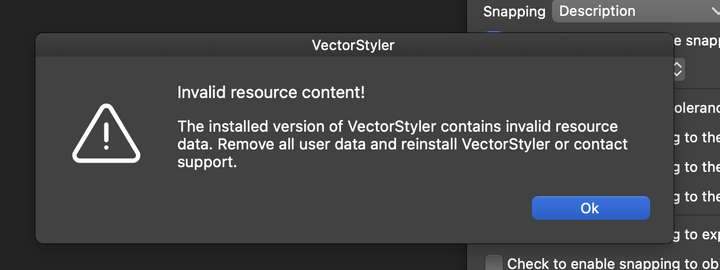
@pentool There is a new "diagnostic" phase at startup, for the case where old resources hang around for some reason.
So if you get a notification after VS starts, just remove the user data and then things should work.
-
Yes, I had that happen.
-
@pentool And I see that in the background the Snapping panel has wrong resources.
Was this fixed after clearing out the user data? -
@VectorStyler Here it was fixed after resetting the app by holding down Command-Shift-Option on start.
-
Yes, snapping panel looks good.

