VectorStyler
    • Categories
    • Unread
    • Recent
    • Tags
    • Popular
    • Register
    • Login

    Change blend mode back to normal is not possible

    Scheduled Pinned Locked Moved VectorStyler 1.1 Bugs
    3 Posts 2 Posters 4.1k Views 2 Watching
    Loading More Posts
    • Oldest to Newest
    • Newest to Oldest
    • Most Votes
    Reply
    • Reply as topic
    Log in to reply
    This topic has been deleted. Only users with topic management privileges can see it.
    • H Offline
      Harry
      last edited by

      Using 125% screen scaling on Windows, it's not possible to change blend mode back to Normal in the Transparency panel.

      Normal blend mode is at the top of the menu, and there is no scroll function:
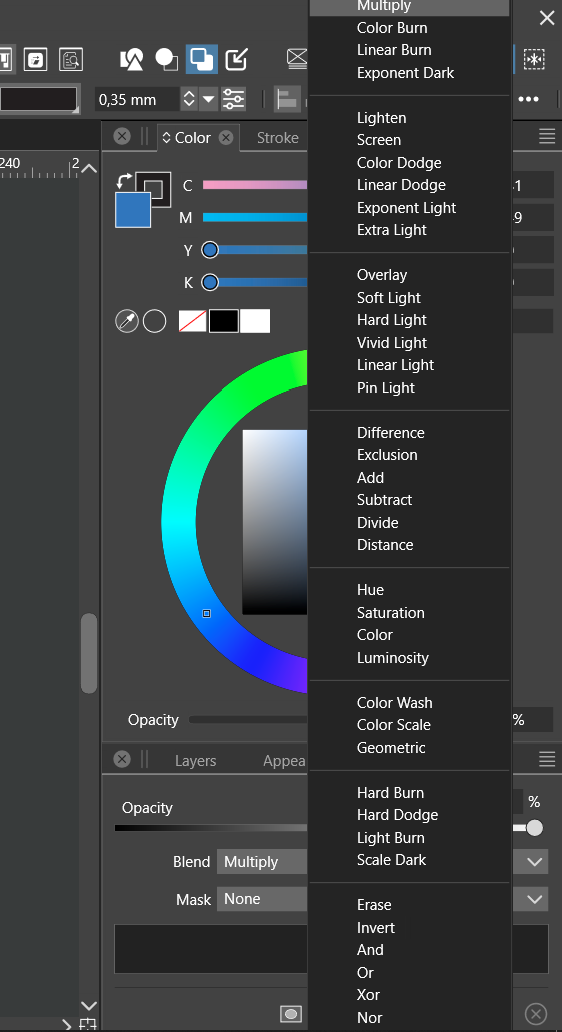
      0_1695389948950_obraz_2023-09-22_153908946.png

      Win 11, XP Pen Deco 01 V2 graphic tablet

      VectorStylerV 2 Replies Last reply Reply Quote 1
      • VectorStylerV Offline
        VectorStyler @Harry
        last edited by

        @Harry I will add this to the backlog.

        1 Reply Last reply Reply Quote 0
        • VectorStylerV Offline
          VectorStyler @Harry
          last edited by VectorStyler

          @Harry Meanwhile as a workaround, try using the scroll wheel or the up/down keys.

          EDIT: the up/down key use works when the list is not open, just click on the Blend label and press the up or down keys.

          The scroll wheel should work by just hovering over the blend field (without opening the list).

          1 Reply Last reply Reply Quote 1
          • First post
            Last post