VectorStyler
    • Categories
    • Unread
    • Recent
    • Tags
    • Popular
    • Register
    • Login

    How to assign a blend
    Scheduled Pinned Locked Moved Questions and Support
    19 Posts 3 Posters 16.3k Views 3 Watching
    Loading More Posts
    • Oldest to Newest
    • Newest to Oldest
    • Most Votes
    Reply
    • Reply as topic
    Log in to reply
    This topic has been deleted. Only users with topic management privileges can see it.
    • AyoA Offline
      Ayo @VectorStyler
      last edited by

      @VectorStyler said in How to assign a blend:

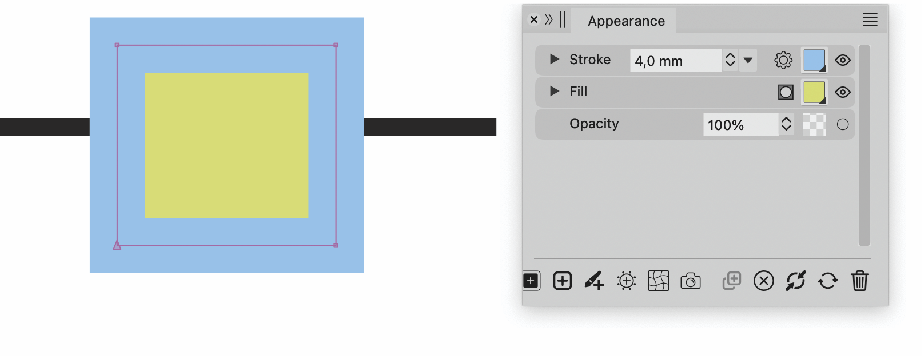
      because it is a preview

      That is exactly the point! And it looks like a preview but it is a link as well! Make that clear. Invite!

      By a triangle or classic underlining or what else is possible
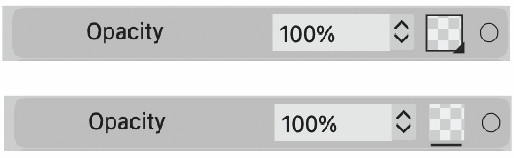
      0_1698411913228_2e8293b3-a485-4119-9b8e-784d36d3d691-image.png

      AyoA 1 Reply Last reply Reply Quote 1
      • AyoA Offline
        Ayo @Ayo
        last edited by

        @Ayo or plus...
        0_1698412223960_dee9efe1-f265-4b5b-b3c1-0774d73319a8-image.png

        AyoA 1 Reply Last reply Reply Quote 1
        • AyoA Offline
          Ayo @Ayo
          last edited by

          @Ayo
          An additional thought...
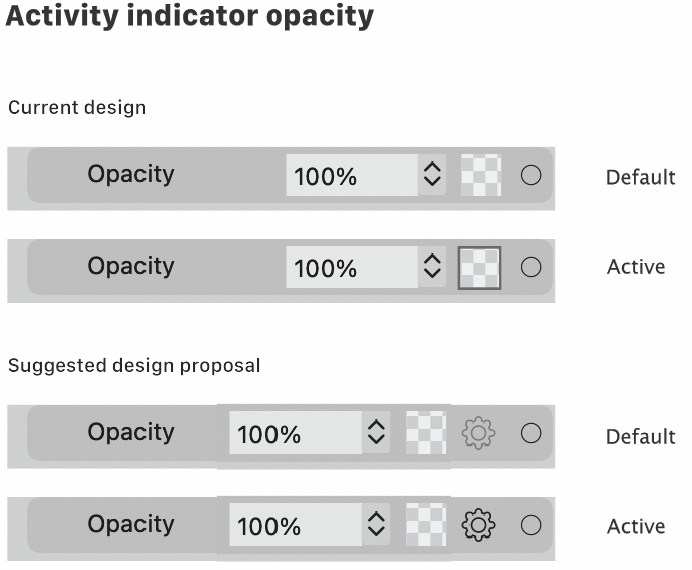
          Since there is no no opacity setting readout in the appearance panel. Would it be useful to have an indicator that shows that the opacity setting is somewhere other than default or none?
          Masks provide a preview but blend options do not.

          Like so...

          0_1698751865633_54774bcb-80d5-49bf-b251-96cf4cbe250e-image.png

          b77B 1 Reply Last reply Reply Quote 0
          • b77B Offline
            b77 @Ayo
            last edited by b77

            @Ayo Sorry, to me it's not clear what you suggest. πŸ™‚

            This is in the Appearance panel in the current design, right?
            Under what condition is the opacity button getting a black outline?

            Also: what is a cog icon supposed to indicate?

            MacBook Pro (Intel) running Monterey 12.6.4

            AyoA 1 Reply Last reply Reply Quote 0
            • AyoA Offline
              Ayo @b77
              last edited by

              @b77 said in How to assign a blend:

              This is in the Appearance panel in the current design, right?
              Also: what is a cog icon supposed to indicate?

              Must be clear from the thread above.

              Under what condition is the opacity button getting a black outline?

              There you go!
              You call it an opacity button but it is and looks like a preview! Therefore a cog.

              Under what condition? Shows that the opacity setting is somewhere other than default or none.

              b77B 2 Replies Last reply Reply Quote 0
              • b77B Offline
                b77 @Ayo
                last edited by

                @Ayo Sorry, this thread is not fresh in anybody's mind β€” it was started 4 days ago.

                Can you recap please?

                Why should there be two buttons β€” a checkerboard button and a cogwheel button?

                What is each one supposed to be doing?

                Thanks! πŸ™‚

                MacBook Pro (Intel) running Monterey 12.6.4

                AyoA 1 Reply Last reply Reply Quote 0
                • AyoA Offline
                  Ayo @b77
                  last edited by

                  @b77
                  Forget it. Consider it unwritten. Will delete it if it gets too complicated. Maybe I should keep my mouth shut for a while.

                  1 Reply Last reply Reply Quote 0
                  • b77B Offline
                    b77 @Ayo
                    last edited by b77

                    @Ayo OK, I know what you mean.

                    There's no need for a preview square (non-button) and a separate button for this.

                    The opacity button could look like this:
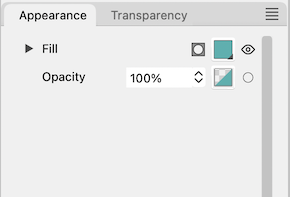
                    0_1698755017373_fddfb.png

                    MacBook Pro (Intel) running Monterey 12.6.4

                    AyoA 1 Reply Last reply Reply Quote 1
                    • AyoA Offline
                      Ayo @b77
                      last edited by

                      @b77 said in How to assign a blend:

                      The opacity button could look like this:

                      The opacity button is here a preview with button property

                      b77B 1 Reply Last reply Reply Quote 0
                      • b77B Offline
                        b77 @Ayo
                        last edited by b77

                        @Ayo

                        The opacity button is here a preview with button property

                        Is a separate checkerboard square needed to preview the
                        actual opacity value? If that is what you mean.

                        MacBook Pro (Intel) running Monterey 12.6.4

                        AyoA 1 Reply Last reply Reply Quote 0
                        • AyoA Offline
                          Ayo @b77
                          last edited by

                          @b77

                          I will try to summarize for you in the hope that my point will be clear.
                          .
                          I started this thread with the question:
                          How to assign a blend (for instance multiply) to only the fill of on top object or only it's stroke?
                          I couldn't find a button for this in the Appearance panel.
                          .
                          You pointed me to click the Opacity button. That was the solution.
                          .
                          Hovering the symbol says 'Opacity'. I advised Vectorstyler to make a better tooltip description like 'Edit transparent attributes' or so.
                          .
                          Vectorstyler pointed out to me that it was no icon but a preview of the transparency mask.
                          .
                          I told Vectorstyler that being a preview was the cause of my confusion. I saw a preview so I didn't suspect there was a link to transparency attributes. That's why I couldn't find it.
                          .
                          I then recommended Vectorstyler to make it clear that it is also a link for careless users like me. Or instead an extra setting icon (like a gear or something). Then you have a preview and separately a settings button.
                          .
                          That's 1
                          .
                          Yesterday I stubbled across the fact that I couldn't see whether or not I had applied a blend/transparency effect to an object. Illustrator gives me an opacity-blend readout in the Appearance panel. But vector styler gives no feedback. You have to dig into the settings to check.
                          .
                          Therefore my final suggestion for an activity indicator based on the existing opacity bar and based on the bar I proposed with an extra setting icon.
                          .
                          That's 2
                          .
                          Pfff...

                          b77B 1 Reply Last reply Reply Quote 2
                          • b77B Offline
                            b77 @Ayo
                            last edited by b77

                            @Ayo Thanks!

                            Well then… isn't it better to have two dropdown menus here?

                            0_1698764498167_fddfb.png

                            MacBook Pro (Intel) running Monterey 12.6.4

                            AyoA 1 Reply Last reply Reply Quote 1
                            • AyoA Offline
                              Ayo @b77
                              last edited by Ayo

                              @b77
                              Very clear and beautiful!
                              but there are more groups than Blend Mode on the menu

                              1 Reply Last reply Reply Quote 0
                              • First post
                                Last post