VectorStyler
    • Categories
    • Unread
    • Recent
    • Tags
    • Popular
    • Register
    • Login

    New release - doesn't install

    Scheduled Pinned Locked Moved VectorStyler 1.2 beta
    9 Posts 4 Posters 8.6k Views 4 Watching
    Loading More Posts
    • Oldest to Newest
    • Newest to Oldest
    • Most Votes
    Reply
    • Reply as topic
    Log in to reply
    This topic has been deleted. Only users with topic management privileges can see it.
    • B Offline
      B-Vs-V
      last edited by B-Vs-V

      Every time you open the beta, VS announces an update and after downloading proposes a repair... and it goes on and on!
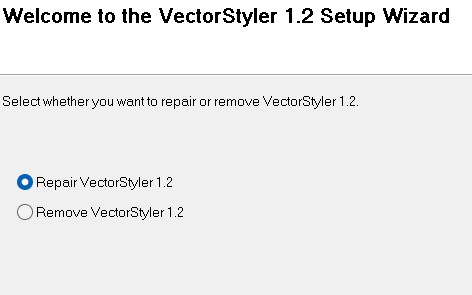
      0_1699194776278_install.jpg

      W11 Pro 25H2 - 12th Gen Intel(R) i7-12700K 3.61 GHz - RAM 64 Go - NVIDIA GF GTX 4070 Ti - Intuos - Dell UP3216Q / Eizo ColorEdge
      W11 Pro 25H2 - 12th Gen Intel(R) i7-12700KF 3.60 GHz -RAM 64 Go - NVIDIA GF GTX 3080 - IntuosPro- ProArt PA329C

      VectorStylerV 1 Reply Last reply Reply Quote 1
      • VectorStylerV Offline
        VectorStyler @B-Vs-V
        last edited by

        @Pat Fixed!

        1 Reply Last reply Reply Quote 0
        • encartE Offline
          encart
          last edited by

          In my case, the latest build did not solve the problem. The installation seems to have gone fine, but on startup, build .002 appears on splashscreen. Every next attepmpt end up with the window that @Pat sent above.

          MacBook Air M4 24Gb, Tahoe 26.2

          VectorStylerV 1 Reply Last reply Reply Quote 0
          • VectorStylerV Offline
            VectorStyler @encart
            last edited by

            @encart I tested this again, but it worked here (004). Try uninstalling and download from https://www.vectorstyler.com/forum/topic/3546/vectorstyler-1-2-beta

            encartE 1 Reply Last reply Reply Quote 0
            • encartE Offline
              encart @VectorStyler
              last edited by

              @Vector Didn't solve the problem. Same situation as it was.

              MacBook Air M4 24Gb, Tahoe 26.2

              H 1 Reply Last reply Reply Quote 0
              • H Offline
                Harry @encart
                last edited by

                @encart said in New release - doesn't install:

                @Vector Didn't solve the problem. Same situation as it was

                I have the same problem - I cannot install the 004 version by downloading or automatically.

                Win 11, XP Pen Deco 01 V2 graphic tablet

                VectorStylerV 1 Reply Last reply Reply Quote 0
                • VectorStylerV Offline
                  VectorStyler @Harry
                  last edited by

                  @Harry @encart I tried to replicate this on 3 different windows machines, both Windows 10 and 11 but it seems to install correctly.
                  Here is the link I used: https://www.vectorstyler.com/beta/vectorstyler.msi

                  H 1 Reply Last reply Reply Quote 0
                  • H Offline
                    Harry @VectorStyler
                    last edited by

                    @VectorStyler I managed to solve this issue. I installed a new version (004) using the repair function of the installer.

                    Installer created a new instance of VS with a new shortcut called "VectorStyler 1.2".
                    I was using the old shortcut in the task bar, which was triggering the old (002) version, because I had two versions of VS in the Add/Remove Programs List of the Windows control panel (VectorStyler and VectorStyler 1.2). It looks like something is wrong with the installer.

                    After uninstalling the 002 release, a new one seems to work fine.

                    Win 11, XP Pen Deco 01 V2 graphic tablet

                    1 Reply Last reply Reply Quote 1
                    • B Offline
                      B-Vs-V
                      last edited by

                      Yes indeed, I had also allowed the "repair" of VectorStyler the first time not knowing what to do, and the complete installation succeeded after the fix of the beta version.

                      W11 Pro 25H2 - 12th Gen Intel(R) i7-12700K 3.61 GHz - RAM 64 Go - NVIDIA GF GTX 4070 Ti - Intuos - Dell UP3216Q / Eizo ColorEdge
                      W11 Pro 25H2 - 12th Gen Intel(R) i7-12700KF 3.60 GHz -RAM 64 Go - NVIDIA GF GTX 3080 - IntuosPro- ProArt PA329C

                      1 Reply Last reply Reply Quote 0
                      • First post
                        Last post