VectorStyler
    • Categories
    • Unread
    • Recent
    • Tags
    • Popular
    • Register
    • Login

    Snap to Artboards - double midpoint?

    Scheduled Pinned Locked Moved Resolved 1.2 bugs
    4 Posts 2 Posters 4.5k Views 2 Watching
    Loading More Posts
    • Oldest to Newest
    • Newest to Oldest
    • Most Votes
    Reply
    • Reply as topic
    Log in to reply
    This topic has been deleted. Only users with topic management privileges can see it.
    • H Offline
      Harry
      last edited by

      It seems like there are two horizontal snapping guides for artboard midpoint - Video

      I noticed this problem with large artboards.

      Win 11, XP Pen Deco 01 V2 graphic tablet

      VectorStylerV 1 Reply Last reply Reply Quote 0
      • VectorStylerV Offline
        VectorStyler @Harry
        last edited by

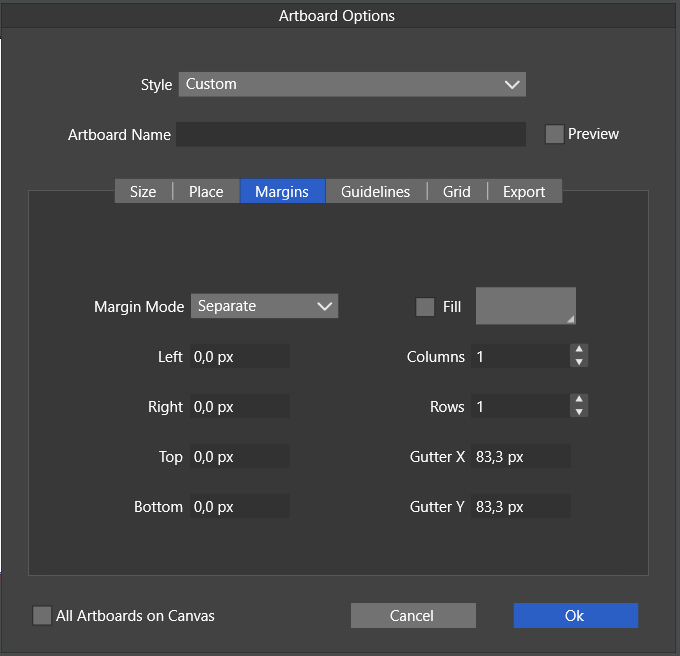
        @Harry Are there margins set for this artboards (in the Artboard Options -> Margins section)?

        H 1 Reply Last reply Reply Quote 0
        • H Offline
          Harry @VectorStyler
          last edited by

          @VectorStyler Here are the margins options:
          0_1710373054337_obraz_2024-03-14_003734329.png

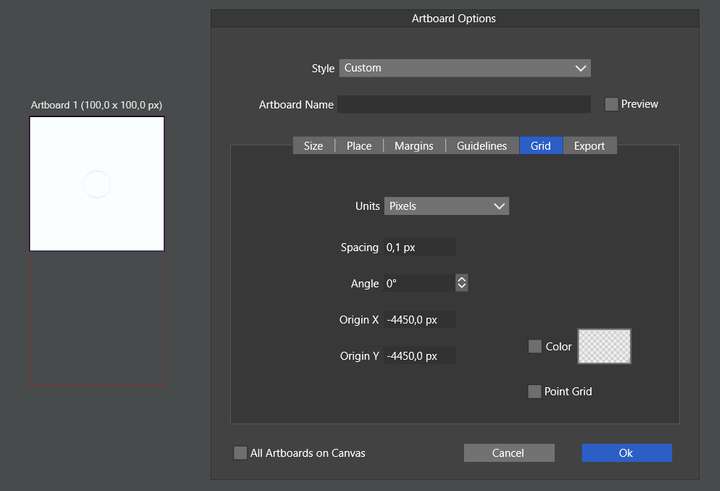
          But when I decreased artboard size to 100 x 100 px this problem doesn't exist, but there is an invisible grid set to -4450 px and some rectangular under the artboard:
          0_1710373824341_obraz_2024-03-14_005024336.png

          Here is the VS file:
          0_1710373987968_Snap to artboard issue.vstyler

          Win 11, XP Pen Deco 01 V2 graphic tablet

          VectorStylerV 1 Reply Last reply Reply Quote 1
          • VectorStylerV Offline
            VectorStyler @Harry
            last edited by

            @Harry Found it: it is caused by the bleed (set in the document options). The margins defined by the bleed (and the center of that frame) are also snapping locations.

            1 Reply Last reply Reply Quote 1
            • First post
              Last post