VectorStyler
    • Categories
    • Unread
    • Recent
    • Tags
    • Popular
    • Register
    • Login

    Problems with text in layers panel

    Scheduled Pinned Locked Moved Resolved 1.2 bugs
    3 Posts 2 Posters 3.5k Views 2 Watching
    Loading More Posts
    • Oldest to Newest
    • Newest to Oldest
    • Most Votes
    Reply
    • Reply as topic
    Log in to reply
    This topic has been deleted. Only users with topic management privileges can see it.
    • Devil DinosaurD Offline
      Devil Dinosaur
      last edited by

      Hi everyone,
      I dont know if it's related to this topic but I cannot rename layers in the layer panel with text containing French marks/accents (such as é, è, â...). While I type a character it displays the right letter then substitute it to another one when I write the following letter. Here's the result of the word côtés (sides) :
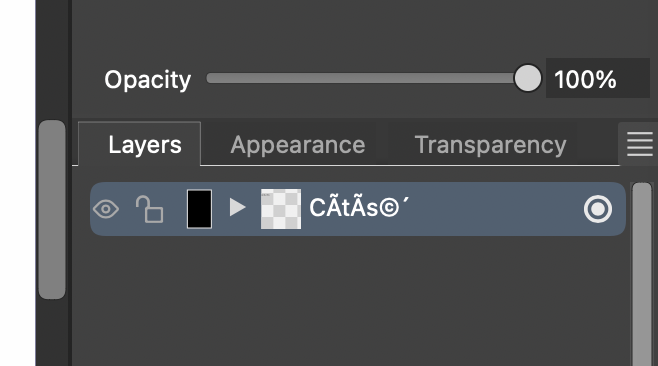
      0_1710916978943_encoding_font.png

      No problem in the text in VS files though. So it's not a big deal. I tried to change the interface font but the problem persisted.

      Fred.
      MacBook Pro (M1) - MacOs Sonoma 14

      VectorStylerV 1 Reply Last reply Reply Quote 1
      • VectorStylerV Offline
        VectorStyler @Devil Dinosaur
        last edited by

        @Devil-Dinosaur I opened a bug on this, and will try to fix it for the next build.

        1 Reply Last reply Reply Quote 1
        • Devil DinosaurD Offline
          Devil Dinosaur
          last edited by

          Works fine on 1.2.018
          Thank you for the quick fix ☺

          Fred.
          MacBook Pro (M1) - MacOs Sonoma 14

          1 Reply Last reply Reply Quote 1
          • First post
            Last post
