Borderline Flicker in Menubar on Windows 10
-
I did check to see if this was reported. I apologize in advance if it has been, but it didn't appear to be.
I have just installed the trial and noticed there is a thin black line underneath the top menu bar (File; Edit; etc) appearing when scanning through options with the mouse as if it were an original UI element that shouldn't be visible. It is appearing and then disappearing. Occasionally a drop menu borders also show before the menu renders on screen, but that's harder to catch.
I thought I would report it. I zipped a gif showing the issue.
0_1711686265251_240328_ui-flicker.zip
System specs:
AMD Ryzen 7 5800X
32GB of RAM (3600Mhz)
Asus Prime X470-Pro
2x 4K display (125%, 150% DPI scale)
eVGA NVIDIA 3080
Windows 10 Build 19045.4170
Windows 11 Build 26200.7171 (25H2)
AMD Ryzen 7 9700X with Gigabyte X870E Aorus Pro Ice
32GB RAM @ 6000MHz
PNY NVIDIA RTX 5070 Ti 16GB; Display 1: 4K @150%; Display 2: 4K @150%
Wacom Intuos Pro L (2025); Wacom Intuos Pro M; Epson ET-8550; Siser Romeo -
-
In fact I can see this little black line appearing and disappearing after opening a file. I had never noticed

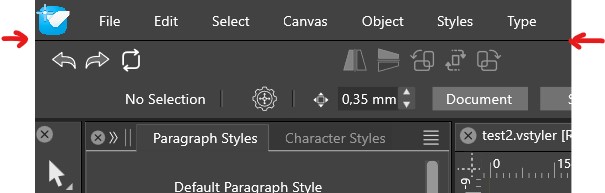
W11 Pro 25H2 - 12th Gen Intel(R) i7-12700K 3.61 GHz - RAM 64 Go - NVIDIA GF GTX 4070 Ti - Intuos - Dell UP3216Q / Eizo ColorEdge
W11 Pro 25H2 - 12th Gen Intel(R) i7-12700KF 3.60 GHz -RAM 64 Go - NVIDIA GF GTX 3080 - IntuosPro- ProArt PA329C -
@debraspicher I opened a bug on this. I think the 125% (and 150%) display scale may cause this. I will try to have a solution as soon as possible.
-
@Pat I kind of like the black line actually lol
@VectorStyler said in Borderline Flicker in Menubar on Windows 10:
@debraspicher I opened a bug on this. I think the 125% (and 150%) display scale may cause this. I will try to have a solution as soon as possible.
That's funny. I only have that one display @ 125% scale because Serif/Affinity refuses to fix their rendering bugs. I re-upped that display back to 150% and restarted my machine. I maybe saw the black line there for a teeny bit like @Pat mentioned, but that defect is gone now, I think.
Thanks!!
Windows 11 Build 26200.7171 (25H2)
AMD Ryzen 7 9700X with Gigabyte X870E Aorus Pro Ice
32GB RAM @ 6000MHz
PNY NVIDIA RTX 5070 Ti 16GB; Display 1: 4K @150%; Display 2: 4K @150%
Wacom Intuos Pro L (2025); Wacom Intuos Pro M; Epson ET-8550; Siser Romeo -
@debraspicher said in Borderline Flicker in Menubar on Windows 10:
display @ 125% scale
Meanwhile the black line issue was replicated here also, and a fix will be in the next build.
-
@VectorStyler I have heard about the quick turnaround times on bugs with VS, but it is very different to experience this in person. Thank you very much. If I see anything else I will come here to report.
-
This issue should be fixed in build 1.2.019
-
@debraspicher said in Borderline Flicker in Menubar on Windows 10:
That's funny. I only have that one display @ 125% scale because Serif/Affinity refuses to fix their rendering bugs.
Serif is a company with a big mouth but tiny fingers.
Welcome to a program with a scalable user interface and bugs that fear for their life. Bugs don't in Nottingham.


