VectorStyler
    • Categories
    • Unread
    • Recent
    • Tags
    • Popular
    • Register
    • Login

    Blend mode of the stroke not effective
    Scheduled Pinned Locked Moved Resolved Issues
    2 Posts 2 Posters 3.7k Views
    Loading More Posts
    • Oldest to Newest
    • Newest to Oldest
    • Most Votes
    Reply
    • Reply as topic
    Log in to reply
    This topic has been deleted. Only users with topic management privileges can see it.
    • A Offline
      Arde
      last edited by Arde

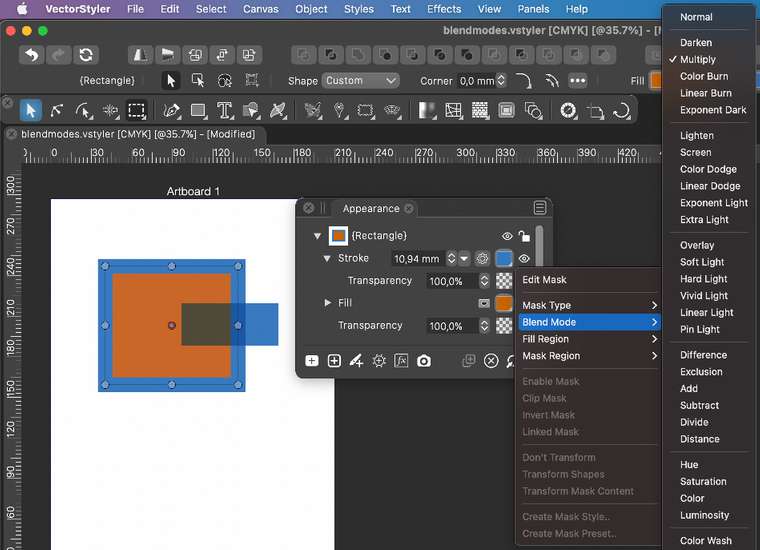
      Here I have assigned Multiply blend mode to the stroke of a rectangle, but it does not appear to "take" (this is center-aligned stroke but it does not work with other modes, either). As a comparison, there is a fill with the same blue color that has Multiply blend mode applied to fill, and that works as expected.
      0_1618163267497_blend_mode_stroke.jpg

      UPDATE: More specifically, the blend mode applied to stroke does not have effect neither on separate objects under the stroke, nor the fill of the object (e.g. rectangle) that is part of the same object as the stroke (in a situation where the stroke and fill overlap, as when stroke is partially or wholly drawn on top of the fill).

      VectorStylerV 1 Reply Last reply Reply Quote 0
      • VectorStylerV Offline
        VectorStyler @Arde
        last edited by

        @Arde This is fixed in the new build (1.0.022).

        1 Reply Last reply Reply Quote 0
        • First post
          Last post