VectorStyler
    • Categories
    • Unread
    • Recent
    • Tags
    • Popular
    • Register
    • Login

    Arkipelago font problem

    Scheduled Pinned Locked Moved Resolved 1.2 bugs
    11 Posts 3 Posters 9.9k Views 2 Watching
    Loading More Posts
    • Oldest to Newest
    • Newest to Oldest
    • Most Votes
    Reply
    • Reply as topic
    Log in to reply
    This topic has been deleted. Only users with topic management privileges can see it.
    • H Offline
      Harry
      last edited by

      After using Arkipelago font in VS's font manager, white spots occurred on printed materials. After activating this font in Fontbase, everything is ok.

      Printed and scanned text:
      ![alt text](0_1714474194817_54d38e44-3ebd-48c2-a6dc-6920491a0318-Arkipelago font problem.png

      Font - link

      Win 11, XP Pen Deco 01 V2 graphic tablet

      VectorStylerV 3 Replies Last reply Reply Quote 0
      • VectorStylerV Offline
        VectorStyler @Harry
        last edited by

        @Harry I till try to replicate this issue. The problem is that regardless where the font is accessed from (VS or Fontbase), VS still handles the font on its own so there should not be any difference.

        1 Reply Last reply Reply Quote 0
        • BoldlineB Offline
          Boldline
          last edited by

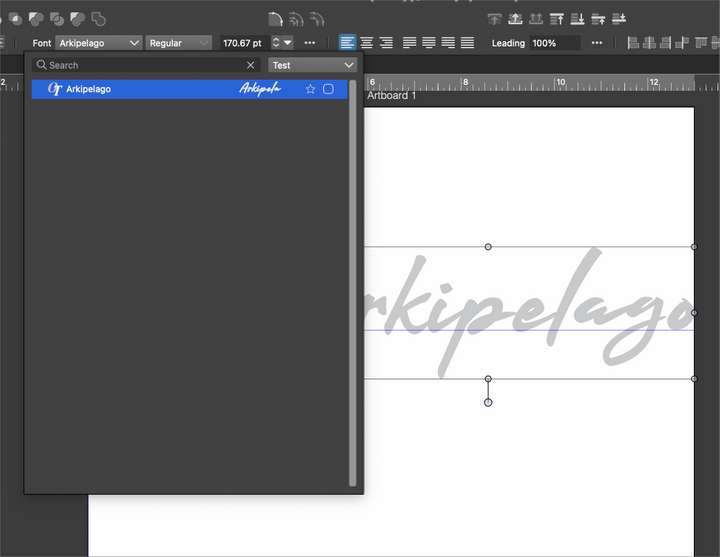
          in case it helps, I made a new folder for fonts inside VS's font manager and added the font "Arkipelago" and did not have any display issues like in the photo from the original post.
          0_1714495439011_5b6df1ac-d104-446c-bf2c-4cd5a4a90325-BLD 2024-04-30 at 12.41.40.png

          🍎 macOS Tahoe 26.2, Mac mini (M1, 2020), Chip Apple M1, Memory 16 GB
          Cintiq 27QHD Display and LG Ultra HD Display

          H 1 Reply Last reply Reply Quote 1
          • VectorStylerV Offline
            VectorStyler @Harry
            last edited by

            @Harry What was the printer driver, and is there an example VS file which resulted in these spots?
            The VS file might be also needed to replicate this.

            H 1 Reply Last reply Reply Quote 0
            • H Offline
              Harry @Boldline
              last edited by

              @Boldline Thanks for checking but display is not a problem. The issue appears on paper after printing.

              Win 11, XP Pen Deco 01 V2 graphic tablet

              BoldlineB 1 Reply Last reply Reply Quote 1
              • H Offline
                Harry @VectorStyler
                last edited by

                @VectorStyler Printer is Brother MFC - J4620 DW. Printer driver is the latest from the Brother site.

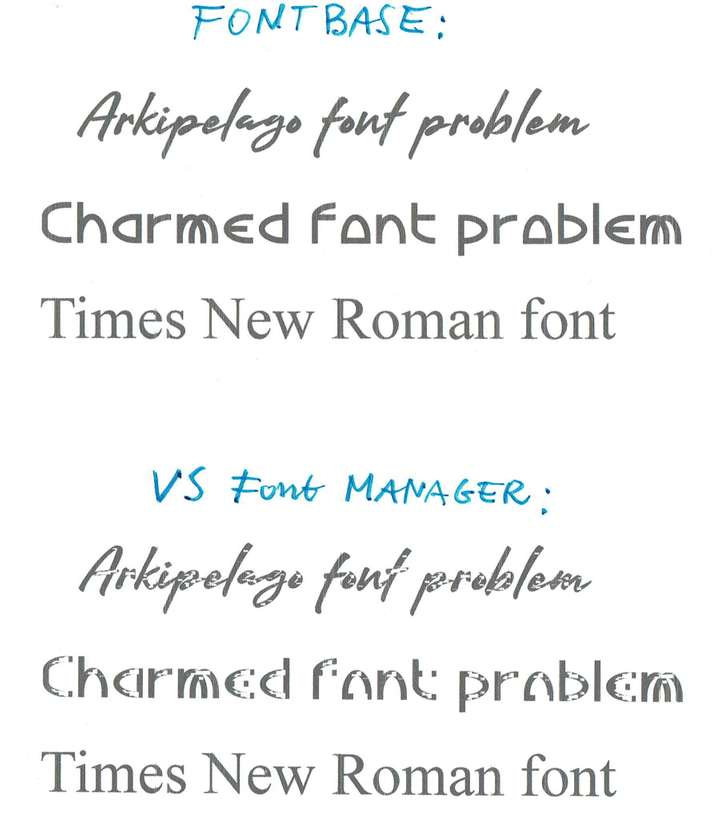
                I've noticed that other (nonsystem fonts) also have this problem. Those are printed and scanned samples made by fonts activated with VS font manager and Fontbase:
                0_1714561202176_Font Manager Problem.jpg

                Another app like MS Word prints those correctly (fonts activated in Fontbase).

                0_1714561301871_Arkipelago font problem.vstyler

                Win 11, XP Pen Deco 01 V2 graphic tablet

                VectorStylerV 1 Reply Last reply Reply Quote 0
                • BoldlineB Offline
                  Boldline @Harry
                  last edited by Boldline

                  @Harry Sorry I initially misunderstood the issue. I understand now what you're trying to solve

                  🍎 macOS Tahoe 26.2, Mac mini (M1, 2020), Chip Apple M1, Memory 16 GB
                  Cintiq 27QHD Display and LG Ultra HD Display

                  1 Reply Last reply Reply Quote 0
                  • VectorStylerV Offline
                    VectorStyler @Harry
                    last edited by

                    @Harry said in Arkipelago font problem:

                    Printer is Brother MFC - J4620 DW. Printer driver is the latest from the Brother site.

                    I will try to replicate this. When the font is from the VS font manager, in some cases it might be sent to the printer as curves.

                    1 Reply Last reply Reply Quote 0
                    • VectorStylerV Offline
                      VectorStyler @Harry
                      last edited by

                      @Harry I tried to replicate this problem, with the printer driver (by printing to file) but it seems to be working here.

                      One thing to try is to print to file (with the Print to File option in VS printing view) and open the resulting PDF file in a PDF viewer to see if there are errors. Also send me the PDF file printed from VS.

                      H 1 Reply Last reply Reply Quote 0
                      • H Offline
                        Harry @VectorStyler
                        last edited by

                        @VectorStyler Here is the file produced with Print to File option in VS and fonts activated in VS Font Manager. I'm unable to open this file. It is zipped for forum.
                        0_1714998634667_Arkipelago font problem.zip

                        Win 11, XP Pen Deco 01 V2 graphic tablet

                        VectorStylerV 1 Reply Last reply Reply Quote 1
                        • VectorStylerV Offline
                          VectorStyler @Harry
                          last edited by

                          @Harry It looks like this is not a PostScript file. Could be that the printer driver does not produce postscript.

                          1 Reply Last reply Reply Quote 0
                          • First post
                            Last post