VectorStyler
    • Categories
    • Unread
    • Recent
    • Tags
    • Popular
    • Register
    • Login

    Transform>Coordinate Oddities

    Scheduled Pinned Locked Moved Resolved 1.2 bugs
    5 Posts 2 Posters 5.0k Views 2 Watching
    Loading More Posts
    • Oldest to Newest
    • Newest to Oldest
    • Most Votes
    Reply
    • Reply as topic
    Log in to reply
    This topic has been deleted. Only users with topic management privileges can see it.
    • debraspicherD Offline
      debraspicher
      last edited by debraspicher

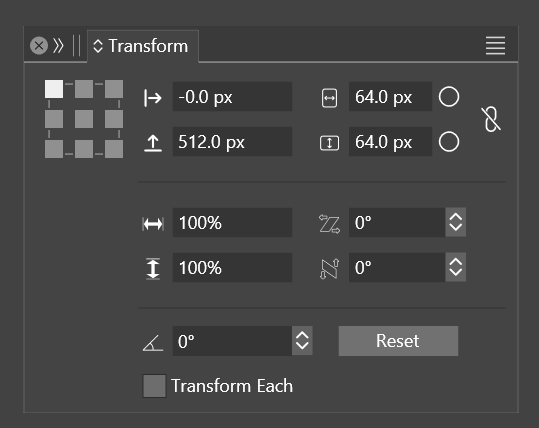
      It looks like a bug as it shows "-0.0" in X. I can't figure out why Y is flipped... moving the object down decreases Y. Not sure if this was always the case as I'm still learning the program so apt to forget.
      0_1715572127708_7643b011-79a4-438e-92e3-2c27f0b572c8-image.png

      Video: https://1drv.ms/v/s!AuWHX0h5bAoRifp3JFA9P7MP6tXo9Q?e=84r4rH

      Windows 11 Build 26200.7171 (25H2)
      AMD Ryzen 7 9700X with Gigabyte X870E Aorus Pro Ice
      32GB RAM @ 6000MHz
      PNY NVIDIA RTX 5070 Ti 16GB; Display 1: 4K @150%; Display 2: 4K @200%
      Wacom Intuos Pro L (2025); Wacom Intuos Pro M; Epson ET-8550; Siser Romeo

      VectorStylerV 1 Reply Last reply Reply Quote 0
      • VectorStylerV Offline
        VectorStyler @debraspicher
        last edited by VectorStyler

        @debraspicher said in Transform>Coordinate Oddities:

        moving the object down decreases Y.

        The default coordinate system in VS is bottom-up direction for Y (it is the Cartesian coordinate system used in math).

        This can be changed in the Document Setup -> General -> Top-Down Coordinates option.

        The "-0.0" could be a small negative number (between -0.09 and 0.0) rounded for display.

        debraspicherD 1 Reply Last reply Reply Quote 1
        • debraspicherD Offline
          debraspicher @VectorStyler
          last edited by debraspicher

          @VectorStyler The odd thing is in this screenshot, this was meant to be snapped to the Artboard in the Top Left using the snapping system. I redid it several times and still came up with that coordinate. (Now I wish I had turned on decimels to check). It's back where it should be now.

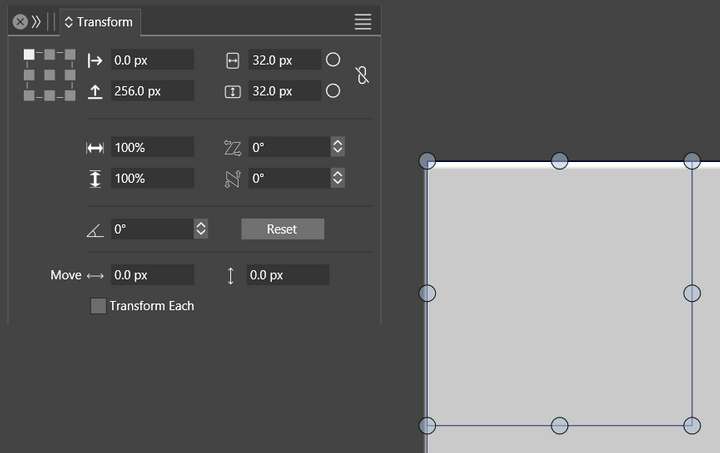
          At the moment, I'm having trouble with pixel alignment/snapping and output being sharp. I have a test document setup with pixel perfect boxes and set on grid on whole numbers. I cannot get it to stop color/edge shifting. I'm still testing on my end to see if it is user error and admittedly it's an opportunity to learn the program options.

          Normally I work in Points, but using in Pixel units to eliminate a potential variable of confusion.

          Output: 0_1715656989498_test.png

          Practice Document: 0_1715656983387_240513_pixel-hint-test_EXPORT.vstyler

          How it showing on in program (Pixel Preview):
          0_1715657271706_7bd0f61f-5f72-4881-a6e7-88c623295fa1-image.png

          Windows 11 Build 26200.7171 (25H2)
          AMD Ryzen 7 9700X with Gigabyte X870E Aorus Pro Ice
          32GB RAM @ 6000MHz
          PNY NVIDIA RTX 5070 Ti 16GB; Display 1: 4K @150%; Display 2: 4K @200%
          Wacom Intuos Pro L (2025); Wacom Intuos Pro M; Epson ET-8550; Siser Romeo

          VectorStylerV 1 Reply Last reply Reply Quote 0
          • VectorStylerV Offline
            VectorStyler @debraspicher
            last edited by

            @debraspicher Yes, there is a small gap in Pixel preview, can be replicated here also. This seems to be a bug. I will try to fix this ASAP.

            debraspicherD 1 Reply Last reply Reply Quote 1
            • debraspicherD Offline
              debraspicher @VectorStyler
              last edited by

              @VectorStyler Thank you! It was crazy making. I didn't remember having this problem before

              Windows 11 Build 26200.7171 (25H2)
              AMD Ryzen 7 9700X with Gigabyte X870E Aorus Pro Ice
              32GB RAM @ 6000MHz
              PNY NVIDIA RTX 5070 Ti 16GB; Display 1: 4K @150%; Display 2: 4K @200%
              Wacom Intuos Pro L (2025); Wacom Intuos Pro M; Epson ET-8550; Siser Romeo

              1 Reply Last reply Reply Quote 0
              • First post
                Last post
