VectorStyler
    • Categories
    • Unread
    • Recent
    • Tags
    • Popular
    • Register
    • Login

    Search feature in palettes
    Scheduled Pinned Locked Moved Implemented Features
    26 Posts 4 Posters 49.3k Views 1 Watching
    Loading More Posts
    • Oldest to Newest
    • Newest to Oldest
    • Most Votes
    Reply
    • Reply as topic
    Log in to reply
    This topic has been deleted. Only users with topic management privileges can see it.
    • BoldlineB Offline
      Boldline @Arde
      last edited by Boldline

      @Arde would you like me to send you the ase file that I tried to use? I also use CS6 but on a mac. I can send you my email in the PM. @vectoradmin said he found the issue with my ase file, but I'd be curious if you could open it without issue like you did the fruit palette.

      🍎 macOS Tahoe 26.2, Mac mini (M1, 2020), Chip Apple M1, Memory 16 GB
      Cintiq 27QHD Display and LG Ultra HD Display

      A 1 Reply Last reply Reply Quote 0
      • A Offline
        Arde @Boldline
        last edited by

        @Boldline said in Search feature in palettes:

        @Arde would you like me to send you the ase file that I tried to use? I also use CS6 but on a mac. I can send you my email in the PM.

        Yes, that's fine.

        1 Reply Last reply Reply Quote 0
        • VectorStylerV Offline
          VectorStyler @Arde
          last edited by

          @Arde The error can be fixed in the ASE import of VectorStyler. Various Adobe versions are not very consistent when writing files, and in some ASE files the header info (palette name, etc) is missing.

          1 Reply Last reply Reply Quote 0
          • BoldlineB Offline
            Boldline
            last edited by

            This was solved for me in the newest beta, thank you!

            🍎 macOS Tahoe 26.2, Mac mini (M1, 2020), Chip Apple M1, Memory 16 GB
            Cintiq 27QHD Display and LG Ultra HD Display

            BoldlineB 1 Reply Last reply Reply Quote 0
            • BoldlineB Offline
              Boldline @Boldline
              last edited by

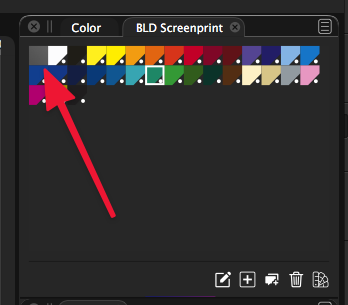
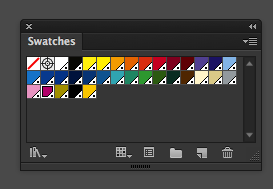
              @vectoradmin I was able to open the color palette I had saved last week and it opened just fine in the new beta. I did notice one thing - the very first swatch in this ase file is the registration color from Illustrator. When it opened in VS, it appears as a neutral gray swatch in the upper left corner.
              I know i can add in a registration swatch natively in VS to solve the problem, but in the interest of covering all the bases, I wanted to see if there was something that could be done when an ase file is imported into VS. I included a screenshot of the same ase file in Illustrator and in VS
              0_1621090984721_BLD 2021-05-15 at 11.02.07.png
              0_1621091037736_BLD 2021-05-15 at 11.03.15.png

              🍎 macOS Tahoe 26.2, Mac mini (M1, 2020), Chip Apple M1, Memory 16 GB
              Cintiq 27QHD Display and LG Ultra HD Display

              VectorStylerV 1 Reply Last reply Reply Quote 0
              • VectorStylerV Offline
                VectorStyler @Boldline
                last edited by

                @Boldline The grey box indicates a color group header. Colors from ASE are organized in groups. I will look into the registration color import issue.


                1 Reply Last reply Reply Quote 0
                • First post
                  Last post