Transform panel refusing coordinate input for guides on occasion
-
It is likely exacerbated by Artboards being resized and using "Artboard Coordinates". It seems to effect guides specifically. For instance, in this case, this Artboard was a bit longer (11" long) before I tried to replace the guides for the new positioning. Inputting manually wasn't working. It finally took after a little bit of convincing:
0_1719937213751_240702_debraspicher_test.vstyler
Video: https://1drv.ms/v/s!AuWHX0h5bAoRipQIWVzDlqhXc2FF8g?e=hRRxDA
Edit: That last guide was not editable using the Guidelines Panel because it was the last entry. I couldn't activate the input field, so I had to use Transform instead. At least it wasn't in that instance. It varies.
-
@debraspicher Yes, this can be replicated. I opened a bug on this.
-
@VectorStyler Can a button be added to the coordinate panel to become a movement transformation panel? In this way, if certain parameters need to be moved, there is no need to perform addition and subtraction operations on the coordinate panel to get the result, nor do you need to open the movement transformation dialog box in the menu bar, which is more convenient.
-
@monsterfox There is a "Move Objects" option in the Transform panel menu, this will enable an additional field for moving.
-
@VectorStyler
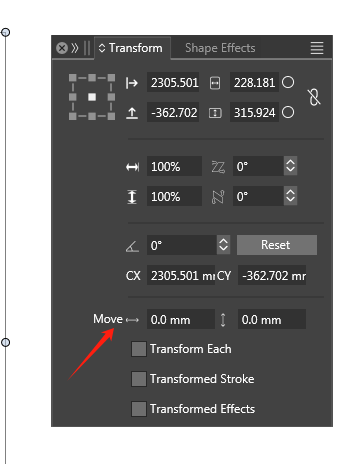
 Two status displays have different functions, and the function of displacement disappears when the panel is pulled to the bottom. Please fix this problem.
 -
@monsterfox said in Transform panel refusing coordinate input for guides on occasion:
Please fix this problem.
I opened a bug on this.

