VectorStyler
    • Categories
    • Unread
    • Recent
    • Tags
    • Popular
    • Register
    • Login

    Gradient mesh shape will persist for every other new shape created

    Scheduled Pinned Locked Moved Resolved Issues
    4 Posts 2 Posters 5.4k Views
    Loading More Posts
    • Oldest to Newest
    • Newest to Oldest
    • Most Votes
    Reply
    • Reply as topic
    Log in to reply
    This topic has been deleted. Only users with topic management privileges can see it.
    • K Offline
      Kyriakos
      last edited by Kyriakos

      This should be easy to reproduce, just make a shape with a gradient mesh and try to draw another shape, it should redraw the gradient mesh you just created instead of the new shape.

      VectorStylerV 2 Replies Last reply Reply Quote 0
      • VectorStylerV Offline
        VectorStyler @Kyriakos
        last edited by

        @Kyriakos Yes, this can be replicated. Will be fixed in the next build.

        1 Reply Last reply Reply Quote 0
        • VectorStylerV Offline
          VectorStyler @Kyriakos
          last edited by

          @Kyriakos This issue is fixed in build 1.0.025

          K 1 Reply Last reply Reply Quote 0
          • K Offline
            Kyriakos @VectorStyler
            last edited by Kyriakos

            @vectoradmin Works fine now, thanks.

            I noticed something else with it that might be a problem, after double-clicking inside your mesh to create a new node you need to reselect the newly created node in order to colour it, otherwise the entire shape gets filled and you cannot undo. So it might be better if newly created nodes are already selected so you can immediately adjust their colour without having to re-click them.

            *Forgot to add that after accidentally filling the shape with a solid colour it sometimes breaks and creates some weird vectors as such...
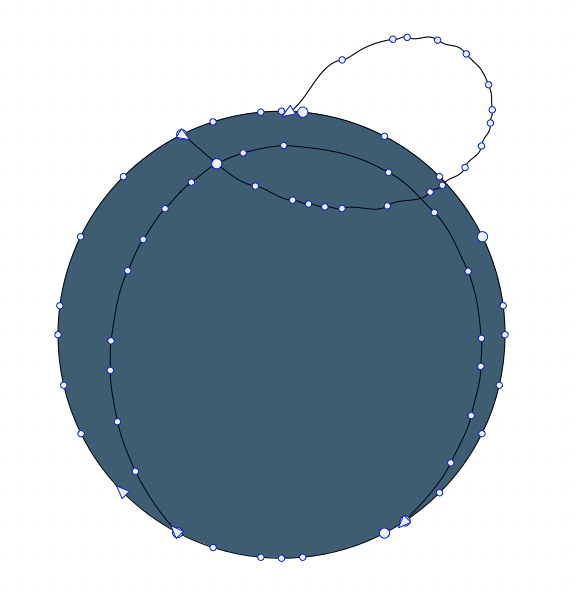

            0_1620374587413_mesh.png

            1 Reply Last reply Reply Quote 1
            • First post
              Last post