VectorStyler
    • Categories
    • Unread
    • Recent
    • Tags
    • Popular
    • Register
    • Login

    Image effect: "opacity" ? bug?

    Scheduled Pinned Locked Moved Resolved 1.2 bugs
    7 Posts 3 Posters 6.5k Views 3 Watching
    Loading More Posts
    • Oldest to Newest
    • Newest to Oldest
    • Most Votes
    Reply
    • Reply as topic
    Log in to reply
    This topic has been deleted. Only users with topic management privileges can see it.
    • B Offline
      B-Vs-V
      last edited by

      I don't understand how Inner shadow opacity works in image effects.
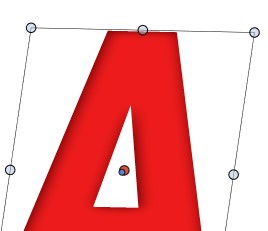
      Here's the object with its color:
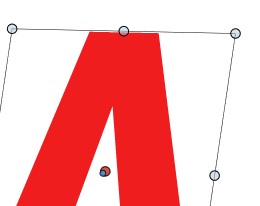
      0_1720099995315_is1.jpg

      Here with inner shadow

      0_1720100007962_is2.jpg

      that I want to reduce with opacity (e.g., the effect & not the colour): I don't get the desired effect at all

      0_1720100028799_is3.jpg

      W11 Pro 25H2 - 12th Gen Intel(R) i7-12700K 3.61 GHz - RAM 64 Go - NVIDIA GF GTX 4070 Ti - Intuos - Dell UP3216Q / Eizo ColorEdge
      W11 Pro 25H2 - 12th Gen Intel(R) i7-12700KF 3.60 GHz -RAM 64 Go - NVIDIA GF GTX 3080 - IntuosPro- ProArt PA329C

      S VectorStylerV 2 Replies Last reply Reply Quote 1
      • S Offline
        Subpath @B-Vs-V
        last edited by Subpath

        @Pat

        curious 🙂

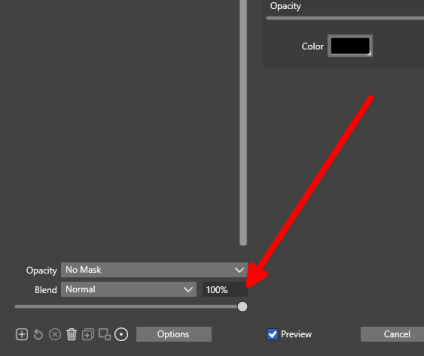
        try this Slider here
        0_1720100597098_inner shadow.png

        Win 11
        CPU: AMD Ryzen 5 9600X, 6-core.
        GPU: Nvidia Geforce RTX 5070.

        B 1 Reply Last reply Reply Quote 1
        • S Offline
          Subpath
          last edited by

          @Pat

          can also recommend “Ksnip” as a screenshot tool
          it also allows annotations.

          Here the Link:
          https://github.com/ksnip/ksnip

          Win 11
          CPU: AMD Ryzen 5 9600X, 6-core.
          GPU: Nvidia Geforce RTX 5070.

          1 Reply Last reply Reply Quote 1
          • B Offline
            B-Vs-V @Subpath
            last edited by B-Vs-V

            @Subpath Indeed, this the one for Inner shadow... but both sliders (seem to) work as expected for Drop shadow ☺

            W11 Pro 25H2 - 12th Gen Intel(R) i7-12700K 3.61 GHz - RAM 64 Go - NVIDIA GF GTX 4070 Ti - Intuos - Dell UP3216Q / Eizo ColorEdge
            W11 Pro 25H2 - 12th Gen Intel(R) i7-12700KF 3.60 GHz -RAM 64 Go - NVIDIA GF GTX 3080 - IntuosPro- ProArt PA329C

            1 Reply Last reply Reply Quote 0
            • VectorStylerV Offline
              VectorStyler @B-Vs-V
              last edited by

              @Pat I will test this, it might be a bug.

              B 1 Reply Last reply Reply Quote 0
              • B Offline
                B-Vs-V @VectorStyler
                last edited by

                @VectorStyler Ok ☺ I suppose that these two opacity-control sliders are not redondant ?

                W11 Pro 25H2 - 12th Gen Intel(R) i7-12700K 3.61 GHz - RAM 64 Go - NVIDIA GF GTX 4070 Ti - Intuos - Dell UP3216Q / Eizo ColorEdge
                W11 Pro 25H2 - 12th Gen Intel(R) i7-12700KF 3.60 GHz -RAM 64 Go - NVIDIA GF GTX 3080 - IntuosPro- ProArt PA329C

                VectorStylerV 1 Reply Last reply Reply Quote 0
                • VectorStylerV Offline
                  VectorStyler @B-Vs-V
                  last edited by

                  @Pat said in Image effect: "opacity" ? bug?:

                  I suppose that these two opacity-control sliders are not redondant ?

                  Should not be.

                  1 Reply Last reply Reply Quote 0
                  • First post
                    Last post