Allow the option to change the Stroke color in Docked Color Palette by Right Clicking
-
@Vector-Rock The new build 1.0.025 adds the right click in color palette for alternate color selection. If the color palette has the fill mode selected then the right click will set stroke. And if the stroke is selected, the right click will set the fill.
Bonus: right click in the color palette wheel will also set the alternate color (stroke or fill). -
@vectoradmin Great! It would be nice if you would also make right-click for stroke color work in the color palette bar.
Also: a minor limitation is that this doesn't work when no object is selected — you can't change the stroke color with right-click before drawing a new object.
MacBook Pro (Intel) running Monterey 12.6.4
-
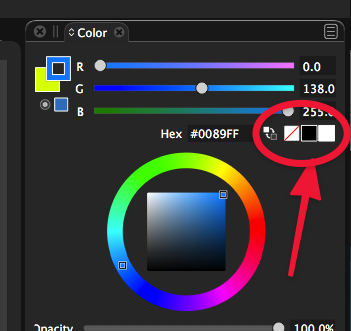
@vectoradmin This is a terrific addition! Could this be added to the "remove color", black and white options in the color panel as well?
-
@Boldline said in Allow the option to change the Stroke color in Docked Color Palette by Right Clicking:
@vectoradmin Could this be added to the "remove color", black and white options in the color panel as well?
Will do so!
-
@b77 said in Allow the option to change the Stroke color in Docked Color Palette by Right Clicking:
@vectoradmin Great! It would be nice if you would also make right-click for stroke color work in the color palette bar.
Also: a minor limitation is that this doesn't work when no object is selected — you can't change the stroke color with right-click before drawing a new object.>
Yes I agree with @b77 on both points above.
This is what I "meant" by my suggestion with my original post (Sorry about that, I should have been more clear
 )
)
.@vectoradmin, would be nice if you could add this.
On the Docker Palette Bar (the color bar strip that by default is currently at the bottom of the screen...or... also when using Panel>Color Palette):
- Left click on a color box in the Palette Bar strip changes the Fill Color to whatever color box you left clicked on
- Right click on a color box in the Palette Bar strip changes the Stroke Color to whatever color box you right clicked
- This includes the "None" and Black and White boxes
.
.
.
I suppose, for purely consistency sake , this could also be applied in the Fill and Stroke "Popover" from the Context panel at the top of the screen as well.
.
.
.@vectoradmin said in Allow the option to change the Stroke color in Docked Color Palette by Right Clicking:
@Vector-Rock The new build 1.0.025 adds
Bonus: right click in the color palette wheel will also set the alternate color (stroke or fill).@vectoradmin, This bonus is excellent. Thank you.
 (I wish I would have thought of adding that capability in that spot in my original post
 )
)Agree with @Boldline about including the right click options in the Color "Panel" for None/Black/White as well.
-
@Vector-Rock said in Allow the option to change the Stroke color in Docked Color Palette by Right Clicking:
@b77 said in Allow the option to change the Stroke color in Docked Color Palette by Right Clicking:
@vectoradmin Great! It would be nice if you would also make right-click for stroke color work in the color palette bar.
Also: a minor limitation is that this doesn't work when no object is selected — you can't change the stroke color with right-click before drawing a new object.>
Yes I agree with @b77 on both points above.
@vectoradmin, would be nice if you could add this.
On the Docker Palette Bar (the color bar strip that by default is currently at the bottom of the screen...or... also when using Panel>Color Palette):
- Left click on a color box in the Palette Bar strip changes the Fill Color to whatever color box you left clicked on
- Right click on a color box in the Palette Bar strip changes the Stroke Color to whatever color box you right clicked
- This includes the "None" and Black and White boxes.
'
@vectoradmin,
Fantastic job on adding/allowing the Right Click on the Docker Color Swatches Palette Bar (in addition to your previous excellent bonus of adding it to the Color Wheel and Brightness and Saturation Center Square).Very much appreciated. Thank You!
.
The one minor improvement you could still possibly add would be as @B77 mentioned, allow Right Click On "Color Swatches Bar" Before Drawing* (i.e., with With Nothing Selected).
*Note: Right clicking on the "Color Wheel and Brightness and Saturation Center Square" with nothing selected (before drawing) already works this way; which is nice.
-
@Vector-Rock This should also work for the palette (color swatches bar) in version 1.0.027. The only drawback (for both) that the default stroke width must also be selected, otherwise it will be zero (thinnest stroke possible).
-
@vectoradmin said in Allow the option to change the Stroke color in Docked Color Palette by Right Clicking:
@Vector-Rock This should also work for the palette (color swatches bar) in version 1.0.027. The only drawback (for both) that the default stroke width must also be selected, otherwise it will be zero (thinnest stroke possible).
@vectoradmin
Hmm, it's not working for me. Here's what happens to me on version 1.0.027 under the below three (3) scenarios:Note: Please watch the upper left hand corner of the Color Docker, where the Fill and Stroke ICONS are located, with the FILL Icon positioned in FRONT and the Stroke Icon behind it (offset partially above and to the right) as you try these three scenarios:
Scenario # 1
With something SELECTED and clicking on Color Swatches Bar::- Left click on a color swatch in the Color Swatches Bar, the forefront Fill ICON changes to that color.
- Right click a color swatch in the Color Swatches Bar, it changes the rear Stroke ICON to that color.
.
Scenario #2
With something SELECTED and clicking on Color Wheel Brightness and Saturation Square- Results are identical to doing so on the "Color Swatches Bar" as noted in scenario 1.
.
Scenario#3
With NO Selection (or when opening New Document with a blank/empty Artboard) and clicking on Color Swatches Bar:- Left Click works identical to scenarios 1 and 2 above
- Right click has no effect on the Stroke Icon color.
- Instead, the right click changes the FILL Color ICON**
.
Summary:
Right click the "Color Swatches Bar" does not change the Stroke ICON Color with NO Selection; rather, it changes the Fill color ICON instead.Put another way, both left and right clicks always and only change the Fill Color ICON if done from the "Color Swatches Bar"), even in version 1.0.027
-
@Vector-Rock Got it! The problem is the update in the Stroke ICON. The new object should be drawn with the selected stroke color.
-
@vectoradmin said in Allow the option to change the Stroke color in Docked Color Palette by Right Clicking:
@Vector-Rock Got it! The problem is the update in the Stroke ICON. The new object should be drawn with the selected stroke color.
@vectoradmin,
Thank you!You nailed it this time.

@b77
Build 1.0.029 RC3 (correction) now allows, from the Color Swatches Bar, with NO Selection on Artboard, Right Click to change the Stroke Color and ICON in Color Panel.


