VectorStyler
    • Categories
    • Unread
    • Recent
    • Tags
    • Popular
    • Register
    • Login

    Character tool not allowing rotation

    Scheduled Pinned Locked Moved Resolved 1.2 bugs
    4 Posts 2 Posters 4.7k Views 1 Watching
    Loading More Posts
    • Oldest to Newest
    • Newest to Oldest
    • Most Votes
    Reply
    • Reply as topic
    Log in to reply
    This topic has been deleted. Only users with topic management privileges can see it.
    • BoldlineB Offline
      Boldline
      last edited by

      The Character tool does not seem to be allowing rotation to occur.

      When I try to rotate the letter selected with the character tool, it deselects the letter instead

      0_1720839756766_b6a4f398-8035-4394-a273-cdb27c0ae3c0-CleanShot 2024-07-12 at 23.02.25.png

      🍎 macOS Tahoe 26.2, Mac mini (M1, 2020), Chip Apple M1, Memory 16 GB
      Cintiq 27QHD Display and LG Ultra HD Display

      VectorStylerV 1 Reply Last reply Reply Quote 0
      • VectorStylerV Offline
        VectorStyler @Boldline
        last edited by

        @Boldline I could not replicate this. When I position the cursor over the rotation knob, or just a bit above it, it changes into a rotation cursor.
        Send me the file with that text, could be some other attribute causing this.

        BoldlineB 1 Reply Last reply Reply Quote 0
        • BoldlineB Offline
          Boldline @VectorStyler
          last edited by Boldline

          @VectorStyler I sent you an email with the file itself as well as my workspace files.
          As I explained in the email I think I found part of the issue; The issue was occurring on my M1 laptop. I just tested the character tool issue on my main desktop M1 computer and did not have any issues with it. I assumed it might be my laptop VS workspace files, so I emailed those as well.
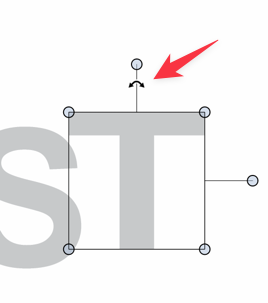
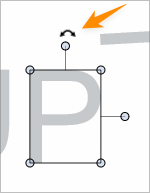
          On the laptop version of VS, the line connecting the knob to the box when a live text letter is selected is a lot longer than normal. Also, the cursor indicator is not accessible above the knob and can only be found below the knob. I was not looking for it there yesterday when I reported the issue.

          In the screenshots below, the red arrow image shows the issue I was having on the laptop. The orange arrow image shows it all working normally on the desktop
          0_1720894467873_d19dc703-095f-4fa0-8567-758074ceb565-image.png

          0_1720894491071_26f4a942-7fb4-4e1b-9135-d4794924b6ac-image.png

          🍎 macOS Tahoe 26.2, Mac mini (M1, 2020), Chip Apple M1, Memory 16 GB
          Cintiq 27QHD Display and LG Ultra HD Display

          VectorStylerV 1 Reply Last reply Reply Quote 1
          • VectorStylerV Offline
            VectorStyler @Boldline
            last edited by

            @Boldline Got it, it could be caused by the selection node scaling settings.

            1 Reply Last reply Reply Quote 1
            • First post
              Last post
