VectorStyler
    • Categories
    • Unread
    • Recent
    • Tags
    • Popular
    • Register
    • Login

    Combining text with a shape does not work

    Scheduled Pinned Locked Moved Resolved Issues
    13 Posts 4 Posters 13.3k Views 1 Watching
    Loading More Posts
    • Oldest to Newest
    • Newest to Oldest
    • Most Votes
    Reply
    • Reply as topic
    Log in to reply
    This topic has been deleted. Only users with topic management privileges can see it.
    • VectorStylerV Offline
      VectorStyler @Gremriel
      last edited by

      @Gremriel I tested this (on a Mac) and it seems to work. Is there an example file you could send me by email, it would help identify the issue.

      b77B encartE 2 Replies Last reply Reply Quote 0
      • b77B Offline
        b77 @VectorStyler
        last edited by b77

        @vectoradmin I guess Gremriel tried to subtract the text from the shape. If so, indeed it doesn't work properly — the text gets combined with the shape as a bunch of paths inside the bigger shape but the letters are not rendered as holes in it, probably because their path direction/winding is not reversed: https://recordit.co/GjXD2ZAQAB

        MacBook Pro (Intel) running Monterey 12.6.4

        G 1 Reply Last reply Reply Quote 2
        • G Offline
          Gremriel @b77
          last edited by

          @b77

          I used Object -->Combine, Combine. And it indeed results in paths inside the shape.

          WIndows 11

          b77B 1 Reply Last reply Reply Quote 0
          • b77B Offline
            b77 @Gremriel
            last edited by

            @Gremriel Try 'Remove Overlaps' then.

            MacBook Pro (Intel) running Monterey 12.6.4

            G 1 Reply Last reply Reply Quote 0
            • G Offline
              Gremriel @b77
              last edited by

              @b77

              Yes, that works. Maybe I'm misunderstanding the Combine option? In CorelDraw it's called Combine, and that works like the Remove Overlaps in VectorStyler.

              WIndows 11

              VectorStylerV 1 Reply Last reply Reply Quote 0
              • VectorStylerV Offline
                VectorStyler @Gremriel
                last edited by

                @Gremriel In VS combine creates a path with multiple sub-paths (possibly holes).

                G 1 Reply Last reply Reply Quote 0
                • encartE Offline
                  encart @VectorStyler
                  last edited by encart

                  I have problems as the same as yours. Try with Object>Break apart (CTRL+K) twice, than weld text to make one object and subtract from shape. Instead of converting text to curves. Somtimes works some not. It's quite problematic. I'm confused with that.

                  MacBook Air M4 24Gb, Tahoe 26.2

                  1 Reply Last reply Reply Quote 0
                  • G Offline
                    Gremriel @VectorStyler
                    last edited by

                    @vectoradmin said in Combining text with a shape does not work:

                    @Gremriel In VS combine creates a path with multiple sub-paths (possibly holes).

                    OK, but if I draw two shapes, one inside the other, and then do combine, I reliably have a hole in the larger shape. If I draw a T shape, I will have a T-shaped hole. Unless the smaller shape was text (either converted to curve or not) I get a sub-path inside a path.

                    As I said, I might be mistaken the function of combine, and I need to use remove overlaps.

                    WIndows 11

                    VectorStylerV 1 Reply Last reply Reply Quote 0
                    • encartE Offline
                      encart
                      last edited by encart

                      Try in that way:

                      1. Draw a shape( shape should be placed under the text)
                      2. Write a text
                      3. Break apart x2
                        4 Combine with holes (CTRL+8)

                      MacBook Air M4 24Gb, Tahoe 26.2

                      1 Reply Last reply Reply Quote 0
                      • VectorStylerV Offline
                        VectorStyler @Gremriel
                        last edited by

                        @Gremriel A temporary fix for combine results: select the object and in the appearance panel set the winding mode of the fill style. Clicking on the icon alternates between even-odd and winding mode fill.
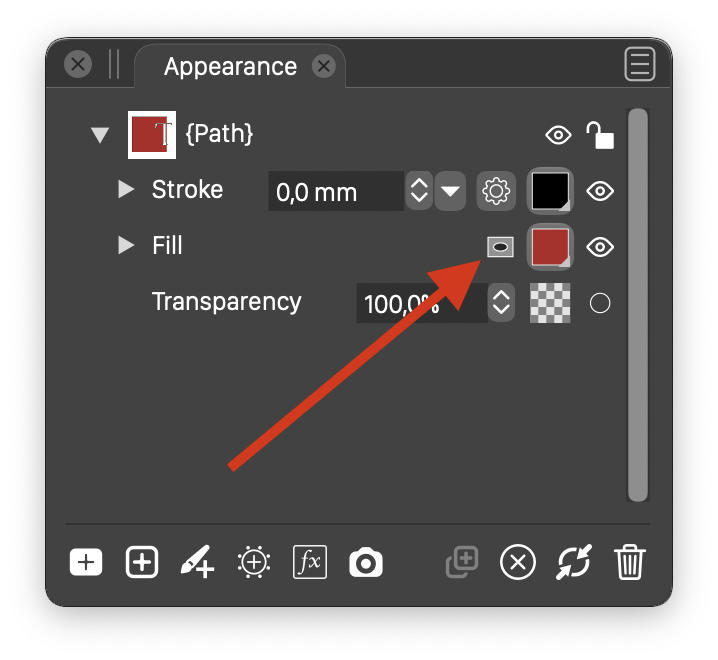
                        0_1620214345419_appearance.png

                        G 1 Reply Last reply Reply Quote 0
                        • G Offline
                          Gremriel @VectorStyler
                          last edited by

                          @vectoradmin said in Combining text with a shape does not work:

                          @Gremriel A temporary fix for combine results: select the object and in the appearance panel set the winding mode of the fill style. Clicking on the icon alternates between even-odd and winding mode fill.

                          That seems to do the trick. Thank you.

                          WIndows 11

                          VectorStylerV 1 Reply Last reply Reply Quote 0
                          • VectorStylerV Offline
                            VectorStyler @Gremriel
                            last edited by VectorStyler

                            @Gremriel The new build 1.0.025 has some fixes regarding the text shape combination issues.

                            1 Reply Last reply Reply Quote 0
                            • First post
                              Last post