VectorStyler
    • Categories
    • Unread
    • Recent
    • Tags
    • Popular
    • Register
    • Login

    SVG Import seems to be broken
    Scheduled Pinned Locked Moved Resolved 1.2 bugs
    14 Posts 4 Posters 11.5k Views 4 Watching
    Loading More Posts
    • Oldest to Newest
    • Newest to Oldest
    • Most Votes
    Reply
    • Reply as topic
    Log in to reply
    This topic has been deleted. Only users with topic management privileges can see it.
    • IngolfI Offline
      Ingolf
      last edited by Ingolf

      I just tried importing SVG, I don't have that issue.

      However, I saw this:

      This gradient from SVG, however, is not imported correctly. Original:

      0_1722072048264_6797c6fa-c595-45fa-9f78-f4e7887b1f8a-image.png

      Vectorstyler:
      0_1722072262928_252bf947-0d53-41fa-814b-520a45ad2e13-image.png

      0_1722072435592_gradient.zip

      🍏 macOS Sequoia Apple Silicon

      IngolfI 1 Reply Last reply Reply Quote 1
      • VectorStylerV Offline
        VectorStyler @Subpath
        last edited by

        @Subpath Send me the SVG file.

        S 2 Replies Last reply Reply Quote 0
        • S Offline
          Subpath @VectorStyler
          last edited by

          @VectorStyler

          you can use the SVG File i attached already
          is the picture in my post above

          Win 11
          CPU: AMD Ryzen 5 9600X, 6-core.
          GPU: Nvidia Geforce RTX 5070.

          1 Reply Last reply Reply Quote 1
          • S Offline
            Subpath @VectorStyler
            last edited by

            @VectorStyler

            SVG file is also send per email

            Win 11
            CPU: AMD Ryzen 5 9600X, 6-core.
            GPU: Nvidia Geforce RTX 5070.

            1 Reply Last reply Reply Quote 0
            • S Offline
              Subpath @Ingolf
              last edited by

              @Ingolf

              the picture above is in SVG Format

              Win 11
              CPU: AMD Ryzen 5 9600X, 6-core.
              GPU: Nvidia Geforce RTX 5070.

              1 Reply Last reply Reply Quote 0
              • nocturnalYLN Offline
                nocturnalYL
                last edited by

                @Subpath
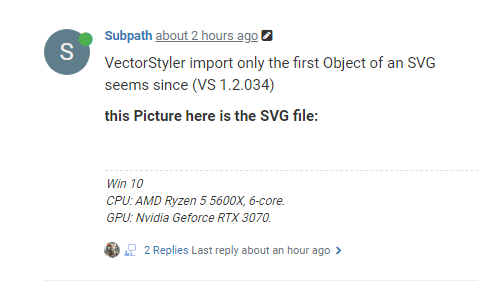
                You seem confused that other people can't see your attachment. This is what I see:
                0_1722074938688_cb0fd0e6-22d6-4881-ac98-f8c414dc969b-image.png

                Clicking the space where the SVG image is supposed to be opens it, but the file itself is not visible in the page.

                S 2 Replies Last reply Reply Quote 1
                • S Offline
                  Subpath @nocturnalYL
                  last edited by Subpath

                  @nocturnalYL

                  seems curious, maybe browser related
                  i put a SVG File as a picture in that post
                  (the Term attached may be a bit misleading)
                  btw i send the SVG already via Email to VectorStyler

                  this is was i see

                  0_1722076228478_my view.png

                  Win 11
                  CPU: AMD Ryzen 5 9600X, 6-core.
                  GPU: Nvidia Geforce RTX 5070.

                  VectorStylerV 1 Reply Last reply Reply Quote 1
                  • VectorStylerV Offline
                    VectorStyler @Subpath
                    last edited by

                    @Subpath No problem, the error was replicated and it is a regression of the last build. A new build will be up by Monday.

                    S 1 Reply Last reply Reply Quote 1
                    • S Offline
                      Subpath @VectorStyler
                      last edited by

                      @VectorStyler said in SVG Import seems to be broken:

                      @Subpath No problem, the error was replicated and it is a regression of the last build. A new build will be up by Monday.

                      thank you

                      Win 11
                      CPU: AMD Ryzen 5 9600X, 6-core.
                      GPU: Nvidia Geforce RTX 5070.

                      1 Reply Last reply Reply Quote 0
                      • S Offline
                        Subpath @nocturnalYL
                        last edited by

                        @nocturnalYL

                        thank you for bringing this to my attention

                        Win 11
                        CPU: AMD Ryzen 5 9600X, 6-core.
                        GPU: Nvidia Geforce RTX 5070.

                        1 Reply Last reply Reply Quote 2
                        • IngolfI Offline
                          Ingolf @Ingolf
                          last edited by Ingolf

                          @Ingolf said in SVG Import seems to be broken:

                          I just tried importing SVG, I don't have that issue.

                          However, I saw this:

                          This gradient from SVG, however, is not imported correctly. Original:
                          0_1722072048264_6797c6fa-c595-45fa-9f78-f4e7887b1f8a-image.png

                          Vectorstyler:
                          0_1722072262928_252bf947-0d53-41fa-814b-520a45ad2e13-image.png

                          0_1722072435592_gradient.zip

                          Not only is the gradient imported incorrectly but the gradient editor behaves very weird when adjusting the gradient. Using the same gradient on a new objects seems better.

                          🔗 Attempt at demonstrating weird behavior (Imgur link)

                          🍏 macOS Sequoia Apple Silicon

                          VectorStylerV 1 Reply Last reply Reply Quote 1
                          • VectorStylerV Offline
                            VectorStyler @Ingolf
                            last edited by

                            @Ingolf This gradient issue is not yet fixed and it did exist before also. I will try to find a solution for this.


                            1 Reply Last reply Reply Quote 1
                            • First post
                              Last post