VectorStyler
    • Categories
    • Unread
    • Recent
    • Tags
    • Popular
    • Register
    • Login

    Toolbar Groups unresponsive to clicks; Regularly having trouble opening the group flyout

    Scheduled Pinned Locked Moved Resolved 1.2 bugs
    9 Posts 5 Posters 8.3k Views 4 Watching
    Loading More Posts
    • Oldest to Newest
    • Newest to Oldest
    • Most Votes
    Reply
    • Reply as topic
    Log in to reply
    This topic has been deleted. Only users with topic management privileges can see it.
    • debraspicherD Offline
      debraspicher
      last edited by

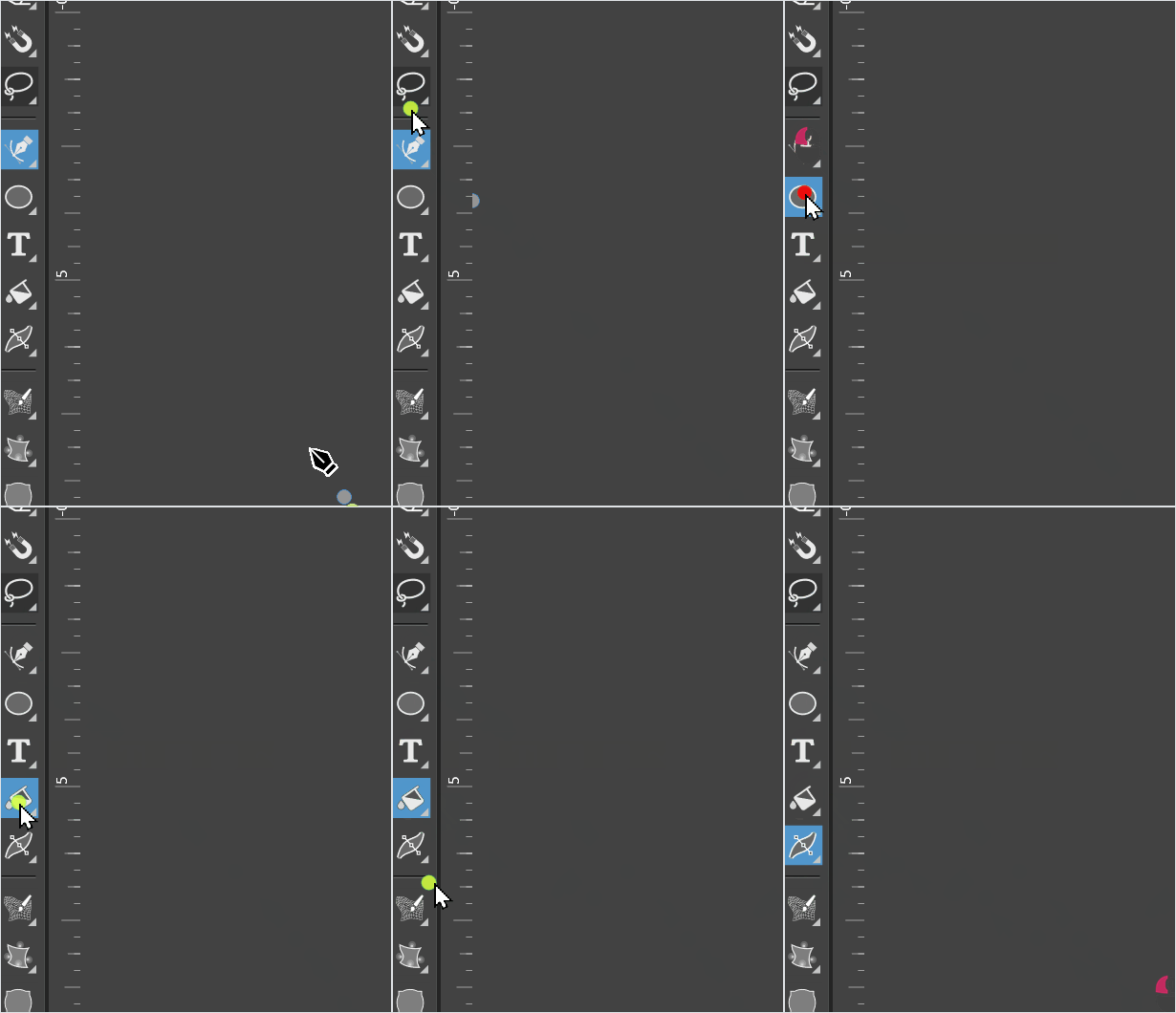
      I've reported this issue before I believe in relation to other UX issues, but this one is particularly persistent and makes utilizing different tools cumbersome. I've attached a video. Note the green/red showing the amount of clicks. Almost nothing can trigger the groups. Unfortunately, this machine (Windows) still has many problems with the VS interface and consistent response of UI elements. I know it's difficult to reproduce but perhaps others may run into the same problem:
      alt text

      https://1drv.ms/u/s!AuWHX0h5bAoRipgQwqDjfwGWAJlL4g?e=6GPRAE

      Windows 11 Build 26200.7171 (25H2)
      AMD Ryzen 7 9700X with Gigabyte X870E Aorus Pro Ice
      32GB RAM @ 6000MHz
      PNY NVIDIA RTX 5070 Ti 16GB; Display 1: 4K @150%; Display 2: 4K @200%
      Wacom Intuos Pro L (2025); Wacom Intuos Pro M; Epson ET-8550; Siser Romeo

      S 1 Reply Last reply Reply Quote 0
      • S Offline
        Subpath @debraspicher
        last edited by

        @debraspicher

        it will work much better, to open a group panel
        if you click onto the little triangle ( i know its small )

        clicking direct onto the Icon will only
        activate the selected Tool

        Win 11
        CPU: AMD Ryzen 5 9600X, 6-core.
        GPU: Nvidia Geforce RTX 5070.

        debraspicherD 1 Reply Last reply Reply Quote 1
        • debraspicherD Offline
          debraspicher @Subpath
          last edited by

          @Subpath Oof. Yeah. I had tried that a few times and I guess I wasn't far enough into the corner, but it is a very tiny hitbox and tucked away. I did not expect that. Thank you, it can at least be consistently activated!

          Windows 11 Build 26200.7171 (25H2)
          AMD Ryzen 7 9700X with Gigabyte X870E Aorus Pro Ice
          32GB RAM @ 6000MHz
          PNY NVIDIA RTX 5070 Ti 16GB; Display 1: 4K @150%; Display 2: 4K @200%
          Wacom Intuos Pro L (2025); Wacom Intuos Pro M; Epson ET-8550; Siser Romeo

          VectorStylerV 1 Reply Last reply Reply Quote 2
          • BoldlineB Offline
            Boldline
            last edited by

            The double click opens the associated panel for that specific tool (if there is one) - I like that feature and wouldn't want to see that change.

            🍎 macOS Tahoe 26.2, Mac mini (M1, 2020), Chip Apple M1, Memory 16 GB
            Cintiq 27QHD Display and LG Ultra HD Display

            1 Reply Last reply Reply Quote 0
            • VectorStylerV Offline
              VectorStyler @debraspicher
              last edited by

              @debraspicher I will make this corner area a bit larger (without larger visuals). The problem is that it needs a separate area to distinguish from the actual tool click.

              S M debraspicherD 3 Replies Last reply Reply Quote 1
              • S Offline
                Subpath @VectorStyler
                last edited by

                @VectorStyler
                that sounds nice and helpful

                Win 11
                CPU: AMD Ryzen 5 9600X, 6-core.
                GPU: Nvidia Geforce RTX 5070.

                1 Reply Last reply Reply Quote 0
                • M Offline
                  monsterfox @VectorStyler
                  last edited by

                  @VectorStyler I think this problem is similar to my situation. The ctrl+ALT+spacebar is often ineffective and the magnifying glass function cannot be used. Other auxiliary shortcuts will also fail. It is necessary to close the file and restart to recover.
                  Hope to find the problem and fix it.

                  1 Reply Last reply Reply Quote 1
                  • debraspicherD Offline
                    debraspicher @VectorStyler
                    last edited by debraspicher

                    @VectorStyler said in Toolbar Groups unresponsive to clicks; Regularly having trouble opening the group flyout:

                    @debraspicher I will make this corner area a bit larger (without larger visuals). The problem is that it needs a separate area to distinguish from the actual tool click.

                    I figured that

                    @monsterfox said in Toolbar Groups unresponsive to clicks; Regularly having trouble opening the group flyout:

                    @VectorStyler I think this problem is similar to my situation. The ctrl+ALT+spacebar is often ineffective and the magnifying glass function cannot be used. Other auxiliary shortcuts will also fail. It is necessary to close the file and restart to recover.
                    Hope to find the problem and fix it.

                    Yes and even in cases where it is by design, or just working differently than the user expects, those kinds of issues can make learning the program and its tools more unnerving. It's only because the program is actively ignoring input at times and so it can seem like this is happening "all the time", when instead we may be doing something incorrectly in some of those cases. That's why it's good to polish up wherever necessary, that way the real issues do actually stand out, are more noticeable, and thus have a greater opportunity to be reported (and thus fixed!)

                    Windows 11 Build 26200.7171 (25H2)
                    AMD Ryzen 7 9700X with Gigabyte X870E Aorus Pro Ice
                    32GB RAM @ 6000MHz
                    PNY NVIDIA RTX 5070 Ti 16GB; Display 1: 4K @150%; Display 2: 4K @200%
                    Wacom Intuos Pro L (2025); Wacom Intuos Pro M; Epson ET-8550; Siser Romeo

                    debraspicherD 1 Reply Last reply Reply Quote 2
                    • debraspicherD Offline
                      debraspicher @debraspicher
                      last edited by

                      The flyout is easier to trigger now, so thanks for this.

                      Windows 11 Build 26200.7171 (25H2)
                      AMD Ryzen 7 9700X with Gigabyte X870E Aorus Pro Ice
                      32GB RAM @ 6000MHz
                      PNY NVIDIA RTX 5070 Ti 16GB; Display 1: 4K @150%; Display 2: 4K @200%
                      Wacom Intuos Pro L (2025); Wacom Intuos Pro M; Epson ET-8550; Siser Romeo

                      1 Reply Last reply Reply Quote 0
                      • First post
                        Last post
