VectorStyler
    • Categories
    • Unread
    • Recent
    • Tags
    • Popular
    • Register
    • Login

    Could the offset path panel be unlocked to be able to move around the screen?

    Scheduled Pinned Locked Moved Features and Ideas
    6 Posts 4 Posters 6.0k Views 3 Watching
    Loading More Posts
    • Oldest to Newest
    • Newest to Oldest
    • Most Votes
    Reply
    • Reply as topic
    Log in to reply
    This topic has been deleted. Only users with topic management privileges can see it.
    • BoldlineB Offline
      Boldline
      last edited by

      Could the offset path panel be unlocked to be able to move around the screen while in use?
      Right now, when I open the Offset Path panel, it appears on the screen and I have to adjust the shapes below to be out of the way of the panel itself. I'd love to be able to drag the panel to the side while it's in use
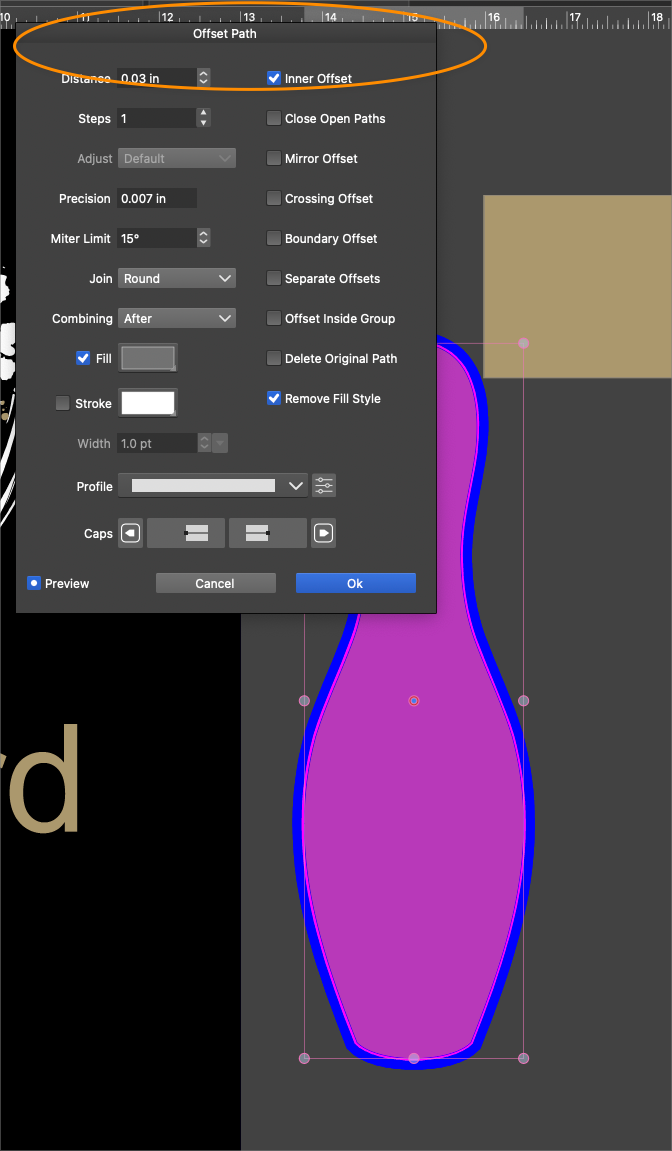
      0_1725403372162_119bcfd3-3e3a-46ed-b56f-c6e3bca57fe4-BLD 2024-09-03 at 18.41.48.png

      🍎 macOS Tahoe 26.2, Mac mini (M1, 2020), Chip Apple M1, Memory 16 GB
      Cintiq 27QHD Display and LG Ultra HD Display

      M S VectorStylerV 3 Replies Last reply Reply Quote 1
      • M Offline
        monsterfox @Boldline
        last edited by

        @Boldline Ctrl + Mouse Wheel, the screen moves up and down. Ctrl + Shift + Mouse Wheel, the screen moves left and right.

        1 Reply Last reply Reply Quote 0
        • S Offline
          Subpath @Boldline
          last edited by Subpath

          @Boldline

          How about using the "Shape Effect Panel" ?
          This is movable

          Panels > Effects > Shape Effects
          then select the "Offset Path Effect"
          Outline > Offset Path

          here a video

          Win 11
          CPU: AMD Ryzen 5 9600X, 6-core.
          GPU: Nvidia Geforce RTX 5070.

          1 Reply Last reply Reply Quote 0
          • VectorStylerV Offline
            VectorStyler @Boldline
            last edited by

            @Boldline It can be moved around the screen, but the document cannot be accessed in the background.

            I think what is needed here is that this view should behave like a panel.

            I will add this to the backlog, but only for 1.3 (would be a bit different feature).

            The non-destructive offset path effect can be added and adjusted from the Shape Effect panel, but that is a bit different.

            BoldlineB 1 Reply Last reply Reply Quote 1
            • BoldlineB Offline
              Boldline @VectorStyler
              last edited by

              @VectorStyler said in Could the offset path panel be unlocked to be able to move around the screen?:

              It can be moved around the screen, but the document cannot be accessed in the background.
              I think what is needed here is that this view should behave like a panel.

              Yes, this is what I was hoping for with the Offset Path panel; that it can be moved around so the selection on the artboard can be seen without having to wonder where the offset path panel will show up and potentially obscure the selection below.
              I understand that the selection itself would not be accessible.
              thanks for adding it to the list!

              🍎 macOS Tahoe 26.2, Mac mini (M1, 2020), Chip Apple M1, Memory 16 GB
              Cintiq 27QHD Display and LG Ultra HD Display

              VectorStylerV 1 Reply Last reply Reply Quote 1
              • VectorStylerV Offline
                VectorStyler @Boldline
                last edited by

                @Boldline There seems to be a regression here. The problem was identified and the fix will be in the next build.


                1 Reply Last reply Reply Quote 0
                • First post
                  Last post