VectorStyler
    • Categories
    • Unread
    • Recent
    • Tags
    • Popular
    • Register
    • Login

    Duplicating a Path Section - per manual, doesn't seem to work
    Scheduled Pinned Locked Moved Questions and Support
    13 Posts 3 Posters 9.2k Views 4 Watching
    Loading More Posts
    • Oldest to Newest
    • Newest to Oldest
    • Most Votes
    Reply
    • Reply as topic
    Log in to reply
    This topic has been deleted. Only users with topic management privileges can see it.
    • P Offline
      pentool
      last edited by

      Well, yes, it works because you selected all the nodes. Per the manual, it says "...any section of a path between two nodes..."

      I think the wording threw me off. I selected 2 nodes of a path but it doesn't work even though the manual says "between 2 nodes". I figured I have to select 2 nodes and drag the section. But it seems you have to select 3 nodes (at the minimum) for it to work.

      MacBook Pro 13" early 2015 8G | Intel Iris Graphics 6100 1536 MB | macOS Monterey 12.7.6

      VectorStylerV 1 Reply Last reply Reply Quote 0
      • S Offline
        Subpath @VectorStyler
        last edited by

        @VectorStyler

        doesnt work via ALt+key here too
        but via Transform > Move

        see video her

        Win 11
        CPU: AMD Ryzen 5 9600X, 6-core.
        GPU: Nvidia Geforce RTX 5070.

        P VectorStylerV 2 Replies Last reply Reply Quote 1
        • P Offline
          pentool @Subpath
          last edited by

          @Subpath Must be a windows issue. It works for me with Option on the Mac but have to select 3 or more nodes.

          MacBook Pro 13" early 2015 8G | Intel Iris Graphics 6100 1536 MB | macOS Monterey 12.7.6

          S 1 Reply Last reply Reply Quote 0
          • S Offline
            Subpath @pentool
            last edited by Subpath

            @pentool

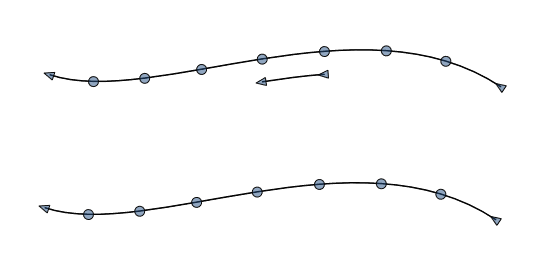
            curious, it doesnt work with the Alt-key on Windows
            but via Menu >Object > Transform > Move
            it works with also with just two nodes
            if i select just one Node this way the whole Path will be copied
            0_1727202558134_ksnip_20240924-202846.png

            Win 11
            CPU: AMD Ryzen 5 9600X, 6-core.
            GPU: Nvidia Geforce RTX 5070.

            VectorStylerV 1 Reply Last reply Reply Quote 0
            • S Offline
              Subpath @monsterfox
              last edited by

              @monsterfox

              I don't know how this happened,
              but your post here is in the wrong thread

              Win 11
              CPU: AMD Ryzen 5 9600X, 6-core.
              GPU: Nvidia Geforce RTX 5070.

              1 Reply Last reply Reply Quote 1
              • VectorStylerV Offline
                VectorStyler @Subpath
                last edited by

                @Subpath said in Duplicating a Path Section - per manual, doesn't seem to work:

                curious, it doesnt work with the Alt-key on Windows

                I will test this on Windows.

                1 Reply Last reply Reply Quote 1
                • VectorStylerV Offline
                  VectorStyler @pentool
                  last edited by

                  @pentool said in Duplicating a Path Section - per manual, doesn't seem to work:

                  any section of a path between two nodes

                  Yes the wording might need to be changed. The two node selection case does something else (stretching rotating the path section).

                  1 Reply Last reply Reply Quote 0
                  • VectorStylerV Offline
                    VectorStyler @Subpath
                    last edited by

                    @Subpath said in Duplicating a Path Section - per manual, doesn't seem to work:

                    doesnt work via ALt+key here too

                    @pentool

                    I tested this on Windows, doe to some other features, the Alt key must be pressed after starting the node movement.

                    S 1 Reply Last reply Reply Quote 1
                    • S Offline
                      Subpath @VectorStyler
                      last edited by Subpath

                      @VectorStyler

                      got it, thanks
                      But that is not necessary if i copy a Shape via the Alt key

                      Also curious, that this way works only with 3 Nodes selected as a minimum,
                      but copy only 2 Nodes work if a use the way via Transform Move
                      which i showed above
                      .
                      .
                      For anyone who is reading this:
                      To copy a part of a Path on Windows

                      select minimum 3 Nodes

                      select any of that 3 Nodes hold the left Mouse Button down
                      (selecting the Path doesnt work)

                      press the Alt-key then and move the Part of the Path
                      and that Part will be copied

                      Win 11
                      CPU: AMD Ryzen 5 9600X, 6-core.
                      GPU: Nvidia Geforce RTX 5070.

                      VectorStylerV 1 Reply Last reply Reply Quote 1
                      • VectorStylerV Offline
                        VectorStyler @Subpath
                        last edited by

                        @Subpath The 3 node limit is because of a conflict with an other feature, where the Alt+ with 2 node selection will stretch the section between the two nodes.

                        S 1 Reply Last reply Reply Quote 2
                        • S Offline
                          Subpath @VectorStyler
                          last edited by

                          @VectorStyler said in Duplicating a Path Section - per manual, doesn't seem to work:

                          @Subpath The 3 node limit is because of a conflict with an other feature, where the Alt+ with 2 node selection will stretch the section between the two nodes.

                          understand, have no Problem with that, (just wondered)
                          if i need it i will add a node if necessary and deleted it later on

                          Win 11
                          CPU: AMD Ryzen 5 9600X, 6-core.
                          GPU: Nvidia Geforce RTX 5070.

                          1 Reply Last reply Reply Quote 2
                          • First post
                            Last post