VectorStyler
    • Categories
    • Unread
    • Recent
    • Tags
    • Popular
    • Register
    • Login

    {UX} Editing Hidden Object in Appearance Panel

    Scheduled Pinned Locked Moved Bugs in VectorStyler
    2 Posts 2 Posters 2.7k Views 2 Watching
    Loading More Posts
    • Oldest to Newest
    • Newest to Oldest
    • Most Votes
    Reply
    • Reply as topic
    Log in to reply
    This topic has been deleted. Only users with topic management privileges can see it.
    • debraspicherD Offline
      debraspicher
      last edited by debraspicher

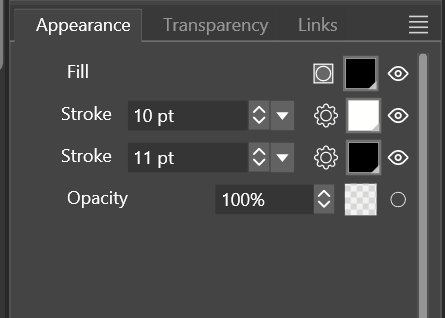
      I have a bit of Text with 2 strokes and I'm able to see that the field is active and can make modifications. As they should, the changes don't take and they revert. I'd recommend to make these unmodifable fields inactive so that we know we need to unhide that Object/Layer.

      *And actually, it does take, but one has to select the option as quick as possible before the field drop down disappears.
      0_1728767911969_967ef29b-856d-4907-b05e-53da0e6f2d63-image.png

      Windows 11 Build 26200.7171 (25H2)
      AMD Ryzen 7 9700X with Gigabyte X870E Aorus Pro Ice
      32GB RAM @ 6000MHz
      PNY NVIDIA RTX 5070 Ti 16GB; Display 1: 4K @150%; Display 2: 4K @200%
      Wacom Intuos Pro L (2025); Wacom Intuos Pro M; Epson ET-8550; Siser Romeo

      VectorStylerV 1 Reply Last reply Reply Quote 1
      • VectorStylerV Offline
        VectorStyler @debraspicher
        last edited by

        @debraspicher If I understand correctly: the object gets deselected immediately after the change is applied.
        I will try to fix this for the next build.

        1 Reply Last reply Reply Quote 0
        • First post
          Last post
