Replacing color of layer color guide seemingly not working
-
@VectorStyler Here is a new file I created today to show how the "replace color" is seemingly including the layer identification color.
0_1732550927111_replace color test.vstylerHere is the video showing how it was created
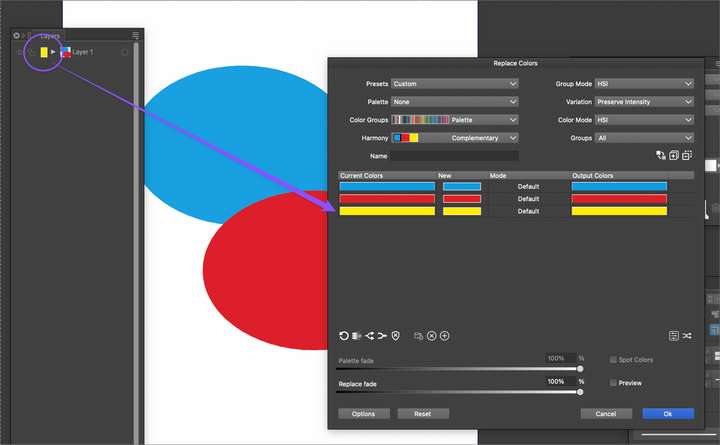
experimenting further - if I select a color or more color objects in the design and then use the "replace color", it only shows me those specific colors - I do like this option. It appears the layer color only shows up if I do not select anything at all - VS seems to then look for any and all colors to represent and change.
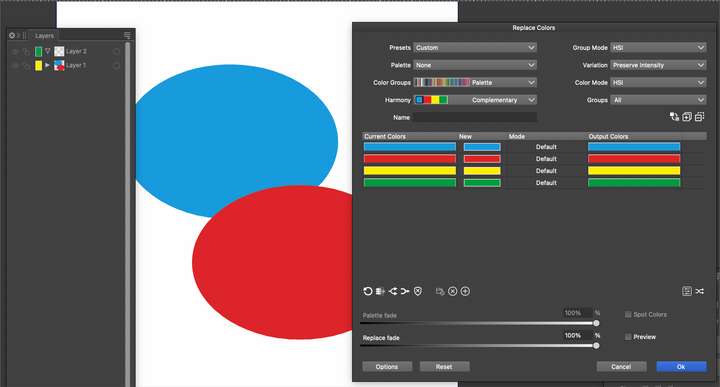
I then added a new layer with a distinct color represntation and when I went back into "replace color", it shows the new layer color (green) as well.
-
@Boldline Yes, you are right, that is a layer color. My mistake.
But it should not be there, that is the problem.
-
@VectorStyler said in Replacing color of layer color guide seemingly not working:
But it should not be there, that is the problem.
Correct. I believe it should be excluded from the sources VS pulls from when assembling the list of colors in the document. What's interesting is that while it shows up there, it cannot be changed using the "replace color" panel.
I like that selecting nothing and then activating "replace color" selects all colors and that selecting specific objects restrains the replace color options to those selected colors. I'd love an dropdown option to click between canvas, specific artboard, and "current view" as well, but I don't know how you would do that since "replace color" relies on what is already selected or not selected when you activate the panel.
-
@Boldline said in Replacing color of layer color guide seemingly not working:
What's interesting is that while it shows up there, it cannot be changed using the "replace color" panel.
This will be fixed in the next build.
-
@VectorStyler said in Replacing color of layer color guide seemingly not working:
This will be fixed in the next build.
Are you planning to keep the option to include layer indicator colors in the "replace color" panel? If not, then it doesn't need fixing in that regard, just a way to skip those colors when using the panel.
I was just pointing out that while the replace color recognizes those layer indicator colors, nothing can be done with them in the "replace color" panel
-
@Boldline said in Replacing color of layer color guide seemingly not working:
Are you planning to keep the option to include layer indicator colors in the "replace color" panel?
No, just not list it.
-
@VectorStyler In keeping with the idea that a selection of specific shapes restrains the "replace color" to those selected colors, what about selecting artboards prior to choosing "replace color" to limit the color selection to those specific artboards?
Right now it still selects everything - see screenshot below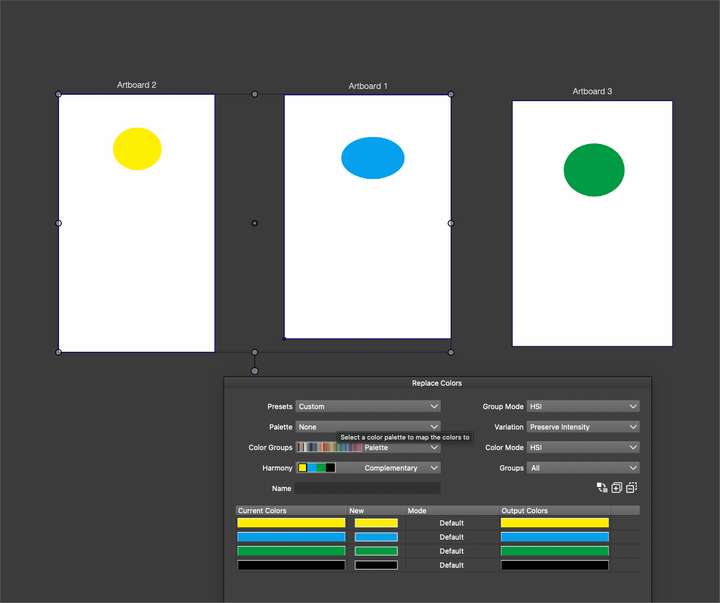
🍎 macOS Tahoe 26.2, Mac mini (M1, 2020), Chip Apple M1, Memory 16 GB
Cintiq 27QHD Display and LG Ultra HD Display -
@VectorStyler Another option to get around the modal limitations of the "replace color"
Perhaps add a dropdown at the #1 area for choosing canvas, artboard, inverse selection, visible view, etc? And then add the option to "refresh" so "replace color" recalibrates without having to exit out and re-open?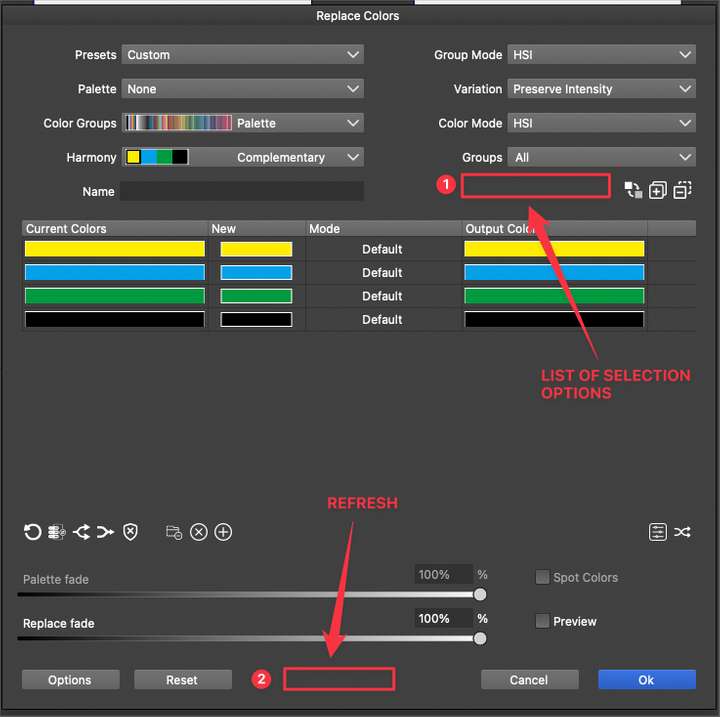
-
@Boldline said in Replacing color of layer color guide seemingly not working:
Right now it still selects everything
If you select the objects, then it should be limited to those objects only.
-
@VectorStyler said in Replacing color of layer color guide seemingly not working:
@Boldline said in Replacing color of layer color guide seemingly not working:
Right now it still selects everything
If you select the objects, then it should be limited to those objects only.
Yes that is correct - I was thinking about the possible way to choose specific artboards to limit the scope to - if someone used the artboard tool and selected specific artboards to replace color on - only the selected artboards and their contents would be affected

