VectorStyler
    • Categories
    • Unread
    • Recent
    • Tags
    • Popular
    • Register
    • Login

    Guidelines Panel tabs overlapping

    Scheduled Pinned Locked Moved Bugs in VectorStyler
    3 Posts 2 Posters 2.9k Views 2 Watching
    Loading More Posts
    • Oldest to Newest
    • Newest to Oldest
    • Most Votes
    Reply
    • Reply as topic
    Log in to reply
    This topic has been deleted. Only users with topic management privileges can see it.
    • debraspicherD Offline
      debraspicher
      last edited by debraspicher

      I'm not sure what caused it. Maybe from the other interface issue when it "woke up" and some panels were rescaled on a different monitor. I fixed it by moving the tabs around and it's fine now, but maybe implementing some kind of default so that the panel remains evenly distributed upon resize and not "squished".
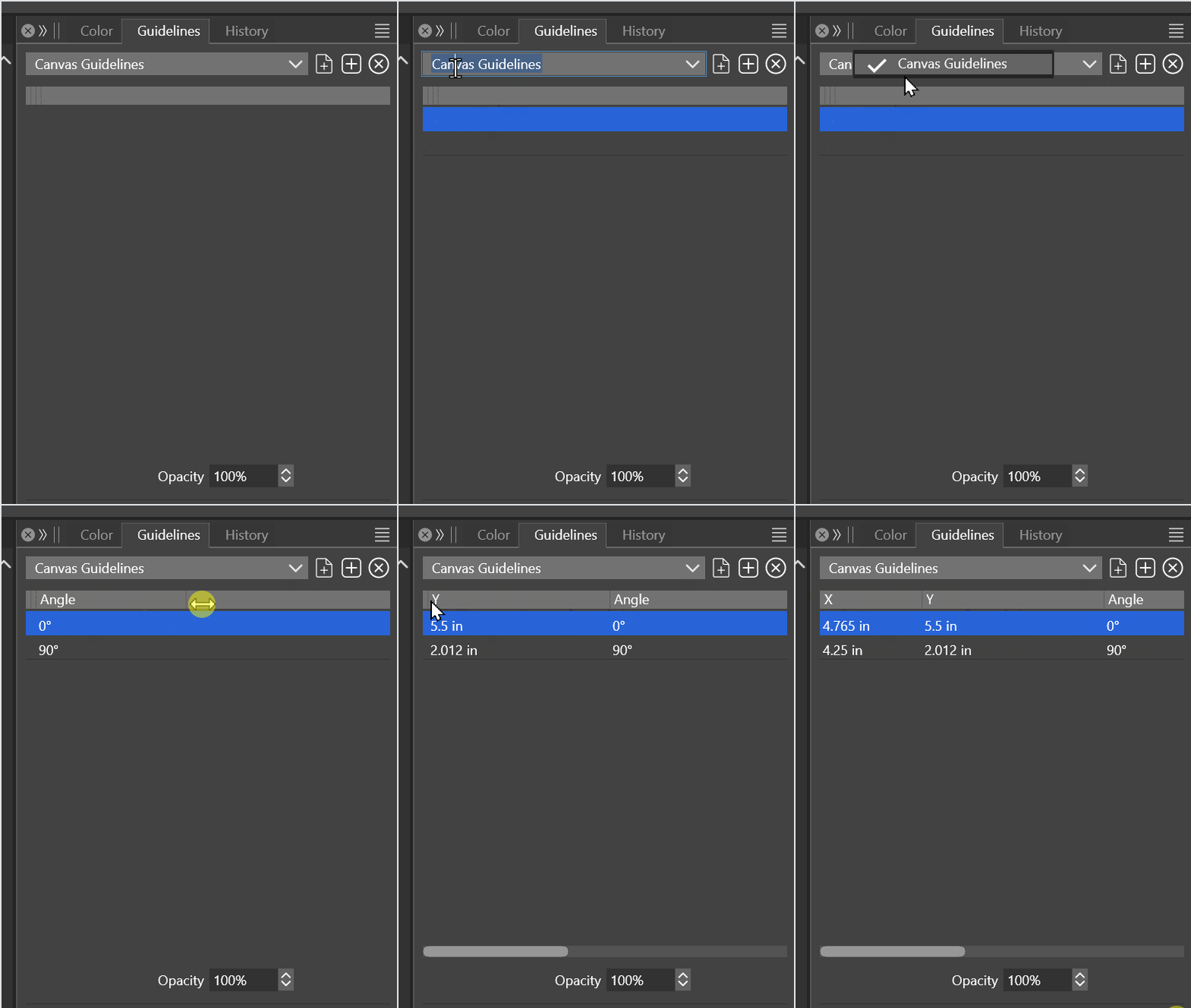
      alt text

      Windows 11 Build 26200.7171 (25H2)
      AMD Ryzen 7 9700X with Gigabyte X870E Aorus Pro Ice
      32GB RAM @ 6000MHz
      PNY NVIDIA RTX 5070 Ti 16GB; Display 1: 4K @150%; Display 2: 4K @200%
      Wacom Intuos Pro L (2025); Wacom Intuos Pro M; Epson ET-8550; Siser Romeo

      VectorStylerV 1 Reply Last reply Reply Quote 0
      • VectorStylerV Offline
        VectorStyler @debraspicher
        last edited by

        @debraspicher I could not replicate this, does this overlap occur after a restart?

        debraspicherD 1 Reply Last reply Reply Quote 0
        • debraspicherD Offline
          debraspicher @VectorStyler
          last edited by debraspicher

          @VectorStyler It's hard to say because the tab was hidden until I activated it to delete some guides. I'm thinking it was from one of the rescale events we have talked about... it did not recur in this case because I had went ahead to adjust it. I had thought maybe it was glitched.


          Windows 11 Build 26200.7171 (25H2)
          AMD Ryzen 7 9700X with Gigabyte X870E Aorus Pro Ice
          32GB RAM @ 6000MHz
          PNY NVIDIA RTX 5070 Ti 16GB; Display 1: 4K @150%; Display 2: 4K @200%
          Wacom Intuos Pro L (2025); Wacom Intuos Pro M; Epson ET-8550; Siser Romeo

          1 Reply Last reply Reply Quote 1
          • First post
            Last post