VectorStyler
    • Categories
    • Unread
    • Recent
    • Tags
    • Popular
    • Register
    • Login

    Occasionally Undo causes items in History and its related Objects to be lost

    Scheduled Pinned Locked Moved Bugs in VectorStyler
    14 Posts 2 Posters 9.9k Views 2 Watching
    Loading More Posts
    • Oldest to Newest
    • Newest to Oldest
    • Most Votes
    Reply
    • Reply as topic
    Log in to reply
    This topic has been deleted. Only users with topic management privileges can see it.
    • debraspicherD Offline
      debraspicher
      last edited by debraspicher

      This issue occurs regularly enough it requires I keep saving into new revisions to keep data safe.

      Anyway, it occurred again, but this time I was prepared and able to catch it in a clip. I will share the aftermath file here. In my files, I keep Store History enabled, so that could theoretically contribute...

      Files: https://1drv.ms/f/s!AuWHX0h5bAoRiqdBFh2H9Czq_baX-Q?e=AxC76Y (Issue caused @1:30)

      Windows 11 Build 26200.7171 (25H2)
      AMD Ryzen 7 9700X with Gigabyte X870E Aorus Pro Ice
      32GB RAM @ 6000MHz
      PNY NVIDIA RTX 5070 Ti 16GB; Display 1: 4K @150%; Display 2: 4K @200%
      Wacom Intuos Pro L (2025); Wacom Intuos Pro M; Epson ET-8550; Siser Romeo

      VectorStylerV 1 Reply Last reply Reply Quote 1
      • debraspicherD Offline
        debraspicher
        last edited by

        May have found at least one trigger... basically combining a throwaway square shape with stroked/unclosed paths.... even just previewing the result causes the square to go away:

        Happens at @:50, @1:00, @1:44 ... Undo is unable to bring back the throw away objects.

        Video: https://1drv.ms/u/s!AuWHX0h5bAoRiqdED5R-4p3Qy2hw4A?e=g9geDO
        File: https://1drv.ms/u/s!AuWHX0h5bAoRiqdFSksoCpBhOQVa7Q?e=2kHN8A

        Windows 11 Build 26200.7171 (25H2)
        AMD Ryzen 7 9700X with Gigabyte X870E Aorus Pro Ice
        32GB RAM @ 6000MHz
        PNY NVIDIA RTX 5070 Ti 16GB; Display 1: 4K @150%; Display 2: 4K @200%
        Wacom Intuos Pro L (2025); Wacom Intuos Pro M; Epson ET-8550; Siser Romeo

        1 Reply Last reply Reply Quote 1
        • VectorStylerV Offline
          VectorStyler @debraspicher
          last edited by

          @debraspicher I opened a bug on this and will try to replicate it.

          1 Reply Last reply Reply Quote 1
          • debraspicherD Offline
            debraspicher
            last edited by

            Still losing objects when hitting Undo. It converted the Layers to this:

            0_1734388845302_22f84f58-726a-47db-bb4d-c72bd8d01724-image.png

            Of course, I wasn't recording. It seems to like to do this after I mess with the Stroke panel

            Windows 11 Build 26200.7171 (25H2)
            AMD Ryzen 7 9700X with Gigabyte X870E Aorus Pro Ice
            32GB RAM @ 6000MHz
            PNY NVIDIA RTX 5070 Ti 16GB; Display 1: 4K @150%; Display 2: 4K @200%
            Wacom Intuos Pro L (2025); Wacom Intuos Pro M; Epson ET-8550; Siser Romeo

            VectorStylerV 1 Reply Last reply Reply Quote 1
            • debraspicherD Offline
              debraspicher
              last edited by

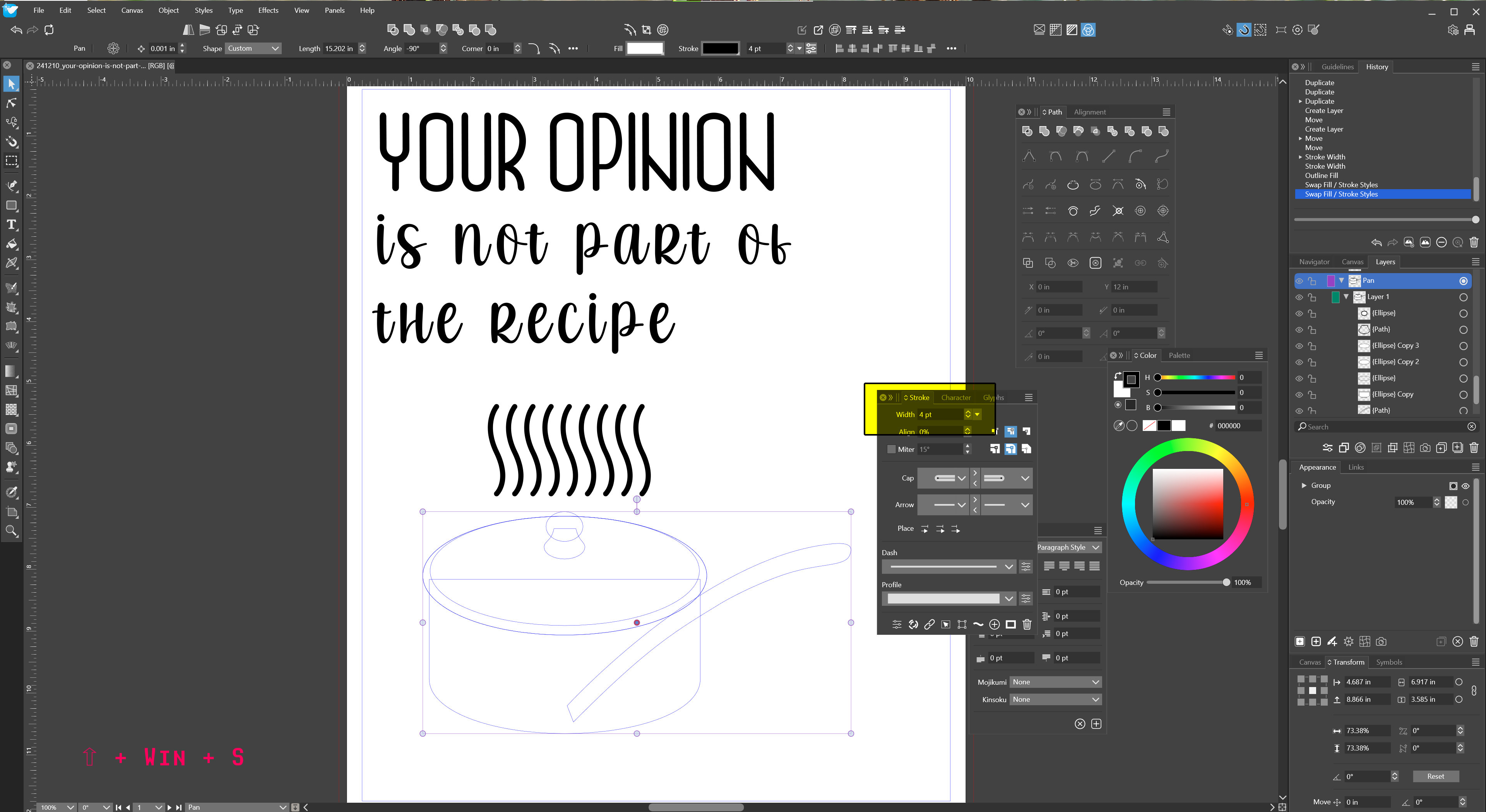
              There might be something to that last bit. I reverted the file and I got my Object back, but I can't edit the stroke at all on it... not sure why that would be the case:
              alt text

              File: https://1drv.ms/u/s!AuWHX0h5bAoRiqtI_BaDXnCaIinMtw?e=smEbRI

              Windows 11 Build 26200.7171 (25H2)
              AMD Ryzen 7 9700X with Gigabyte X870E Aorus Pro Ice
              32GB RAM @ 6000MHz
              PNY NVIDIA RTX 5070 Ti 16GB; Display 1: 4K @150%; Display 2: 4K @200%
              Wacom Intuos Pro L (2025); Wacom Intuos Pro M; Epson ET-8550; Siser Romeo

              VectorStylerV 1 Reply Last reply Reply Quote 1
              • VectorStylerV Offline
                VectorStyler @debraspicher
                last edited by

                @debraspicher said in Occasionally Undo causes items in History and its related Objects to be lost:

                Still losing objects when hitting Undo. It converted the Layers to this:

                0_1734388845302_22f84f58-726a-47db-bb4d-c72bd8d01724-image.png

                Here it looks like a layer ended up inside an object. What was the step causing this?

                debraspicherD 1 Reply Last reply Reply Quote 0
                • VectorStylerV Offline
                  VectorStyler @debraspicher
                  last edited by

                  @debraspicher said in Occasionally Undo causes items in History and its related Objects to be lost:

                  but I can't edit the stroke at all on it

                  I tested the attached file, and I can change the stroke (I also selected the Pen layer in the panel)

                  But it seems that the file I got is a. bit different from yours, in my case I had "inch" as a unit for the document, and in your screenshot it seems to be "pt"

                  This error could also be caused by some workspace / settings issue. Send me your workspace files.

                  debraspicherD 1 Reply Last reply Reply Quote 0
                  • debraspicherD Offline
                    debraspicher @VectorStyler
                    last edited by

                    @VectorStyler If it matters, I have Stroke set to show up as points. That's why that panel shows this way.

                    Upon reopening VS, I was able to see both the stroke again and change the lines. When the history panel issue happens, it's almost like when reverting back to prior states, it bugs out somehow and things misordered. I usually lose Layers, not just single Objects, but I'll try to pay more attention to it...

                    WS Files: https://1drv.ms/u/s!AuWHX0h5bAoRiqtcBhchfiHzSP1GnQ?e=BZhHC0

                    Windows 11 Build 26200.7171 (25H2)
                    AMD Ryzen 7 9700X with Gigabyte X870E Aorus Pro Ice
                    32GB RAM @ 6000MHz
                    PNY NVIDIA RTX 5070 Ti 16GB; Display 1: 4K @150%; Display 2: 4K @200%
                    Wacom Intuos Pro L (2025); Wacom Intuos Pro M; Epson ET-8550; Siser Romeo

                    VectorStylerV 1 Reply Last reply Reply Quote 1
                    • VectorStylerV Offline
                      VectorStyler @debraspicher
                      last edited by

                      @debraspicher said in Occasionally Undo causes items in History and its related Objects to be lost:

                      it bugs out somehow and things misordered

                      Could be caused by undoing something. I just need to replicate.

                      debraspicherD 1 Reply Last reply Reply Quote 0
                      • debraspicherD Offline
                        debraspicher @VectorStyler
                        last edited by

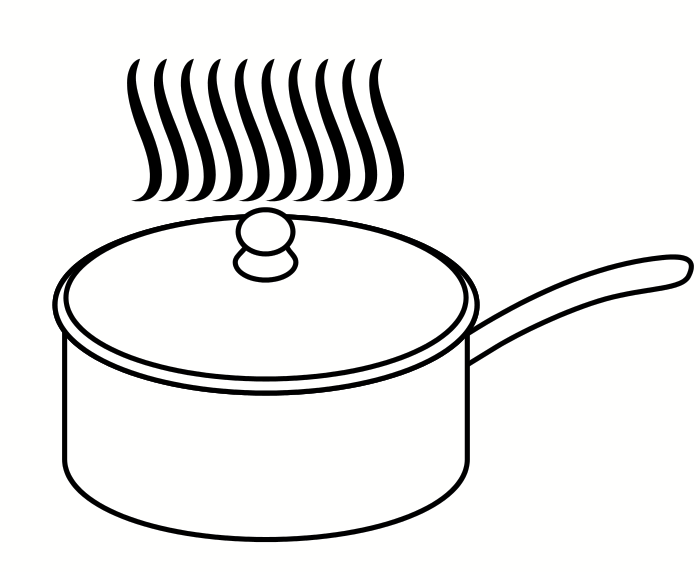
                        @VectorStyler Funnily enough I looked at the reverted file.. the wavy bits are a solid straight lined curve, but in my original file (accessed using revert), it is actually different.. and it's a bit weird that it restored the original Object in the document, but left in some changes... I wish I had been recording.
                        0_1734464391170_10103fff-f580-4047-bc43-c001e226f061-image.png

                        Windows 11 Build 26200.7171 (25H2)
                        AMD Ryzen 7 9700X with Gigabyte X870E Aorus Pro Ice
                        32GB RAM @ 6000MHz
                        PNY NVIDIA RTX 5070 Ti 16GB; Display 1: 4K @150%; Display 2: 4K @200%
                        Wacom Intuos Pro L (2025); Wacom Intuos Pro M; Epson ET-8550; Siser Romeo

                        1 Reply Last reply Reply Quote 0
                        • debraspicherD Offline
                          debraspicher
                          last edited by

                          So, that file deteriorated quite a bit after I started working on it. The waveys I could never select so that prompted my doing Layer fishing... for a bit, I could hide/show other Layers to try to look for it, but could never find the waves...

                          Then it got to the point that show/hide didn't work on the other Layers also. I save the file midway through but then I save at the end after items become more or less non-selectable... I'm moving the bounding boxes right now and the graphics are staying in place.

                          At the beginning of the video, I believe the waveys were meant to be in that "Layer 1" at the very top of the Layer stack. It was when I did a shift + add new Layer to move them away from the original Layer so I could experiment...

                          Video: https://1drv.ms/v/s!AuWHX0h5bAoRiqtfGufMNQSIwz_IhQ?e=hjdC5F

                          File1: https://1drv.ms/u/s!AuWHX0h5bAoRiqtdVXG8OS255b1QbA?e=Z2kr8E
                          File2: https://1drv.ms/u/s!AuWHX0h5bAoRiqteuYEIxk-O__lLLA?e=Y3LzHd

                          Windows 11 Build 26200.7171 (25H2)
                          AMD Ryzen 7 9700X with Gigabyte X870E Aorus Pro Ice
                          32GB RAM @ 6000MHz
                          PNY NVIDIA RTX 5070 Ti 16GB; Display 1: 4K @150%; Display 2: 4K @200%
                          Wacom Intuos Pro L (2025); Wacom Intuos Pro M; Epson ET-8550; Siser Romeo

                          1 Reply Last reply Reply Quote 0
                          • debraspicherD Offline
                            debraspicher
                            last edited by debraspicher

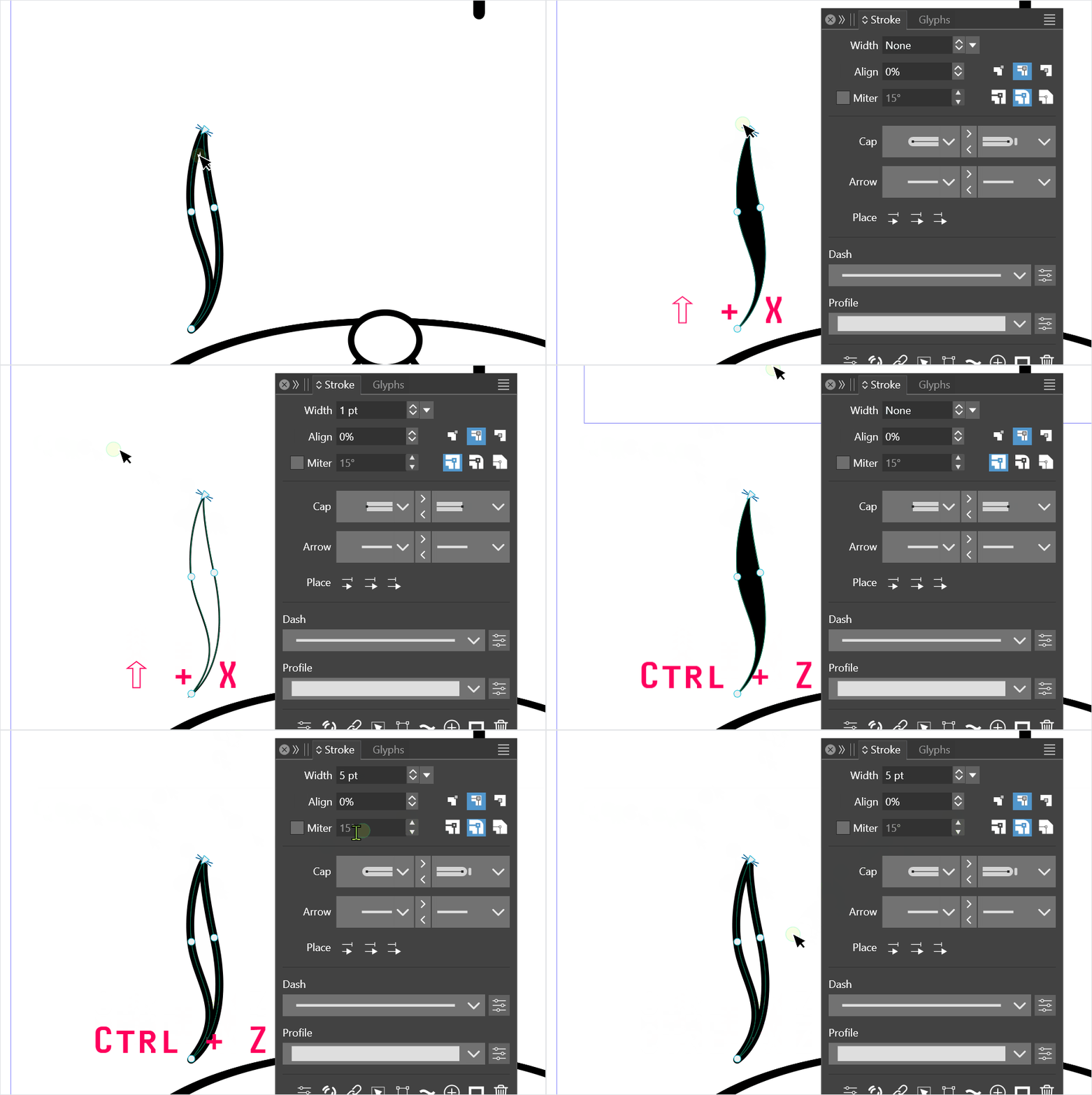
                            Discovered something else unexpected in the process after restoring the file (closing out and restarting). (And yes, those waveys were meant to be in Layer 1)

                            Shift + X causes the path to lose its original Stroke settings:
                            alt text

                            Windows 11 Build 26200.7171 (25H2)
                            AMD Ryzen 7 9700X with Gigabyte X870E Aorus Pro Ice
                            32GB RAM @ 6000MHz
                            PNY NVIDIA RTX 5070 Ti 16GB; Display 1: 4K @150%; Display 2: 4K @200%
                            Wacom Intuos Pro L (2025); Wacom Intuos Pro M; Epson ET-8550; Siser Romeo

                            VectorStylerV 1 Reply Last reply Reply Quote 1
                            • VectorStylerV Offline
                              VectorStyler @debraspicher
                              last edited by

                              @debraspicher said in Occasionally Undo causes items in History and its related Objects to be lost:

                              Shift + X causes the path to lose its original Stroke settings:

                              Yes, the stroke is removed because there is no fill and the fill style is applied to the stroke.

                              1 Reply Last reply Reply Quote 1
                              • debraspicherD Offline
                                debraspicher @VectorStyler
                                last edited by debraspicher

                                @VectorStyler Sorry missed this. It's the result of the Undo/History bug. Sometimes this happens... I will keep recording and eventually I capture it. It's happened a few times. I'm not sure, but my guess would be the Object was originally meant to be a Layer... (I put everything in sublayers, generally)

                                Edit: I wonder if my habit of Shift + {Click} New Layer/Sublayer might also add something not so nice to the History steps/recipe that might cause Objects that were moved around to get lost, as well? It's just a thought.


                                Windows 11 Build 26200.7171 (25H2)
                                AMD Ryzen 7 9700X with Gigabyte X870E Aorus Pro Ice
                                32GB RAM @ 6000MHz
                                PNY NVIDIA RTX 5070 Ti 16GB; Display 1: 4K @150%; Display 2: 4K @200%
                                Wacom Intuos Pro L (2025); Wacom Intuos Pro M; Epson ET-8550; Siser Romeo

                                1 Reply Last reply Reply Quote 1
                                • First post
                                  Last post